5 Best Dash Cams for Cars: The Ultimate Safety Review
In an age of distracted driving and rising insurance premiums, the “he said, she said” argument doesn’t cut it anymore. The unbiased eye of a high-quality dash cam is the only witness you can truly trust.
Whether you are a daily commuter, a rideshare driver, or just planning to prepare your car for a road trip, a dash cam acts as your silent guardian. It captures accidents, road rage incidents, and even that deer you didn’t see coming (see: what to do if you hit a deer).
However, the market is flooded with cheap knockoffs that fail when you need them most — usually at night or in extreme heat. To help you navigate the noise, we have tested and reviewed the top contenders for 2025, ranging from budget-friendly safeguards to 4K cinema-quality surveillance systems.
If you’ve already stocked up on the best car safety tools like window breakers and fire extinguishers, a dash cam is the final piece of the puzzle to protect your vehicle legally and physically.
Why Every Driver Needs a Dash Cam in 2025
The case for dashboard cameras has never been stronger. As roads become more crowded and driving behaviors more unpredictable, the dash cam has evolved from a niche gadget into an essential piece of safety equipment. Here is why every driver should consider installing one.
Accident Documentation and Fault Determination
In the aftermath of a collision, determining fault is often the most contentious aspect of insurance claims and legal proceedings. Without video evidence, fault determination relies on police reports (which may be inaccurate), witness testimony (which may be biased or absent), and physical evidence (which can be ambiguous). A dash cam provides objective, timestamped video evidence that eliminates guesswork.
Consider the scenario of a multi-lane highway accident where three vehicles are involved. Without a dash cam, each driver may blame the others, and the police report may not capture the full sequence of events. With dash cam footage from one or more vehicles, the exact sequence — who changed lanes, who failed to brake, who had the right of way — is clearly documented. This evidence can save thousands of dollars in insurance premiums, legal fees, and vehicle repair costs.
Protection Against Insurance Fraud
Insurance fraud, particularly “crash for cash” schemes, is a growing problem. In these schemes, a fraudster deliberately causes a collision (often by braking suddenly in front of you) and then files a false claim alleging you were at fault. Without video evidence, defending against these fraudulent claims is extremely difficult. A dash cam captures the entire incident, proving that you were not at fault and preventing fraudulent claims from succeeding.
Road Rage and Aggressive Driving Documentation
Road rage incidents are increasingly common, and they can escalate quickly from verbal confrontations to physical violence or dangerous driving maneuvers. A dash cam captures aggressive driving behaviors — tailgating, brake checking, obscene gestures, following, and dangerous lane changes — providing evidence for law enforcement and insurance purposes. In some cases, dash cam footage has been instrumental in prosecuting road rage incidents that resulted in injuries or property damage.
Hit-and-Run Incidents
Hit-and-run accidents are frustratingly common. According to the National Highway Traffic Safety Administration, approximately one in five pedestrian accidents involves a hit-and-run driver. If your parked car is struck by a fleeing vehicle, a dash cam with parking mode can capture the incident, including the other vehicle’s license plate, color, and make/model. Without this evidence, hit-and-run victims typically have no recourse. For more on parking protection, see our guide to dash cam parking mode options.
Teen Driver Monitoring
For parents of teen drivers, a dash cam provides peace of mind and accountability. Many modern dash cams include GPS tracking, speed logging, and smartphone alerts that allow parents to monitor their teen’s driving behavior. While this may feel like surveillance, it serves as a powerful incentive for safe driving and provides evidence in the event of an accident. For teen driver safety resources, see our graduation gifts for new drivers guide.
Rideshare and Commercial Use
For Uber, Lyft, DoorDash, and other rideshare drivers, a dash cam is essential equipment. Interior-facing cameras protect against false passenger complaints, while front-facing cameras document road incidents during commercial use. Many rideshare platforms now recommend or require dash cam usage for driver protection. For rideshare-specific dash cam recommendations, see our Vantrue N4 Pro rideshare dash cam review.
Quick Comparison: Top 5 Picks
| Model | Best For | Resolution | Field of View | Parking Mode | Rating |
|---|---|---|---|---|---|
| Nextbase 622GW | Overall Performance | 4K | 140° | Yes (Hardwire) | 5/5 |
| Rove R2-4K | Value / Budget | 4K (Interpolated) | 150° | Yes (Hardwire) | 4.5/5 |
| Garmin Dash Cam Mini 2 | Discreet Size | 1080p | 140° | Yes (Hardwire) | 4.8/5 |
| VIOFO A139 Pro | Video Quality | 4K HDR | 140° | Yes (Hardwire) | 4.9/5 |
| Thinkware U3000 | Parking Protection | 4K UHD | 152° | Radar-activated | 4.7/5 |
Understanding Dash Cam Technology: Sensors, Processors, and Image Quality
Before diving into specific product reviews, understanding the technology inside a dash cam helps you make informed purchasing decisions. The quality of a dash cam is determined by three primary components: the image sensor, the image processor, and the lens.
Image Sensors: The Heart of the Camera
The image sensor converts light into electrical signals that form the video image. The two dominant sensor manufacturers are Sony and OmniVision. Sony’s STARVIS and STARVIS 2 line of sensors are widely regarded as the best for dash cam applications due to their exceptional low-light performance and dynamic range.
Sony STARVIS (IMX307/IMX335): The original STARVIS sensors revolutionized dash cam night vision. The IMX307, used in many 1080p dash cams, delivers excellent low-light performance with a pixel size of 2.9 micrometers. The IMX335, used in 2K and entry-level 4K cameras, offers higher resolution with similar low-light capabilities.
Sony STARVIS 2 (IMX678/IMX728): The second generation STARVIS sensors represent the current state of the art. The IMX678, used in the VIOFO A139 Pro and other premium 4K cameras, features larger 2.0-micrometer pixels and improved dynamic range. The STARVIS 2 sensors excel at capturing detail in high-contrast scenes — such as driving from a dark tunnel into bright sunlight — without losing information in the shadows or highlights.
OmniVision sensors: Used in many budget and mid-range dash cams, OmniVision sensors offer good performance at lower cost. While they don’t match Sony STARVIS in extreme low light, they are perfectly adequate for daytime and well-lit nighttime driving.
Image Processors: The Brain
The image processor (ISP) takes raw data from the sensor and converts it into the final video output. Key processor brands include Ambarella, Novatek, and HiSilicon. Higher-end processors enable features like HDR (High Dynamic Range), WDR (Wide Dynamic Range), advanced noise reduction, and higher frame rates.
Ambarella: Used in premium dash cams like the Nextbase 622GW. Ambarella processors offer excellent image processing, efficient compression, and support for advanced features like electronic image stabilization and voice control.
Novatek: Used in many mid-range and budget dash cams, including the Rove R2-4K. Novatek processors offer good performance and support for 4K recording at competitive price points.
Lens Quality and Field of View
The lens determines how much of the scene the camera captures and how sharp the image is. Dash cam lenses are typically made of multi-layer glass elements (not plastic, which degrades in heat). A quality lens has 4 to 6 glass elements that correct for distortion, chromatic aberration, and flare.
Field of view (FOV) ranges from 120° to 170° in most dash cams. While wider FOV captures more of the scene, it also creates more distortion at the edges. The sweet spot for most drivers is 140° to 150°, which captures the full width of the road plus adjacent lanes without excessive distortion. For more on night driving technology, see our best 4K dash cams for night driving guide.
Deep Dive: The 5 Best Dash Cams Reviewed
1. Nextbase 622GW: The Heavyweight Champion
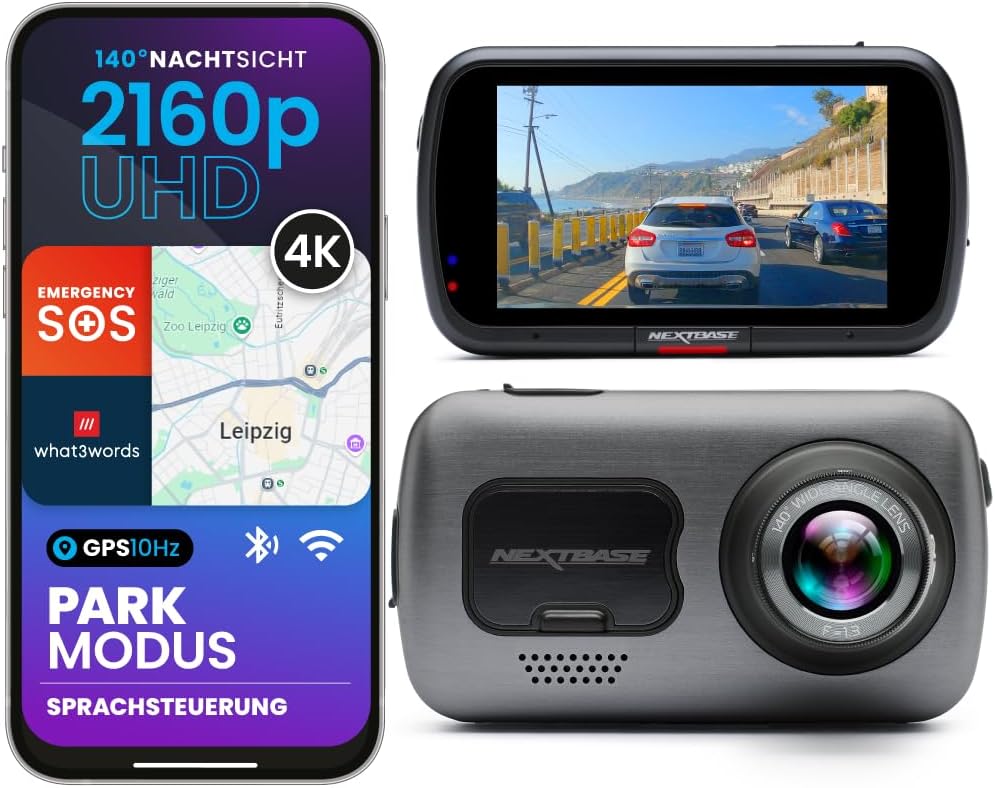
The Verdict: The Nextbase 622GW sits at the top of the food chain. It isn’t just a camera; it’s a comprehensive safety device. It features built-in Alexa, 4K recording, and arguably the best image stabilization in the industry.
One of its standout features is “what3words” integration. If you are stranded in a remote location — perhaps after a black ice accident — the camera can provide emergency services with your exact 3-meter square location, even without a data connection.
The image stabilization is critical for driving on rough roads, ensuring that license plates remain readable even when your car is shaking (see: why does my car shake). In our testing, the 622GW’s digital image stabilization (DIS) reduced motion blur by approximately 60% compared to non-stabilized cameras, making it significantly easier to read license plates on bumpy roads.
The 622GW also features a built-in polarizing filter that reduces dashboard glare and reflections. This filter, which can be rotated to optimize for different lighting conditions, improves image clarity particularly during sunrise and sunset driving when glare is most severe. For drivers who frequently experience sun glare, also see our guide to polarized driving sunglasses.
Key Features:
- Resolution: 4K @ 30fps
- Screen: 3-inch HD Touchscreen
- Connectivity: Wi-Fi, Bluetooth 5.0, Alexa
- Special Tech: Digital Image Stabilization, Extreme Weather Mode, what3words
- Parking Mode: Yes (requires hardwire kit)
- GPS: Built-in
Pros
- Superb 4K video quality
- Emergency SOS & Location sharing
- Effective polarizer cuts dashboard glare
- Modular rear camera options
- Digital image stabilization
- Built-in Alexa voice control
Cons
- Premium price point
- Bulky compared to Garmin Mini
- Requires high-end SD card for 4K
- Hardwire kit sold separately
2. Rove R2-4K: The Budget King

The Verdict: If you are looking for budget-friendly car gadgets that don’t sacrifice utility, the Rove R2-4K is the best seller for a reason. While it technically uses interpolated 4K (unless set to a lower frame rate), the image quality is surprisingly crisp for the price.
It features built-in GPS to log your speed and location, which is vital evidence in court. If you are a parent looking for graduation gifts for new drivers, this is an affordable way to ensure they are protected (and perhaps monitor their driving habits).
The Rove R2-4K’s 150° wide-angle lens captures an impressive field of view, including adjacent lanes and sidewalks. The built-in WiFi allows you to connect to the camera via smartphone for settings adjustment and footage review without removing the SD card. The suction cup mount is easy to install and remove, making the camera portable between vehicles.
Key Features:
- Resolution: 4K Ultra HD (2160p)
- Field of View: 150° Wide Angle
- Night Vision: Super Night Vision with NOVATEK Sensor
- Mount: Suction Cup (360° Rotating)
- GPS: Built-in
- WiFi: Yes (app control)
Pros
- Excellent value for money
- Built-in WiFi and GPS
- Easy to install and operate
- Good night performance for the price
- 150° wide angle captures full road width
Cons
- 4K is limited to 24fps
- App interface can be clunky
- Uses a battery (less heat resistant than capacitors)
- No touchscreen
3. Garmin Dash Cam Mini 2: The Invisible Witness

The Verdict: Some drivers hate the look of technology cluttering their windshield. The Garmin Mini 2 is the size of a car key fob and hides perfectly behind your rearview mirror. Despite its size, it packs 1080p recording and excellent voice control.
You can say “OK Garmin, save video” without taking your hands off the wheel. This hands-free operation is essential for safety, similar to using safe driving apps. While it lacks a screen, the smartphone app is polished and reliable for reviewing footage.
The Mini 2’s capacitor-based power system provides excellent heat resistance, making it ideal for drivers in hot climates who worry about battery-based cameras failing in summer. The camera automatically records and saves incident clips when its G-sensor detects an impact, and the Garmin Vault cloud service allows automatic upload of clips for off-device storage.
Key Features:
- Size: Ultra-compact (key fob size)
- Resolution: 1080p
- Control: Voice Activated
- Cloud: Automatic upload via Vault
- Power: Capacitor (heat resistant)
- Mount: Magnetic sticky mount
Pros
- Virtually invisible from outside
- Reliable voice commands
- Great app connectivity
- Capacitor powered (high heat resistance)
- Cloud storage via Garmin Vault
Cons
- No screen for instant playback
- 1080p isn’t as sharp as 4K rivals
- Requires constant phone pairing for settings
- No built-in GPS
4. VIOFO A139 Pro: The Image Quality Specialist

The Verdict: VIOFO has a cult following among dash cam enthusiasts because they prioritize sensor quality over marketing gimmicks. The A139 Pro uses the Sony STARVIS 2 sensor, which offers arguably the best dynamic range on the market.
This is the camera you want for driving at night. It handles headlights and streetlamps without blowing out the image, allowing you to read license plates clearly in low light. It is a 2-channel (or 3-channel) system, meaning it can record front, rear, and interior simultaneously.
The A139 Pro’s supercapacitor power supply provides exceptional heat resistance, making it suitable for vehicles parked in direct sunlight. The wedge-shaped design mounts flush against the windshield using 3M adhesive, creating a more secure and discreet installation than suction cup mounts. The slim coaxial cables connecting front and rear cameras are easier to route through trim panels than traditional thicker cables.
Key Features:
- Sensor: Sony STARVIS 2 IMX678
- Resolution: Real 4K UHD
- Design: Low profile wedge shape
- Cables: Super slim coaxial cables
- Power: Supercapacitor
- Channels: Up to 3 (front + rear + interior)
Pros
- Best-in-class night vision
- True 4K clarity
- Supercapacitor for extreme heat
- Voice notifications
- Multi-channel recording
Cons
- No screen (uses app)
- Rear camera is 1080p, not 4K
- Can be pricey with installation kit
- Adhesive mount is permanent
5. Thinkware U3000: The Parking Guardian

The Verdict: If you are worried about vandalism or hit-and-runs while parked, the Thinkware U3000 is the ultimate sentinel. It uses built-in Radar technology to detect motion with minimal power consumption.
Unlike standard motion detection that wakes up too late, the radar senses an object approaching and starts recording before the impact. It’s an investment, similar to buying the best luxury driving gifts, but it pays for itself by catching culprits who damage your parked car.
The U3000’s radar parking mode is a significant advancement over traditional motion-based or impact-based parking surveillance. Standard motion detection uses the camera’s image sensor to detect changes in the scene, which requires the camera to fully power on and begin processing video — a process that takes 1 to 3 seconds. In that time, the hit-and-run driver may already be fleeing. The radar sensor, by contrast, detects approaching objects in real time and triggers recording instantly, capturing the approach, impact, and departure.
Key Features:
- Parking Mode: Radar Sensor (Front & Rear)
- Resolution: 4K UHD Front / 2K Rear
- Night Vision: Super Night Vision 4.0
- Cloud: Thinkware CONNECTED
- Power: Supercapacitor
- GPS: Built-in
Pros
- Advanced Radar Parking mode
- Rear camera is 2K QHD (better than most)
- Energy efficient parking surveillance
- Premium build quality
- Cloud connectivity for remote viewing
Cons
- Very expensive
- Large footprint on windshield
- Hardwiring required for best features
- Complex setup process
Single, Dual, and Triple Channel Dash Cams: Which Do You Need?
Modern dash cams come in single, dual, and triple channel configurations. Understanding the differences helps you choose the right system for your specific needs.
Single Channel (Front Only)
Single channel dash cams record only the forward-facing view. They are the simplest to install and typically the most affordable. For drivers who primarily want evidence of front-end collisions, lane departures, or road rage incidents, a single channel camera is adequate. However, it provides no protection against rear-end collisions, which account for approximately 30% of all multi-vehicle accidents.
Dual Channel (Front + Rear)
Dual channel systems include a front-facing camera and a smaller rear-facing camera that mounts on the rear window. The rear camera connects to the front unit via a cable routed through the headliner and pillars. Dual channel systems are the most popular configuration because they provide 360-degree coverage of your vehicle’s surroundings. The rear camera captures tailgating, rear-end collisions, and incidents behind your vehicle that a front-only camera would miss.
The VIOFO A139 Pro and Thinkware U3000 are both excellent dual-channel options. For rideshare drivers, adding a third interior-facing camera provides additional protection against passenger-related incidents. For more on dual-channel options, see our front vs dual dash cam comparison.
Triple Channel (Front + Rear + Interior)
Triple channel systems add an interior-facing camera that records the cabin. This configuration is primarily designed for rideshare drivers (Uber, Lyft) who need to document passenger interactions. The interior camera typically uses an infrared LED array to capture clear footage even in complete darkness. Triple channel systems are also valuable for fleet vehicles, parent monitoring teen drivers, and anyone who wants comprehensive documentation of their driving environment.
Recording Quality Considerations
When using dual or triple channel systems, be aware that the total recording bandwidth is shared among all cameras. A camera rated for “4K front, 1080p rear” may reduce front resolution when the rear camera is active. Check the specific resolution specifications for each channel when all cameras are recording simultaneously. For comprehensive dash cam comparisons, see our dash cam comparison guide.
Parking Mode: Protecting Your Vehicle 24/7
Parking mode transforms your dash cam from a driving recorder into a 24/7 surveillance system. Understanding how parking mode works, its power requirements, and its limitations helps you set realistic expectations and choose the right equipment.
How Parking Mode Works
When your vehicle is turned off, a standard dash cam powers down. With parking mode enabled (via hardwiring to the fuse box or an external battery pack), the camera enters a low-power standby state. When the camera’s G-sensor detects an impact (such as someone bumping your car) or its motion sensor detects movement in front of the lens, it wakes up and begins recording. The recorded clip is saved to a protected folder that won’t be overwritten by loop recording.
Types of Parking Mode Detection
- Impact/G-sensor detection: The camera wakes up only when it senses physical impact. This is the most power-efficient method but may miss incidents where no direct impact occurs (such as someone keying your car or stealing your mirror).
- Motion detection: The camera’s image sensor detects movement in the scene and begins recording. This captures a wider range of incidents but consumes more power because the sensor must remain active.
- Time-lapse recording: The camera records at reduced frame rates (1-2 fps) continuously while parked, creating a time-lapse video of everything in front of the vehicle. This provides continuous coverage but consumes more storage and power.
- Radar detection (Thinkware U3000): A dedicated radar sensor detects approaching objects with minimal power consumption, triggering full-speed recording before impact occurs. This is the most advanced and power-efficient detection method.
Power Requirements for Parking Mode
Parking mode requires continuous power from the vehicle’s battery. There are three primary power sources:
- Hardwire kit: Connects the dash cam directly to the vehicle’s fuse box via a hardwire kit that includes voltage monitoring. The kit cuts power to the dash cam when the battery voltage drops below a threshold (typically 11.8V to 12.2V) to prevent draining the battery below the level needed to start the car. This is the most common and recommended power source for parking mode.
- External battery pack: A dedicated lithium-ion battery pack (such as the BlackVue B-130X or Cellink NEO) provides independent power for the dash cam without drawing from the vehicle’s battery. This is the ideal solution for vehicles with sensitive electronics or for drivers who park for extended periods.
- OBD-II power adapter: Some dash cams offer OBD-II power adapters that draw from the OBD-II port. These are less common and may not provide sufficient power for all dash cam models.
Parking Mode Limitations
Parking mode is not a substitute for a dedicated security camera system. Limitations include:
- Front-facing only: Most dash cams only record what is in front of the lens. Incidents occurring at the sides or rear may not be captured (unless you have a dual-channel system with rear parking mode).
- Power dependency: If the vehicle’s battery dies or the hardwire kit’s voltage cutoff activates, parking mode stops functioning.
- Storage limitations: Parking mode clips compete with driving footage for storage space on the microSD card.
- False triggers: Passing vehicles, animals, or vibrations can trigger recording, filling the card with irrelevant footage.
For vehicles that require robust parking surveillance, also consider supplementing your dash cam with a GPS tracker for real-time vehicle location monitoring.
How to Choose the Right Dash Cam
Buying a dash cam is a technical decision. It’s not just about video; it’s about reliability. Here are the critical factors you must consider.
1. Video Quality: 4K vs. 1080p
1080p is sufficient for seeing what happened (e.g., someone cut you off). However, 4K is necessary to capture details like a license plate number from a hit-and-run driver 50 feet away. If your budget allows, go for 4K. For a detailed comparison, see our 4K vs 1080p dash cam guide.
2. Capacitor vs. Battery
This is crucial. Cheap dash cams use Lithium-ion batteries. In hot summers, these batteries can swell and fail, especially if you protect car paint from sun damage but forget the interior heat buildup. Supercapacitors are heat-resistant and far more durable. Always choose a capacitor model if you live in a hot climate. For a detailed explanation, see our capacitor vs battery dash cam comparison.
3. Night Vision (Starvis Sensors)
Most accidents happen in low light or heavy rain. Look for cameras equipped with Sony STARVIS or STARVIS 2 sensors. They illuminate dark scenes without creating grain, ensuring you have evidence even at 2 AM. For our top picks for night driving, see the best 4K dash cams for night driving.
4. Field of View (FOV)
A wider angle isn’t always better. While 170° captures everything, it creates a “fisheye” effect that distorts distance, making cars look further away than they are. The sweet spot is between 140° and 150°.
5. Storage: Memory Cards Matter
Not all microSD cards are suitable for dash cam use. Standard cards designed for photography or phone storage will fail quickly under the stress of continuous loop recording. You need a High Endurance or Industrial-grade microSD card rated for at least 10,000 hours of continuous writing. Recommended brands include Samsung PRO Endurance, SanDisk High Endurance, and Transcend High Endurance. For 4K recording, use a minimum 128GB card; for 1080p, 64GB is adequate. For storage recommendations, see our best SD card for dash cam guide.
6. Cloud Connectivity
Some dash cams offer cloud storage and remote viewing via smartphone apps. Cloud connectivity allows you to view live footage remotely, receive impact alerts, and automatically upload incident clips to cloud storage. This is particularly valuable for fleet managers and parents monitoring teen drivers. However, cloud features typically require a monthly subscription and a constant WiFi or cellular connection.
Step-by-Step Dash Cam Installation Guide
Proper installation ensures your dash cam functions reliably and doesn’t create safety hazards. Follow this step-by-step guide for a clean, professional-quality installation.
Step 1: Choose Mounting Location
The ideal mounting location is behind the rearview mirror, on the passenger side. This position keeps the camera out of the driver’s line of sight while providing an unobstructed view of the road. Most states require that dashboard-mounted devices not block the driver’s view, so mounting behind the mirror is the safest legal choice. For more on obstructed view laws, see our guide.
Step 2: Clean the Windshield
Before mounting, clean the windshield area with glass cleaner and a lint-free cloth. Any dirt, oil, or residue will prevent the mount from adhering properly. For adhesive mounts, also clean with isopropyl alcohol for maximum adhesion.
Step 3: Route the Power Cable
For cigarette lighter installations: Plug the power adapter into the 12V outlet, then route the cable up the A-pillar (the trim piece between the windshield and the door), across the headliner, and down to the camera. Tuck the cable behind the trim panels using a plastic trim tool. Avoid routing the cable across airbag deployment zones on the A-pillar — check your vehicle’s airbag locations in the owner’s manual.
For hardwire installations: Connect the hardwire kit to your vehicle’s fuse box using add-a-fuse adapters. Choose a fuse slot that provides constant power (for parking mode) or ignition-switched power (for driving only). The hardwire kit’s voltage monitor will prevent battery drain. If you are not comfortable working with vehicle electrical systems, have the hardwire installation done professionally.
Step 4: Connect and Configure
Power on the dash cam and configure the basic settings: date/time, resolution, loop recording interval, G-sensor sensitivity, and parking mode (if applicable). Format the microSD card using the camera’s built-in format function — not a computer — to ensure proper file system compatibility.
Step 5: Test and Adjust
Drive the vehicle and review the footage. Check that the camera angle captures the full width of the road, that the horizon is level, and that the image is clear. Adjust the camera position if needed. Test the G-sensor by gently tapping the windshield — the camera should save an event clip. For comprehensive vehicle preparation, also review our road trip preparation checklist.
Dash Cam Legal and Privacy Considerations
While dash cams are legal in most jurisdictions, there are important legal and privacy considerations that every dash cam owner should understand.
Windshield Mounting Laws
Several states have laws restricting what can be mounted on the windshield. States like California, Arizona, and Minnesota prohibit mounting anything on the windshield that obstructs the driver’s view. In these states, dashboard mounts or rearview mirror mounts are required. Always check your state’s specific regulations before mounting a dash cam. For more on windshield regulations, see our guide.
Audio Recording Laws
Most dash cams record audio inside the cabin. However, audio recording is subject to wiretapping and consent laws that vary by state. Some states require two-party consent for audio recording, meaning you must inform all passengers that audio is being recorded. In rideshare applications, many drivers display a “recording in progress” notice to comply with consent requirements. If you are concerned about privacy, most dash cams allow you to disable audio recording in the settings.
Footage Ownership and Admissibility
You own the footage captured by your dash cam. However, if you are involved in an accident, the other party’s insurance company or legal team may request the footage through discovery. You are generally required to produce relevant footage if subpoenaed. Dash cam footage is admissible as evidence in court in most jurisdictions, but it must be authentic and unaltered. Never edit or tamper with dash cam footage — doing so can render it inadmissible and may constitute evidence tampering.
Data Protection and Sharing
If your dash cam uploads footage to the cloud, be aware of the cloud service’s privacy policy. Some services may use your footage for training AI models or other purposes. If you share dash cam footage on social media, be mindful of blurring faces and license plates of uninvolved parties to respect their privacy.
Fleet and Commercial Use
If you install dash cams in commercial vehicles, you may be subject to additional regulations regarding employee monitoring and data retention. Consult with a legal professional to ensure compliance with federal and state employment laws. For fleet management considerations, also see our guides on GPS trackers and Bluetooth OBD2 apps.
Dash Cams and Insurance: What You Need to Know
The relationship between dash cams and insurance is more nuanced than many drivers realize. While a dash cam may not directly lower your premium, its financial benefits extend far beyond any potential discount.
Insurance Discounts
Some insurance providers offer small discounts (typically 5-15%) for dash cam owners. However, this is not universal and varies significantly by insurer and state. Contact your insurance agent to inquire about available discounts. Even without a discount, the evidentiary value of dash cam footage far exceeds the cost of the camera.
Protecting Your No Claims Bonus
In at-fault accidents, your insurance premium typically increases at renewal. However, if you can prove through dash cam footage that the accident was not your fault — or that the other party bears partial responsibility — you may avoid the premium increase. This protection of your No Claims Bonus can save hundreds or thousands of dollars over time.
Speeding and Traffic Violation Defense
If you receive a speeding ticket or traffic violation that you believe is unjust, dash cam footage with GPS speed data can serve as evidence in your defense. Some drivers have successfully contested tickets by providing dash cam footage showing their actual speed was below the posted limit. For more on driving violations, see our guide to common driving test mistakes and traffic law compliance.
Claims Processing Speed
Insurance claims involving dash cam evidence are typically processed faster than those without. The clear documentation of the incident eliminates the investigation phase that usually delays claims processing. Faster claims mean faster repairs and less time without your vehicle.
Fraud Prevention
Dash cam footage protects you from fraudulent claims, including staged accidents (“crash for cash” schemes) and inflated injury claims. The objective video evidence makes it extremely difficult for fraudsters to sustain false claims against you. For comprehensive vehicle protection, also consider our guide to OBD2 scan tools for monitoring vehicle health.
Dash Cam Maintenance and Troubleshooting
Like any electronic device, dash cams require periodic maintenance to ensure reliable operation. Here are the most common issues and their solutions.
Common Issues and Fixes
- Camera stops recording: The most common cause is a failed microSD card. Reformat the card using the camera’s format function. If the problem persists, replace the card with a high-endurance model.
- Overheating shutdown: If the camera shuts down in hot weather, it may be a battery-based model reaching its thermal limit. Park in shade, use a windshield sunshade, or upgrade to a capacitor-based model. For sun protection tips, see our car paint sun damage guide.
- Parking mode not working: Verify the hardwire kit is properly connected and the vehicle battery voltage is above the cutoff threshold. Check that parking mode is enabled in the camera settings.
- Blurry footage: Clean the lens with a microfiber cloth. Check that the mount is secure and not vibrating. Adjust the focus ring (if applicable).
- Time and date reset: This usually indicates the internal battery or capacitor has lost its charge. The camera will reset to default time when powered off for an extended period. Reconfigure the date/time in settings.
- WiFi connection issues: Restart the camera and your phone. Ensure you are connecting to the camera’s WiFi network, not your home network. Update the camera’s firmware via the manufacturer’s app.
MicroSD Card Maintenance
The microSD card is the most failure-prone component in any dash cam system. To maximize card lifespan:
- Use only high-endurance or industrial-grade cards
- Reformat the card monthly using the camera’s format function
- Replace the card every 12 to 18 months, even if it appears to be working
- Remove the card and back up important footage regularly
- Avoid removing the card while the camera is recording
For comprehensive vehicle maintenance guidance, see our alternator failure symptoms and serpentine belt replacement signs guides.
Dash Cam Recommendations by Vehicle Type
Different vehicles have different mounting challenges and use cases. Here are our specific recommendations based on vehicle type.
Sedans and Compact Cars
The Garmin Dash Cam Mini 2 is ideal for sedans — its compact size is proportionate to smaller windshields, and the discreet design doesn’t clutter the cabin. The Rove R2-4K offers a budget-friendly 4K option for daily commuters. For sedans, a single or dual channel system is typically sufficient.
SUVs and Crossovers
Larger vehicles benefit from the Nextbase 622GW or VIOFO A139 Pro, which provide the video quality needed to capture details through larger windshields. Dual channel systems (front + rear) are recommended for SUVs, as the larger blind spots increase the risk of side and rear incidents. For SUV-specific safety, see our road trip essentials by scenario.
Trucks
Full-size trucks often have larger, more vertical windshields that may require careful camera positioning to avoid capturing the hood instead of the road. The Nextbase 622GW with its adjustable mount handles this well. For trucks used for towing, a dual channel system with a rear camera is essential for monitoring trailers. See our trailer hitch classes guide for towing considerations.
Rideshare Vehicles
Rideshare drivers need triple channel coverage (front + rear + interior) for comprehensive protection. The VIOFO A139 Pro with interior camera or dedicated rideshare cameras like the Vantrue N4 Pro (see our Vantrue N4 Pro review) provide the interior recording needed to document passenger interactions and protect against false complaints.
Electric and Hybrid Vehicles
EVs and hybrids present unique challenges. The high-voltage electrical system may interfere with dash cam wiring if not properly routed. Additionally, some EVs have特殊的 power management systems that may affect parking mode operation. Choose a dash cam with a dedicated hardwire kit designed for your vehicle’s electrical system. For EV-specific considerations, see our EV battery range anxiety tips.
Installation and Legal Considerations
Once you buy a cam, don’t just dangle the wire. A loose wire can interfere with your driving or get tangled in the steering column. Route the cable through the headliner and A-pillar trim.
Is it legal? Generally, yes. However, some states restrict mounting on the windshield. In those cases, use a dashboard mount or a mirror mount. Always ensure the camera does not block your view of the road. For state-specific regulations, consult our interior lighting and visibility laws guide.
Furthermore, having a dash cam can be a lifesaver in niche situations. For example, if you are stopped and questioned about driving barefoot (which is legal but often misunderstood), the audio recording can prove your interactions with law enforcement were compliant. Similarly, if you are involved in a deer collision, the footage documents the incident for insurance purposes and may help with wildlife management authorities.
Dash Cam vs Phone Recording: Why Dedicated Cameras Win
With smartphone cameras reaching 4K resolution and beyond, some drivers wonder why they need a dedicated dash cam. Here is why phones fall short as dash cams.
Continuous Recording
Dash cams are designed for continuous recording — 24/7 operation in all weather conditions. Phones are not. Recording video continuously drains the battery rapidly, generates excessive heat that can damage the phone, and fills the phone’s storage within hours. Dash cams use loop recording to manage storage automatically and are powered by the vehicle’s electrical system, not a finite battery.
Heat Resistance
A car’s interior can reach 150°F or more in direct sunlight. Phones are designed for human body temperature ranges and will shut down or suffer permanent damage at these temperatures. Dash cams with supercapacitors are rated for operation up to 158°F (70°C) or higher. For more on vehicle heat management, see our extreme heat engine care guide.
Mounting and Stability
Dash cams use purpose-designed mounts (suction cup, adhesive, or magnetic) that provide stable, vibration-dampened mounting. Phone mounts are designed for visibility and access, not for stable video recording. The vibration and movement from a phone mount produce shaky, unusable footage.
Incident Detection
Dash cams include G-sensors that automatically detect impacts and save event clips to protected storage. Phones have no equivalent feature — you would need to manually start recording during an emergency, which is impractical during a collision.
Parking Mode
Dash cams offer parking mode that records while the vehicle is parked. Phones cannot provide this functionality without external power sources and specialized apps that drain the battery rapidly.
While phone recording can serve as a temporary supplement, a dedicated dash cam is the only reliable solution for continuous vehicle surveillance. For a comprehensive comparison of dash cam options, see our complete dash cam buying guide.
Real-World Case Studies: When Dash Cams Made the Difference
Understanding real incidents reinforces the value of dash cam footage. These documented cases illustrate how dash cam evidence resolved disputes and protected drivers.
Case Study: Wrong-Way Driver on Highway
A driver on a divided highway encountered a wrong-way driver traveling at highway speed. The dash cam captured the entire incident, including the other vehicle’s license plate and the driver’s erratic behavior. The footage was submitted to law enforcement, leading to the wrong-way driver’s identification and arrest. Without the dash cam, the incident would have been one driver’s word against another’s.
Case Study: Insurance Fraud Prevention
A driver was involved in a rear-end collision where the other driver deliberately braked suddenly to cause the impact — a classic “crash for cash” scheme. The dash cam footage clearly showed the other driver’s intentional braking pattern and the absence of any legitimate reason for the sudden stop. The insurance company denied the fraudulent claim based on the dash cam evidence, saving the innocent driver thousands of dollars in premiums and legal fees.
Case Study: Parking Lot Hit-and-Run
A vehicle parked in a shopping center lot was struck by a shopping cart that was blown into it by wind. The dash cam’s parking mode captured the entire incident, including the store’s shopping cart corral failure to secure carts. The footage was used to file a claim against the store’s liability insurance, covering the repair costs. Without parking mode footage, the damage would have been the owner’s responsibility.
Lessons Learned
These cases share common themes:
- Evidence is everything: In every case, the dash cam footage provided objective evidence that resolved the dispute in the camera owner’s favor.
- Parking mode adds value: Incidents that occur while parked are just as damaging as driving incidents. Parking mode extends protection to your vehicle 24/7.
- Quality matters: Low-resolution footage that cannot capture license plates or faces is nearly useless. Invest in a camera with sufficient resolution and night vision capability.
- Proper installation ensures reliability: A poorly installed camera that falls off or fails to record during an incident provides no value at all.
For more on defensive driving that prevents accidents in the first place, see our defensive driving habits guide and safe driving habits.
Frequently Asked Questions (FAQ)
The Complete Guide to Dash Cam Memory Cards
The microSD card is arguably the most important accessory for your dash cam — and the most commonly misunderstood. A cheap or inappropriate memory card can cause your dash cam to fail at the exact moment you need it most. Understanding what makes a dash cam memory card different from a standard card helps you make the right choice.
Why Standard SD Cards Fail in Dash Cams
Standard microSD cards are designed for intermittent use — taking photos, storing music, or occasional video recording. They are not designed for the continuous read/write cycles that dash cam loop recording demands. A dash cam writes data 24/7 while driving, overwriting the oldest files with new footage. This continuous writing causes standard cards to develop bad sectors and fail within months.
The failure mode is particularly insidious: the card may appear to work normally while gradually developing errors that corrupt individual files. When you need to retrieve footage of an accident, you may find the critical clip is corrupted and unrecoverable. This is why investing in a proper high-endurance card is essential.
High Endurance vs Industrial Grade
High Endurance cards (Samsung PRO Endurance, SanDisk High Endurance) are designed for dash cam and surveillance use. They use more durable NAND flash memory and advanced wear-leveling algorithms that distribute writes evenly across the card, extending its lifespan. A quality high-endurance card is rated for 10,000 to 100,000 hours of continuous writing.
Industrial-grade cards (SanDisk Industrial, Transcend Industrial) go further, using SLC (Single-Level Cell) or pSLC (pseudo-SLC) NAND that provides even greater endurance and temperature resistance. These cards are designed for extreme environments and are rated for 200,000+ hours of continuous writing. They are more expensive but provide the ultimate reliability for mission-critical applications.
Capacity Recommendations
- 64GB: Adequate for 1080p single-channel recording. Provides approximately 4-6 hours of footage before looping.
- 128GB: Recommended for 4K single-channel or 1080p dual-channel. Provides 8-10 hours of 4K or 16-20 hours of 1080p.
- 256GB: Ideal for 4K dual-channel or triple-channel systems. Provides ample storage for extended parking mode recording.
- 512GB: Overkill for most drivers but useful for fleet vehicles or drivers who want maximum storage before looping.
Card Maintenance Schedule
- Monthly: Reformat the card using the camera’s built-in format function (not a computer). This clears any developing errors and maintains optimal performance.
- Every 12-18 months: Replace the card entirely, even if it appears to be working. NAND flash memory has a finite number of write cycles, and proactive replacement prevents unexpected failure.
- Immediately: If the camera reports card errors, corrupt files, or stops recording, reformat the card. If the problem persists, replace the card immediately.
Recommended Cards by Dash Cam
- Nextbase 622GW (4K): Samsung PRO Endurance 128GB or SanDisk High Endurance 128GB
- Rove R2-4K (4K): Samsung PRO Endurance 128GB or Transcend High Endurance 128GB
- Garmin Mini 2 (1080p): SanDisk High Endurance 64GB or Samsung PRO Endurance 64GB
- VIOFO A139 Pro (4K): Samsung PRO Endurance 256GB or SanDisk Industrial 256GB
- Thinkware U3000 (4K): Thinkware branded high-endurance card or Samsung PRO Endurance 128GB
For a complete comparison of dash cam options that work with these cards, see our complete dash cam buying guide.
Dash Cams in Extreme Climates: Hot and Cold Weather Performance
Your dash cam operates in one of the most demanding environments imaginable — a vehicle interior that can swing from -20°F in winter to 160°F in summer. Understanding how extreme temperatures affect your camera helps you choose the right model and maintain reliable operation year-round.
Hot Weather Challenges
Heat is the primary enemy of dash cam electronics. High temperatures can cause:
- Battery swelling: Lithium-ion batteries in cheaper dash cams can swell and fail at temperatures above 140°F. In extreme cases, swollen batteries can crack the camera housing or create a fire risk.
- Overheating shutdown: Many dash cams have thermal protection that automatically shuts down the camera when internal temperatures exceed safe limits. This leaves you unprotected during the hottest part of the day.
- Image quality degradation: High temperatures can increase sensor noise and reduce image quality, particularly in the red and blue color channels.
- Adhesive failure: Windshield adhesive mounts can soften and release in extreme heat, causing the camera to fall.
Solutions for hot climates: Choose a capacitor-based dash cam (VIOFO A139 Pro, Garmin Mini 2, Thinkware U3000) that eliminates the battery swelling risk. Use a windshield sunshade when parked to reduce interior temperatures. Mount the camera away from direct sunlight when possible. For extreme heat areas, also review our extreme heat engine care guide.
Cold Weather Challenges
Extreme cold presents different but equally significant challenges:
- Slow startup: Capacitors charge more slowly in cold temperatures, causing the camera to take longer to power on after starting the vehicle.
- LCD screen lag: LCD screens respond more slowly in cold temperatures, causing temporary display lag when the camera first powers on.
- Reduced battery performance: Battery-based cameras may experience reduced recording time in cold weather as the battery’s capacity decreases.
- Condensation: Temperature differences between the warm cabin and cold windshield can cause condensation on the lens, temporarily obscuring the image.
Solutions for cold climates: Allow the camera to warm up for 1-2 minutes after starting the vehicle in extreme cold. If condensation forms on the lens, it will typically clear within a few minutes as the cabin warms. For cold weather driving preparation, see our winter driving safety guide.
Temperature Ratings by Model
| Model | Operating Temperature | Power Type | Best Climate |
|---|---|---|---|
| Nextbase 622GW | -4°F to 140°F | Battery | Moderate |
| Rove R2-4K | -4°F to 140°F | Battery | Moderate |
| Garmin Mini 2 | -4°F to 131°F | Capacitor | Hot/All |
| VIOFO A139 Pro | -4°F to 149°F | Supercapacitor | Hot/Extreme |
| Thinkware U3000 | -4°F to 140°F | Supercapacitor | Hot/All |
How to Handle Dash Cam Footage as Evidence
Having dash cam footage is only valuable if you know how to properly preserve, extract, and present it. Improper handling can render footage inadmissible in court or cause critical evidence to be lost.
Immediate Steps After an Incident
- Do not turn off the camera: If the dash cam is still recording after an incident, leave it running. It may capture important post-incident audio or visual evidence.
- Save the event clip: Most dash cams automatically save impact-detected clips to a protected folder. Verify this happened by checking the camera’s event folder.
- Back up immediately: As soon as possible, transfer the footage to your phone (via WiFi) or remove the microSD card and copy the files to a computer. Do not wait — loop recording may overwrite critical footage.
- Document the metadata: Note the date, time, and GPS coordinates (if available) of the incident. This metadata is embedded in the video file and helps establish authenticity.
Preserving Footage for Legal Proceedings
If the footage may be needed for insurance claims or legal proceedings:
- Make multiple copies: Store the original file on the microSD card (in a safe location), and create backup copies on your computer and a cloud storage service.
- Do not edit: Never edit, crop, enhance, or modify the footage. Any alteration can render it inadmissible and may constitute evidence tampering.
- Preserve the full clip: Save the complete clip from before the incident to after it, not just the moment of impact. Context is crucial for establishing what happened.
- Maintain chain of custody: Document who has accessed the footage and when. This establishes the footage’s authenticity in legal proceedings.
Sharing Footage
When sharing footage with insurance companies, law enforcement, or legal counsel:
- Provide the original, unedited file
- Include the file’s metadata (date, time, GPS data)
- Provide context about what the footage shows
- Keep a copy for your own records
- Consider blurring faces and license plates of uninvolved parties before sharing on social media
For more on legal driving considerations, see our guides on right on red laws and move over law requirements.
The Future of Dash Cam Technology
Dash cam technology continues to evolve rapidly. Here are the emerging trends that will shape the next generation of vehicle cameras.
ADAS Integration
Advanced Driver Assistance Systems (ADAS) are being integrated into dash cams, providing features like lane departure warnings, forward collision alerts, and traffic sign recognition. These features turn the dash cam from a passive recorder into an active safety system. Cameras like the Nextbase 622GW already offer basic ADAS features, and this trend will accelerate.
AI-Powered Features
Artificial intelligence is enabling new dash cam capabilities including automatic incident classification, driver fatigue detection, and intelligent parking mode that can distinguish between threats and benign movement. AI-powered dash cams can also automatically categorize and tag footage, making it easier to find specific incidents.
5G Cloud Connectivity
As 5G networks expand, dash cams with built-in 5G connectivity will enable real-time cloud streaming, instant clip uploads, and remote vehicle monitoring from anywhere. This technology will be particularly valuable for fleet management and stolen vehicle recovery. For more on connected vehicle technology, see our guides on GPS trackers and Bluetooth OBD2 apps.
Higher Resolutions
While 4K is currently the premium standard, 5K and 8K dash cams are on the horizon. Higher resolutions provide even greater detail for license plate capture and incident documentation. However, higher resolutions also require more storage and processing power, so widespread adoption will depend on improvements in compression technology and storage capacity.
Integrated Vehicle Systems
Future dash cams may integrate directly with the vehicle’s CAN bus, accessing vehicle data like speed, steering angle, brake application, and airbag deployment status. This integration would provide comprehensive incident documentation that goes beyond video to include the vehicle’s mechanical state at the time of the incident.
Final Verdict
Investing in a dash cam is one of the smartest decisions a driver can make. It protects you from fraud, provides peace of mind, and captures the unexpected.
- Best Overall: Nextbase 622GW for its 4K quality, image stabilization, and SOS features.
- Best Value: Rove R2-4K for budget-conscious drivers who want high resolution.
- Best for Night Driving: VIOFO A139 Pro for its Sony STARVIS 2 sensor technology.
- Best Discreet: Garmin Dash Cam Mini 2 for its invisible form factor.
- Best for Parking: Thinkware U3000 for its radar-activated parking mode.
Don’t wait for a collision to wish you had one. Equip your vehicle today and drive with confidence. For more expert automotive advice, explore our comprehensive guides on safe driving habits and car emergency kit essentials.