5 Best OBD2 Scanner Apps (Review): Unlock Your Car’s Hidden Data
Your car is essentially a computer on wheels, constantly generating data about everything from fuel efficiency to engine temperature. When that “Check Engine” light flickers on, that computer is trying to tell you something. In the past, you needed a bulky, expensive handheld tool to understand the language. Today, you just need your smartphone.
The best OBD2 scanner apps transform your iPhone or Android device into a powerful diagnostic center. They can save you hundreds of dollars in mechanic diagnostic fees, help you monitor performance in real-time, and even unlock “hidden” features in your vehicle’s software.
However, the App Store and Google Play Store are flooded with low-quality, ad-riddled options. To help you avoid the junk, we’ve tested the top contenders. Whether you need to figure out if you can drive with the engine light on or you want to customize your dashboard, there is an app here for you.
Quick Comparison: Top Diagnostic Apps
| App Name | Best For | Platform | Cost | Key Feature |
|---|---|---|---|---|
| BlueDriver | Overall Best | iOS / Android | Free (Requires specific $100 sensor) | Verified Fix Reports |
| Torque Pro | Android Enthusiasts | Android Only | ~$5.00 | Custom Dashboards |
| OBD Fusion | Reliability | iOS / Android | ~$9.99 | Deep PID Support |
| Car Scanner ELM OBD2 | Budget/Free | iOS / Android | Free / Pro | Excellent Sensor Data |
| FIXD | Beginners | iOS / Android | Free App (Paid Hardware) | Plain English Diagnosis |
1. BlueDriver OBDII Scan Tool App: The Professional’s Choice

If you want a “set it and forget it” solution that just works, BlueDriver is the king of the hill. Unlike other apps that work with generic cheap adapters, BlueDriver pairs its free app exclusively with its own hardware sensor. This ensures a rock-solid connection every time.
Why It Wins
The “killer feature” here is the Repair Report. When BlueDriver pulls a trouble code (like P0300), it doesn’t just give you a definition. It cross-references a database of millions of verified fixes from ASE-certified mechanics. It tells you exactly which part needs replacing.
It also reads enhanced codes (ABS, Airbag, Transmission) for most major vehicle brands. If you are dealing with complex safety systems, having this level of insight is as vital as carrying the best car safety tools.
- Reads ABS, SRS (Airbag), and Transmission codes.
- “Verified Fix” feature saves research time.
- Smog check readiness included.
- Zero subscription fees (after buying the sensor).
- The proprietary sensor is more expensive than generic ones.
- Live data refresh rate is slower than Torque Pro.
Verdict: The closest you can get to a professional mechanic’s tool on your phone. It belongs in your glovebox right next to your emergency flashlight.
2. Torque Pro (OBD 2 & Car): The Android Legend
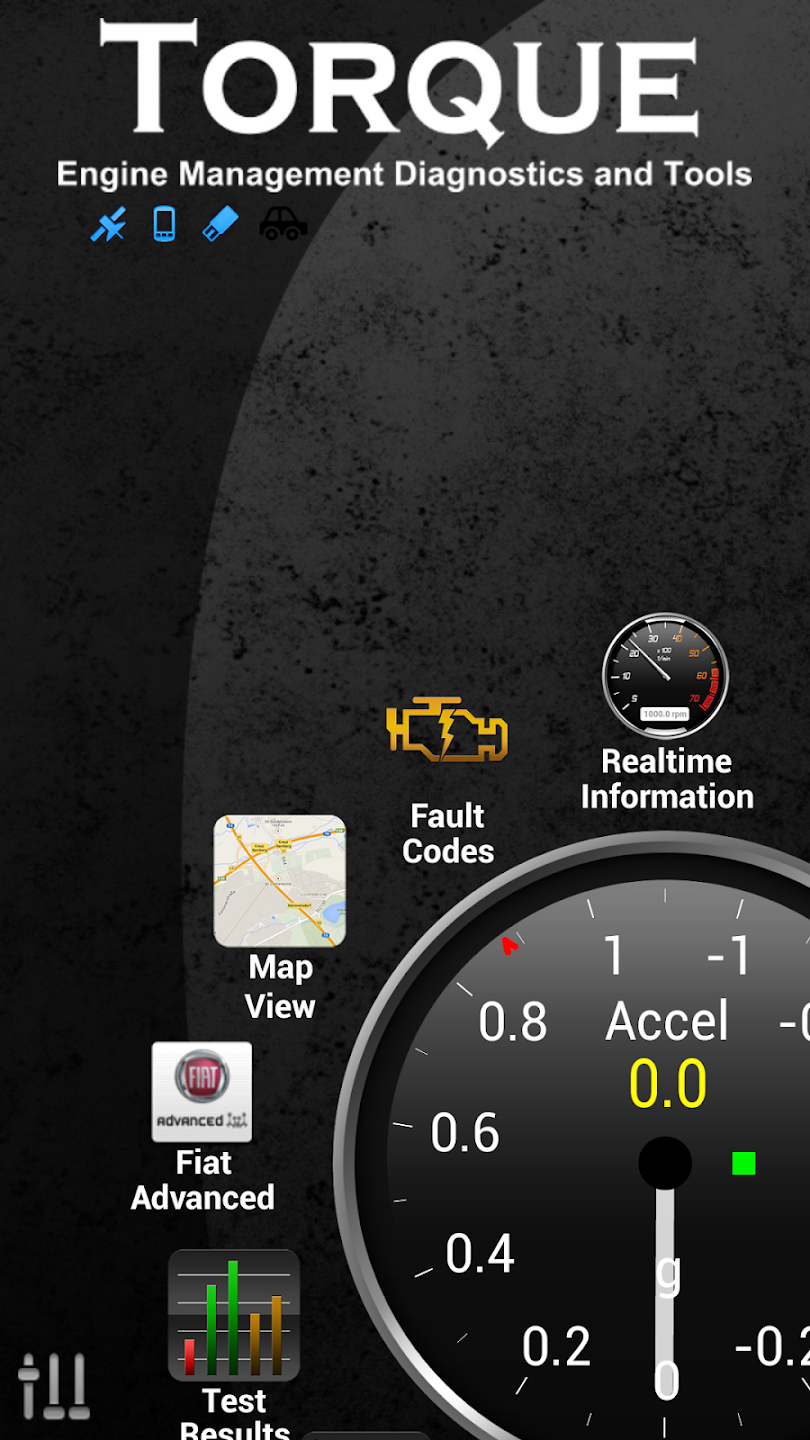
For Android users, Torque Pro is legendary. It has been the go-to app for car enthusiasts for over a decade. While the interface looks like it is stuck in 2012, the functionality is unmatched for the price of a cup of coffee.
Customization Heaven
Torque Pro allows you to build custom dashboards. You can add widgets for practically any sensor your car supports—Boost, Coolant Temp, 0-60 timings, and more. It is perfect for monitoring engine health while towing or during long trips alongside your must-have car gadgets.
It also supports “Track Recorder” plugins, allowing you to overlay OBD2 data onto video recorded from your phone, effectively turning your phone into a high-tech dash cam (though for dedicated recording, we still recommend a standalone dash cam).
- Incredibly cheap (one-time purchase).
- Works with almost any cheap ELM327 Bluetooth adapter.
- Fully customizable themes and gauge layouts.
- Huge community support and plugins.
- Android only (iOS users are out of luck).
- Interface is dated and clunky.
- Can be overwhelming for non-technical users.
Verdict: If you have an Android phone and love tinkering, this is the only app you need.
3. OBD Fusion: The Reliable All-Rounder

If Torque Pro is the chaotic genius, OBD Fusion is the polished professional. Available on both iOS and Android, it offers a great balance of diagnostics and beautiful dashboards. It is developed by the same team behind TouchScan for PC, so the coding backend is robust.
Deep Diagnostics
One of OBD Fusion’s strengths is its ability to access manufacturer-specific networks (often via in-app purchase add-ons) for Ford, Lincoln, Mercury, Mazda, Toyota, Lexus, and Scion. This allows you to see data that generic apps miss, such as specific transmission temperatures—crucial if you are wondering why your car shakes under load.
It works seamlessly with a wide variety of WiFi and Bluetooth LE adapters, making it a versatile choice for multi-car families.
- Clean, modern user interface.
- Excellent graphing capabilities for live data.
- Advanced expansion packs for specific car brands.
- Works on both iPhone and Android.
- Enhanced diagnostics cost extra (in-app purchase).
- Setup can be slightly more complex than BlueDriver.
Verdict: The best Torque Pro alternative for iPhone users, and a solid reliable choice for everyone else.
4. FIXD: The Beginner’s Best Friend

For those who don’t care about “fuel trim banks” or “intake manifold pressure” and just want to know if their car is going to explode, FIXD is the answer. It translates technical jargon into plain English.
Maintenance and Safety
When the engine light comes on, FIXD categorizes the problem by severity:
- Red: Stop Driving Immediately.
- Yellow: Okay to drive, but fix soon.
- Green: Minor issue.
It also tracks maintenance schedules, reminding you when to change oil, filters, or rotate tires. It pairs well with other safe driving apps to keep your car healthy.
- Simplifies complex car problems.
- Great for multi-vehicle families (monitor all cars in one app).
- Easy maintenance reminders.
- Aggressive upsell for their “Premium” subscription.
- Requires their specific hardware sensor for best results.
Verdict: The perfect gift for new drivers or non-car people. Check our guide on gifts for new car owners for similar ideas.
5. Car Scanner ELM OBD2: The Budget Champion

If you are looking for budget-friendly car gadgets, this app is a hidden gem. Car Scanner ELM OBD2 offers a surprising amount of functionality in its free version, with a very reasonable Pro upgrade.
Broad Compatibility
This app supports a massive range of connection standards and adapters. It also has specific profiles for different car brands (Hyundai, Kia, Mitsubishi, Toyota) which helps it read data more accurately than generic apps.
It even includes some basic “coding” features for specific vehicles (like the MQB platform for Volkswagen/Audi), allowing you to change settings like daytime running lights or window behaviors—something usually reserved for expensive tools.
- Excellent free version.
- Compatible with almost all cheap generic adapters.
- Clean, customizable dashboard.
- Some coding features for VAG/Toyota vehicles.
- Free version has ads.
- Setup requires selecting the correct connection profile manually.
Verdict: The best free/freemium option on the market today. Highly recommended if you are on a tight budget.
Buying Guide: How to Choose the Right OBD2 App
Choosing an app isn’t just about the software; it’s about the ecosystem. Here is what you need to know before downloading.
1. The Adapter (Dongle) is Key
You cannot use these apps without a hardware device plugged into your car.
- Bluetooth LE (4.0+): The modern standard. Works with both iPhone and Android. Low power consumption.
- WiFi: Older tech. Fast data transfer, but often disconnects your phone’s 4G/5G internet while in use.
- Proprietary: Devices like BlueDriver and FIXD work best (or only) with their own adapters.
2. iOS vs. Android
Historically, iPhones couldn’t use standard Bluetooth OBD2 adapters. This has changed with Bluetooth LE, but Android still offers more flexibility. If you are an iPhone user, BlueDriver or OBD Fusion are your safest bets.
3. Diagnostics vs. Coding
Most people just want to read codes (Diagnostics). However, some advanced users want to change vehicle settings (Coding), such as disabling the seatbelt chime or changing light patterns. Apps like BimmerCode (for BMW) or Car Scanner are better for coding, while FIXD is purely for diagnostics.
4. Live Data Needs
If you are diagnosing a complex issue, like checking if your alternator is charging (see: best car battery testers), you need an app with fast refresh rates and graphing. Torque Pro and OBD Fusion excel here.
Understanding OBD2 Trouble Codes: A Plain-English Primer
Before you even open one of these apps, it helps to understand what you are actually looking at once a code appears on your screen. Every diagnostic trouble code, or DTC, follows a predictable structure that was standardized decades ago so that any generic scanner could talk to any vehicle built after the mid-1990s. Once you understand the pattern, the alphabet-soup of letters and numbers stops being intimidating and starts being useful.
Each code begins with a letter that tells you which system is throwing the fault. A “P” means Powertrain (engine and transmission), a “B” means Body (airbags, power seats, climate control), a “C” means Chassis (ABS, steering, suspension), and a “U” means Network (communication between the car’s various computer modules). The digit that follows the letter tells you whether the code is generic (a “0” means it is a standard SAE code shared across all manufacturers) or manufacturer-specific (a “1” means it is proprietary to that particular brand, like Ford or Toyota). The remaining three digits narrow down the exact subsystem and fault.
Common Codes You’ll Actually See
Certain codes show up far more often than others because they relate to components that wear out or fail more frequently than the rest of the car. Knowing these ahead of time means you won’t panic the first time your OBD2 scanner app spits out a string of numbers.
- P0300 (Random/Multiple Cylinder Misfire Detected): One of the most common codes on the road. It usually points to worn spark plugs, a bad ignition coil, or a vacuum leak.
- P0420 (Catalyst System Efficiency Below Threshold): Often blamed on a failing catalytic converter, though it is frequently caused by a cheaper issue like a bad oxygen sensor first.
- P0171 / P0174 (System Too Lean): Usually a vacuum leak, a dirty mass airflow sensor, or a failing fuel pump.
- P0455 (Evaporative Emission System Leak Detected — Large Leak): Nine times out of ten, this is simply a loose or cracked gas cap.
- P0128 (Coolant Thermostat Below Regulating Temperature): A classic sign of a stuck-open thermostat, especially common in colder climates.
- P0442 (Evaporative Emission Control System Leak — Small Leak): Similar to P0455 but harder to pinpoint; may require a smoke test to locate the leak in the charcoal canister or hoses.
- P0301-P0308 (Cylinder-Specific Misfire): These tell you exactly which cylinder is misfiring, which is invaluable when diagnosing coil packs or injectors.
A quality scanner app doesn’t just show you the raw code; it translates it into something readable and, in the case of apps like BlueDriver and FIXD, tells you the probability of each likely cause based on real repair data. That single feature is often the difference between a five-minute fix and an expensive guessing game at the shop.
OBD1 vs. OBD2 vs. EOBD vs. JOBD
Not every vehicle speaks the same diagnostic language, and this is a major point of confusion for first-time buyers of a code reader app. Understanding the different standards will save you from buying the wrong adapter entirely.
- OBD1: Used in most vehicles built before 1996 in the United States. There was no universal connector or protocol, meaning each manufacturer had its own proprietary system. None of the apps in this guide will work with true OBD1 vehicles without a specialized adapter.
- OBD2 (OBD-II): The US standard since January 1, 1996. This is what every app and adapter mentioned in this article is built around. It standardized the 16-pin connector and the core set of generic PIDs (Parameter IDs).
- EOBD: The European equivalent of OBD2, mandatory for gasoline vehicles from 2001 and diesel vehicles from 2003-2004 depending on the country. Functionally very similar to OBD2 for basic code reading.
- JOBD: Japan’s version of the standard, used primarily on vehicles sold within Japan rather than exported models, which typically use standard OBD2.
If you own a classic car or an early-90s import, standard smartphone OBD2 scanner apps simply will not connect, and you’ll need to research a dedicated OBD1 tool instead. This is a common source of one-star reviews for apps that are, in reality, working exactly as designed for the standard they support.
Freeze Frame Data and Mode 6: The Hidden Diagnostic Layer
Advanced users quickly discover that trouble codes are only half the story. When a fault is detected, most vehicle computers save a “freeze frame” — a snapshot of engine conditions (RPM, load, coolant temperature, speed) at the exact moment the fault occurred. Apps like OBD Fusion and Torque Pro can display this freeze frame data, which is enormously helpful for diagnosing intermittent problems that don’t happen consistently.
Even deeper is “Mode 6,” a raw diagnostic layer that shows the actual pass/fail test results for onboard monitors — the self-tests your car constantly runs on its catalytic converter, oxygen sensors, and evaporative system. Very few consumer apps expose Mode 6 data in a readable format, but those that do (OBD Fusion in particular) give you a genuine glimpse into what a shop-grade scan tool sees.
OBD2 Adapter Hardware: What’s Inside That Little Dongle?
Not all OBD2 adapters are created equal, and the app you choose is only as good as the hardware feeding it data. This is one of the most overlooked keyword topics in most reviews, yet it’s often the actual source of connection headaches.
ELM327 Clones vs. STN11xx Chipsets
The vast majority of budget adapters sold on Amazon and eBay use a clone of the original ELM327 chip, a design that has been copied and re-copied so many times that quality varies wildly between sellers. These clones are inexpensive, often under fifteen dollars, and work fine for basic code reading and clearing. However, they tend to struggle with fast-refreshing live data, sometimes dropping the connection mid-stream or returning corrupted readings.
Higher-end adapters, such as those from OBDLink, use an STN11xx chipset instead. This is a completely different, more modern piece of silicon designed specifically for automotive diagnostics. It processes commands faster, supports more communication protocols reliably, and tends to work across a much wider range of vehicles without the odd compatibility quirks that plague generic ELM327 clones. If you’ve ever wondered why the same app behaves flawlessly on your friend’s adapter but flakes out on yours, the chipset is usually the culprit.
Popular Adapter Brands Compared
| Adapter Brand | Chipset | Connection Type | Best Paired With |
|---|---|---|---|
| OBDLink MX+ | STN2120 | Bluetooth 4.0 / USB | Torque Pro, OBD Fusion, Car Scanner |
| Veepeak OBDCheck BLE | ELM327 Clone (v1.5) | Bluetooth LE | Car Scanner ELM OBD2 |
| BAFX Products 34t5 | ELM327 Clone | Bluetooth Classic | Torque Pro (Android only) |
| Panlong P1611 | ELM327 Clone | WiFi | OBD Fusion, Car Scanner |
| BlueDriver Proprietary | Custom Firmware | Bluetooth LE | BlueDriver App (exclusive) |
| FIXD Sensor | Custom Firmware | Bluetooth LE | FIXD App (exclusive) |
Notice the pattern: budget-friendly, general-purpose apps like Torque Pro and Car Scanner pair with third-party generic adapters, while polished, beginner-focused experiences like BlueDriver and FIXD lock their software to proprietary hardware. This trade-off between flexibility and reliability is really the central decision you’re making when picking an app in this category.
Bluetooth Classic vs. Bluetooth LE vs. WiFi: A Deeper Look
We touched on this in the buying guide, but the distinction deserves more attention because it directly affects iPhone compatibility. Older Bluetooth Classic adapters simply cannot pair with an iPhone at all — Apple’s Made for iPhone (MFi) restrictions block direct Bluetooth Classic OBD communication. This is why so many budget adapters proudly advertise “Android only” in their listings.
Bluetooth LE (Low Energy) adapters solved this problem by using a communication protocol Apple does allow third-party accessories to use. If you own an iPhone, always double check that the specific adapter you’re buying explicitly lists Bluetooth LE or “BLE” support, not just generic “Bluetooth.” WiFi adapters sidestep the issue entirely since WiFi isn’t restricted the same way, but as mentioned, they typically hijack your phone’s WiFi radio, which can silently disconnect you from cellular data or your home network while the scanner is active.
Brand-Specific and Advanced Coding Apps
Once you’ve owned a generic scanner for a while, many enthusiasts graduate to brand-specific tools that unlock manufacturer-level access far beyond generic OBD2 PIDs. These apps occupy a different tier of the market entirely, closer to what a dealership technician would use.
BMW: BimmerLink and Carly
BMW and MINI owners have two dominant options. BimmerLink is the budget-friendly choice, offering live data, service resets, and basic coding for a relatively small one-time fee when paired with a compatible ENET or Bluetooth adapter. Carly, on the other hand, is a subscription-based ecosystem that goes deeper — enabling hidden features (coding), detailed used-car history checks via the VIN, and battery registration after replacing your car’s battery, a step BMW owners often don’t realize is required.
Volkswagen, Audi, Seat, and Skoda: OBDeleven and VCDS
The VAG group (Volkswagen Audi Group) has one of the most active coding communities in the aftermarket scanner world. OBDeleven is a modern, app-based tool that lets owners of MQB and MLB platform vehicles enable or disable features like automatic windows, ambient lighting colors, and daytime running light patterns. VCDS (VAG-COM Diagnostic System) is the older, PC-based gold standard that professional VAG technicians and hardcore enthusiasts still swear by, though it lacks the polished mobile experience of newer apps.
Toyota and Lexus: Techstream
Toyota’s official diagnostic software, Techstream, is a PC-based tool rather than a phone app, but it deserves mention because it’s the only way to access certain hybrid-system diagnostics and ADAS (Advanced Driver Assistance Systems) calibrations on Toyota and Lexus models. For everyday code reading, though, Car Scanner ELM OBD2’s Toyota-specific profile covers the vast majority of what most owners will ever need.
Honda: HDS (Honda Diagnostic System)
Honda and Acura enthusiasts often reach for HDS when they need access to system-specific diagnostics not exposed through generic OBD2, particularly for SRS (airbag) and TPMS (tire pressure) resets. Like Techstream, it’s primarily a PC tool used with a compatible J2534 pass-thru device rather than a smartphone app.
The common thread across all of these brand-specific tools is that they trade broad compatibility for depth. If you only own one car and want to unlock every hidden setting it has, a brand-specific coding app will always outperform a generic scanner. If you own multiple vehicles from different manufacturers, a universal app like Torque Pro or Car Scanner remains the more practical choice.
Diagnosing Electric and Hybrid Vehicles
As EVs and hybrids become a larger share of the vehicles on the road, a growing number of readers ask whether a standard OBD2 scanner app even works on them. The answer is a qualified yes, but with important caveats.
Electric and hybrid vehicles still contain a standard OBD2 port because it’s a legal requirement tied to emissions and safety systems, not just the internal combustion engine. On a hybrid like a Toyota Prius or Honda Insight, a generic scanner app will read powertrain codes related to the gasoline engine, plus whatever hybrid-specific codes the manufacturer chooses to expose through the standard port. Battery pack cell-level diagnostics, however, usually remain locked behind manufacturer-proprietary software.
Fully electric vehicles are trickier. A Tesla, for example, doesn’t expose meaningful diagnostic data through the standard OBD2 port at all — you would need Tesla’s own service tools or specialized third-party hardware designed specifically for Tesla’s proprietary CAN bus architecture. Other EVs, like the Chevrolet Bolt or Nissan Leaf, do offer some usable data through their OBD2 ports, including battery state of health, charging statistics, and regenerative braking performance, but you’ll often need an app with specific EV PID support (Car Scanner ELM OBD2 has an active community-maintained PID database for several EV models) rather than the generic PIDs used for gasoline engines.
If EV diagnostics are your primary reason for buying a scanner, research your specific make and model before purchasing any adapter, since compatibility varies dramatically from one manufacturer to the next.
Data Logging, Fuel Economy Tracking, and Performance Monitoring
Beyond fault-code reading, one of the most underrated uses of an OBD2 scanner app is long-term data logging. Apps like Torque Pro and OBD Fusion allow you to log dozens of parameters over time — fuel trims, coolant temperature trends, throttle position, boost pressure, and instantaneous fuel economy — and export that data as a CSV file for deeper analysis in a spreadsheet.
This is particularly valuable for a few groups of drivers:
- Track day enthusiasts who want to correlate lap times with engine data like air-fuel ratio and boost.
- Long-distance commuters trying to squeeze out better real-world MPG by identifying which driving habits waste the most fuel.
- Used car buyers doing a pre-purchase inspection who want to log a test drive and review fuel trims and misfire counters afterward for signs of hidden problems.
- Fleet managers tracking multiple vehicles’ health trends over weeks or months rather than reacting only when a warning light appears.
Some apps go a step further and integrate GPS data alongside the OBD2 stream, letting you overlay speed, acceleration, and engine parameters onto a map or exported video — the same “Track Recorder” style feature mentioned earlier with Torque Pro. If your goal is genuine performance tuning rather than casual troubleshooting, prioritize an app with robust logging and export capabilities over one that simply looks the nicest.
Emissions Readiness Monitors and Smog Check Prep
If you live in a state or region that requires periodic emissions testing, your OBD2 scanner app can save you a failed test and a wasted trip. Every OBD2-compliant vehicle runs a series of background “readiness monitors” — self-tests for the catalytic converter, oxygen sensors, evaporative system, EGR system, and more.
When you clear a trouble code (or disconnect the battery), these monitors reset to “not ready” and need to complete a full drive cycle before they’ll report a pass/fail status again. Most smog check stations will fail a vehicle outright if too many monitors show “not ready,” even if there are no active trouble codes. Apps like BlueDriver explicitly show you a “Smog Check Ready” status, telling you at a glance whether all required monitors have completed and you’re safe to head to the test station.
A practical tip: if you recently cleared a code or had your battery disconnected for any reason (including a battery replacement), don’t go straight to a smog check. Drive normally for several days first, checking your readiness monitors with your scanner app along the way, to avoid an automatic failure that has nothing to do with your actual emissions performance.
Data Privacy and Security Considerations
An OBD2 port gives an app fairly deep access to your vehicle’s internal network, and it’s fair to ask what happens to that data once it leaves your car. Most consumer-facing scanner apps process live diagnostic data locally on your phone and only transmit specific information to their servers when you use cloud-connected features — for example, BlueDriver’s Repair Report lookup or FIXD’s maintenance reminder sync.
Still, it’s worth reviewing each app’s privacy policy before granting Bluetooth and location permissions, particularly since many of these apps request background location access to support features like trip logging or theft alerts. If privacy is a significant concern for you, favor apps like Torque Pro and Car Scanner ELM OBD2 that can operate largely offline once configured, over apps that require a persistent account and constant connectivity to function.
It’s also worth noting that clearing codes or altering settings through a coding app can, in rare cases, interact with a vehicle’s anti-theft or immobilizer systems. Stick to well-reviewed apps and avoid installing coding modules you don’t fully understand, especially on a vehicle still under manufacturer warranty.
DIY Diagnosis vs. a Trip to the Mechanic: A Real Cost Comparison
One of the biggest draws of these apps is the money they can save. A typical shop charges somewhere between eighty and one hundred fifty dollars just to plug in a scan tool and tell you what code is stored — information you can retrieve yourself in under two minutes with a fifteen-dollar adapter and a free app.
| Scenario | Mechanic Diagnostic Fee | DIY Cost (App + Adapter) | Time Saved |
|---|---|---|---|
| Check engine light, single code | $80 – $150 | $0 – $20 | Same day vs. 1-3 day wait |
| Pre-purchase used car inspection | $100 – $200 | $15 – $100 | Minutes vs. scheduling an appointment |
| Emissions readiness check | $40 – $60 | $0 (already own adapter) | Instant vs. a dedicated visit |
| Recurring intermittent issue | $150+ (multiple visits) | $15 – $100 (data logging over time) | Days vs. weeks of guesswork |
Of course, reading the code is only the first step. Actually repairing the underlying issue still requires either the tools and skills to do it yourself or a trip to a mechanic — but walking in already knowing the code, the likely cause, and the estimated cost of the repair puts you in a much stronger negotiating position and helps you avoid unnecessary upsells.
Common Mistakes When Using an OBD2 Scanner App
Even with a great app and a reliable adapter, plenty of first-time users run into avoidable frustrations. Here are the mistakes we see most often.
- Clearing the code without diagnosing the cause. This turns the check engine light off temporarily, but the underlying problem remains and readiness monitors reset, which can cause a failed emissions test.
- Assuming the first listed cause is the correct one. A code like P0420 can have a dozen possible causes; the app gives you a starting point, not a guaranteed diagnosis.
- Using a cheap adapter with a demanding app. Pairing a five-dollar ELM327 clone with an app that wants fast live-data streaming often results in dropped connections and inaccurate readings.
- Leaving the adapter plugged in permanently. Some cheap adapters draw a small parasitic current even when the car is off, which can drain your battery if the vehicle sits unused for extended periods.
- Ignoring firmware updates. Both the app and, in some cases, the adapter’s firmware receive periodic updates that fix bugs and add support for newer vehicle protocols. Skipping updates is a common cause of “it worked last month but not now” complaints.
- Not selecting the correct vehicle profile. Apps like Car Scanner ELM OBD2 rely on you selecting your specific make and model to unlock manufacturer-specific PIDs; skipping this step limits you to generic data only.
Glossary of OBD2 Terms
| Term | Meaning |
|---|---|
| DTC | Diagnostic Trouble Code — the alphanumeric code stored when a fault is detected. |
| PID | Parameter ID — a specific data point the app requests from the car, like RPM or coolant temperature. |
| Freeze Frame | A snapshot of sensor data captured at the exact moment a fault occurred. |
| Readiness Monitor | A background self-test the vehicle runs on emissions-related systems. |
| Mode 6 | Raw pass/fail test results for onboard emissions monitors. |
| Fuel Trim | A correction value the engine computer applies to keep the air-fuel mixture balanced. |
| CAN Bus | Controller Area Network — the internal wiring standard that lets a car’s computers talk to each other. |
| ELM327 | The original chipset design used in most budget OBD2 Bluetooth and WiFi adapters. |
| J2534 Pass-Thru | A standardized interface used by manufacturer diagnostic software for deeper, dealer-level access. |
How to Connect Your OBD2 Scanner App
Many users give these apps 1-star reviews because they fail to connect. Here is the proper sequence to ensure success:
- Locate the Port: Usually under the dashboard on the driver’s side.
- Plug in the Adapter: Do this while the car is OFF.
- Turn Ignition ON: You don’t need to start the engine, but the dashboard lights must be on.
- Pair Bluetooth (Android Only): Go to phone settings and pair with “OBDII”. (Note: iOS users usually skip this step and connect directly inside the app).
- Open the App: Go to settings within the app and select your connection type (Bluetooth/WiFi).
Frequently Asked Questions (FAQ)
Do I need a specific adapter for these apps?
Yes. The app is just the software. You need a hardware dongle (Bluetooth or WiFi ELM327 adapter) plugged into your car’s OBD2 port to transmit data to your phone. Some apps, like BlueDriver, require their own proprietary adapter.
Can an OBD2 app reset my check engine light?
Yes, almost all OBD2 scanner apps allow you to read diagnostic trouble codes (DTCs) and clear them, which turns off the check engine light. However, if the underlying mechanical issue isn’t fixed, the light will come back on.
Which is better: WiFi or Bluetooth adapters?
Bluetooth (specifically Bluetooth 4.0/LE) is generally preferred for ease of use because it allows your phone to stay connected to mobile data while using the scanner. WiFi adapters can sometimes block your phone’s internet connection.
Can I use these apps while driving?
Yes, many apps offer “Live Data” or “Dashboard” modes to monitor coolant temp, RPM, and speed while driving. However, you should never manipulate the app or read detailed text reports while the vehicle is in motion.
Do these apps work on all cars?
They work on most vehicles manufactured after 1996 in the US (OBD2 standard) and roughly 2001/2004 for petrol/diesel in Europe. Some advanced features (like ABS or Airbag codes) are vehicle-specific and app-dependent.
Will an OBD2 scanner app drain my car battery?
The app itself uses negligible power on your phone, but a cheap, low-quality adapter left plugged in permanently can draw a small parasitic current from your car’s battery, even with the ignition off. If you don’t plan to use the scanner regularly, it’s good practice to unplug it when not in use, especially on older vehicles or ones that sit unused for long stretches.
Can I use one adapter with multiple apps?
Generally yes, as long as the adapter uses an open, generic ELM327 or STN-based chipset. You can pair the same Bluetooth or WiFi adapter with Torque Pro, OBD Fusion, and Car Scanner ELM OBD2 interchangeably. Proprietary hardware like the BlueDriver sensor or the FIXD sensor, however, is locked to its own companion app and won’t work with anything else.
Do I need a subscription to use these apps?
It depends on the app. BlueDriver, Torque Pro, and OBD Fusion are one-time purchases (or free with a one-time hardware cost). FIXD and some premium tiers of Car Scanner ELM OBD2 offer optional ongoing subscriptions for extra features like maintenance tracking or manufacturer-specific code packs, but the core diagnostic functionality typically doesn’t require one.
What’s the difference between a code reader app and a professional scan tool?
Professional-grade tools from brands like Autel, Launch, Snap-on, and Foxwell are standalone handheld devices that cost anywhere from a few hundred to several thousand dollars. They typically offer bi-directional control (actively commanding components to test them, not just reading data), broader manufacturer-specific coverage, and more robust build quality for daily shop use. Smartphone apps paired with a Bluetooth adapter cover the vast majority of DIY needs at a fraction of the cost, but they generally lack bi-directional control for anything beyond basic actuation tests.
Can these apps read transmission, ABS, and airbag codes?
Only apps that support “enhanced” or manufacturer-specific diagnostics can read these systems — generic OBD2 mode only guarantees access to powertrain (engine and transmission-related emissions) codes. BlueDriver and OBD Fusion (with its brand-specific add-ons) are the strongest options in this guide for enhanced system coverage.
Is it legal to clear codes before a smog or emissions test?
Clearing a code to hide a genuine emissions problem before a required test is against the spirit and, in many jurisdictions, the letter of emissions regulations, and it will likely cause an automatic failure anyway due to incomplete readiness monitors. Clearing a code after a legitimate repair, however, is completely normal and expected.
Do OBD2 apps work on diesel engines?
Yes, diesel vehicles built to meet OBD2 (or EOBD for European diesels, generally required from 2003-2004) use the same 16-pin connector and communication standard as gasoline vehicles. Diesel-specific systems like DPF (diesel particulate filter) regeneration status and DEF (diesel exhaust fluid) levels may require an app with expanded PID support, such as OBD Fusion or Car Scanner ELM OBD2.
A Brief History of OBD: How We Got Here
To fully appreciate why these apps work the way they do, it helps to understand where the OBD standard came from. Onboard diagnostics existed in a primitive form as early as the 1970s and 1980s, when manufacturers like GM and Ford began adding basic computer control to fuel injection and emissions systems. These early systems, retroactively labeled OBD1, were a fragmented mess — every manufacturer used its own connector shape, its own communication protocol, and its own proprietary trouble codes. A scan tool built for a Ford in 1988 was completely useless on a Chevrolet from the same year.
California led the push toward standardization in the early 1990s through the California Air Resources Board (CARB), which mandated a more consistent diagnostic system to help enforce emissions compliance. This effort snowballed into a federal requirement, and by January 1, 1996, every new car and light truck sold in the United States was required to include OBD2: a standardized 16-pin connector (usually located under the dashboard near the steering column), a common set of communication protocols, and a shared library of generic trouble codes that any compliant scan tool could read regardless of manufacturer.
This single regulatory decision is the entire reason a fifteen-dollar Bluetooth dongle and a free app can talk to a Honda, a Ford, and a BMW using the same basic protocol today. Without that mid-1990s standardization push, the smartphone scanner app industry as we know it simply wouldn’t exist. Europe followed with its own EOBD mandate a few years later, and most of the rest of the world has since aligned with some variation of the same core standard, which is why these apps travel reasonably well across international markets even though adapter availability and app store listings can vary by region.
Regional and State-Specific Emissions Considerations
Emissions testing requirements vary enormously depending on where you live, and this affects how you should actually use your scanner app day to day. Some states and countries require periodic testing for every registered vehicle; others only test in specific metropolitan counties with air-quality concerns; and some regions have no testing requirement at all.
In areas with strict testing regimes, readiness monitors (discussed earlier in this guide) become far more important to track proactively rather than reactively. Drivers in these regions benefit most from an app that clearly surfaces monitor status, like BlueDriver’s dedicated smog-readiness screen, so they aren’t caught off guard by a failed test months after a repair or battery disconnection.
In regions without mandatory testing, the emphasis shifts more toward general maintenance and early fault detection rather than compliance. Either way, it’s worth checking your local requirements once and noting them somewhere in your scanner app if it supports custom notes, so you’re never scrambling to remember the rules right before a registration renewal deadline.
Ford, GM, Mazda, and Subaru: Additional Manufacturer-Specific Tools
Beyond the BMW, VAG, Toyota, and Honda ecosystems covered earlier, several other manufacturer communities have developed dedicated tools worth knowing about if you own one of these brands.
Ford: FORScan
Ford, Lincoln, and Mercury owners frequently turn to FORScan, a free desktop application (with a companion mobile-friendly workflow using a compatible ELM327-based adapter) that unlocks an enormous range of hidden configuration options. FORScan users commonly enable features like automatic headlight delay adjustments, remote start via factory key fobs, and detailed module-level diagnostics not exposed through generic OBD2 scanning.
General Motors: GDS2 and Techline Connect
GM’s official dealer-level software, GDS2 and its successor Techline Connect, remain largely inaccessible to consumers without a J2534 pass-thru device and a paid subscription. For most GM owners, a strong generic app like OBD Fusion or Car Scanner ELM OBD2 with GM-specific PID packs covers the everyday diagnostic needs of Chevrolet, Buick, GMC, and Cadillac vehicles.
Mazda and Subaru
Mazda and Subaru don’t have quite the same dedicated enthusiast coding-app ecosystem as BMW or VAG vehicles, but both brands are well supported by the manufacturer-specific expansion packs available in OBD Fusion and the brand-selection profiles inside Car Scanner ELM OBD2, which unlock additional live-data parameters like turbo boost pressure on Subaru’s turbocharged models and detailed transmission data on Mazda’s Skyactiv-equipped vehicles.
Troubleshooting: Why Won’t My App Connect?
Connection failures are, by a wide margin, the most common complaint in app store reviews for every product on this list — and the overwhelming majority of them are solvable without contacting support. Here is a systematic checklist to work through before assuming your adapter is defective.
Step 1: Confirm the Adapter Has Power
Most adapters have a small LED that lights up the moment they’re plugged in, even with the ignition off, since they draw power directly from the OBD2 port’s constant 12-volt pin. If there’s no light at all, try a different OBD2 port cleaning (dust and debris in the port is a surprisingly common culprit) or test the adapter in a different vehicle if one is available.
Step 2: Verify Ignition Position
Many adapters require the ignition to be in the “ON” position (dashboard lights illuminated) rather than fully off, but the engine does not need to be running. Some vehicles also require a brief delay after turning the key before the OBD2 network becomes active.
Step 3: Check Bluetooth Pairing (Android)
On Android, most ELM327-based adapters need to be paired at the phone’s operating system level, in Settings > Bluetooth, before the app can see them — simply opening the app and expecting it to find an unpaired device is a very common mistake. The default PIN for most generic adapters is either 1234 or 0000.
Step 4: Restart Everything in the Right Order
If a connection that used to work suddenly stops, the fastest fix is often the simplest: unplug the adapter, force-close the app, turn Bluetooth off and back on, then reconnect in this order — plug in the adapter first, wait for the LED, then open the app.
Step 5: Check for Interference and Range
Bluetooth signals can be surprisingly sensitive to interference from other electronics, phone cases with metal components, or simply being too far from the OBD2 port (which is usually under the dash, low and to the left of the driver). If your phone is mounted far away or in a metal cup holder mount, try holding it closer to the adapter to rule out a range issue.
Step 6: Update Firmware and App Versions
Both proprietary adapters (BlueDriver, FIXD) and their companion apps receive periodic firmware and software updates that fix bugs related to specific vehicle model years. If your car is a very new model, check whether a firmware update is available before assuming the adapter is broken — brand-new vehicles sometimes need a protocol update to be recognized correctly.
Using an OBD2 App When Buying a Used Car
One of the most financially valuable uses of a scanner app has nothing to do with your own car at all — it’s bringing one along when you’re shopping for a used vehicle. A cheap Bluetooth adapter and a free app can reveal red flags in minutes that would otherwise take a paid pre-purchase inspection to uncover.
Here’s a practical checklist for using your app during a used car viewing:
- Check for stored and pending codes before you even start the engine. A seller who cleared codes right before your visit can sometimes still be caught if pending codes have already reappeared.
- Review the readiness monitor status. If every single monitor shows “not ready,” it’s a strong sign the codes were recently cleared specifically to hide a problem from you or from an emissions test, rather than through a normal battery disconnection weeks earlier.
- Log a short test drive and review fuel trims and misfire counters afterward. Long-term fuel trim values that are unusually high or low can indicate a vacuum leak or sensor problem that isn’t yet severe enough to trigger a code.
- Check the odometer reading against the vehicle’s ECU data where supported, as a basic cross-check against odometer rollback, though this isn’t foolproof on every make and model.
- Look at freeze frame data on any stored codes, even ones that seem minor, since it tells you the exact conditions under which a fault occurred and can hint at a bigger underlying issue.
None of this replaces a proper pre-purchase inspection by a trusted mechanic for a major purchase, but it’s an excellent, nearly free first filter that can save you from wasting time on a car with hidden problems before you ever get to that stage.
Seasonal Maintenance and Live Data Monitoring
Beyond fault codes, the live data streams available in apps like Torque Pro and OBD Fusion double as an excellent early warning system tied to seasonal changes. A few parameters worth checking as the seasons shift:
- Coolant temperature behavior in winter: A thermostat that’s stuck open will show the engine taking unusually long to reach normal operating temperature, which hurts both fuel economy and cabin heat output in cold weather.
- Battery voltage during hot summer months: Heat is actually harder on car batteries than cold, and watching your live voltage readings can give you advance warning of a battery nearing the end of its life before it strands you.
- Long-term fuel trims after seasonal fuel blend changes: Many regions switch between summer and winter fuel blends, and unusually shifting fuel trim values around these transition periods can be a normal adaptation or a sign of a developing issue worth watching.
- Tire pressure sensor data, where supported through enhanced PIDs, since cold weather causes tire pressure to drop and is one of the most common triggers for a TPMS warning light each fall.
Building a light habit of checking these values every few weeks, rather than only when a warning light appears, is one of the best ways to catch developing problems while they’re still cheap and easy to fix.
Smartphone Apps vs. Dedicated Handheld Scanners
A question we get constantly is whether it’s better to buy a standalone handheld scan tool from brands like Autel, Innova, or Foxwell instead of pairing a phone with an app. The honest answer depends heavily on how often you’ll use it and what depth of diagnostics you actually need.
Advantages of the Smartphone + App Route
- Lower upfront cost: A generic Bluetooth adapter plus a free or cheap app costs a fraction of even an entry-level handheld unit.
- Larger, better screen: You already own a high-resolution touchscreen; no need to squint at a small, low-contrast handheld display.
- Constant software updates: App-based tools update instantly through the App Store or Play Store, whereas handheld scanners often require manual firmware updates via a PC and USB cable, sometimes for a fee after the first year.
- Data logging and cloud backup: Your phone’s storage and connectivity make it trivial to log, export, and back up diagnostic history over time.
Advantages of a Dedicated Handheld Scanner
- No pairing hassles: A handheld unit plugs directly into the OBD2 port with no Bluetooth or WiFi connection to troubleshoot.
- Bi-directional control: Higher-end handhelds can actively command components (like cycling a cooling fan or triggering a fuel injector test) rather than just reading passive data.
- Ruggedness for shop use: Built for daily, repeated use in a garage environment, often with a more durable housing than a smartphone.
- No dependency on phone battery or connectivity: Useful in situations where you don’t want to risk your personal phone’s battery life or data plan.
For the overwhelming majority of DIY drivers who just want to check a check-engine light a few times a year, monitor live data occasionally, and keep tabs on maintenance, the smartphone-and-app combination covers everything they need at a much lower cost. Full-time hobbyist mechanics or anyone doing frequent bi-directional testing will eventually outgrow the smartphone approach and benefit from investing in a proper handheld unit alongside their app of choice.
Extended Live Data (PID) Reference
For readers who want to go deeper into live data monitoring, here is a broader reference of commonly available parameters across most OBD2-compliant vehicles, beyond the handful mentioned earlier in this guide.
| Parameter | What It Tells You |
|---|---|
| Engine RPM | Real-time engine speed; useful for diagnosing rough idle or stalling issues. |
| Calculated Engine Load | How hard the engine is working relative to its maximum capacity at a given RPM. |
| Short-Term / Long-Term Fuel Trim | How much the ECU is adjusting the air-fuel mixture from its baseline; large values suggest a leak or sensor fault. |
| Intake Air Temperature | Helps diagnose sensor faults that can throw off fuel calculations. |
| Mass Air Flow (MAF) Rate | Measures the volume of air entering the engine; a dirty or failing MAF sensor is a common cause of rough running. |
| Throttle Position | Shows how far the throttle is open, useful for diagnosing hesitation or surging issues. |
| O2 Sensor Voltage | Tracks oxygen sensor activity, central to diagnosing catalytic converter and fuel mixture problems. |
| Vehicle Speed | Cross-references against RPM to diagnose transmission slipping or speedometer sensor faults. |
| Timing Advance | Shows ignition timing adjustments, relevant when diagnosing pinging, knocking, or performance issues. |
| Fuel Pressure | On supported vehicles, helps confirm whether a weak fuel pump is causing performance problems. |
| Battery/Module Voltage | A quick way to spot a failing alternator or a battery on its way out. |
| Barometric Pressure | Used by the ECU to adjust for altitude; occasionally useful when diagnosing altitude-related performance complaints. |
Not every parameter is supported on every vehicle — coverage depends on the specific make, model, and model year, and whether the app you’re using has a manufacturer-specific expansion pack installed. Apps like Torque Pro and OBD Fusion generally expose the widest range of these parameters for graphing and logging, while beginner-focused apps like FIXD deliberately hide most of this complexity to keep the experience simple.
Using OBD2 Apps Outside the United States
While this guide is written primarily with a US audience in mind, every app covered here also works internationally, with a few regional notes worth flagging. In the European Union and United Kingdom, EOBD compliance means the same fundamental connector and protocol apply, so adapters and apps purchased in the US will typically work on EU-market vehicles without modification, though enhanced manufacturer-specific PID packs may need to be purchased separately depending on the brand’s regional presence.
In Australia and New Zealand, OBD2 compliance became mandatory around 2006 for petrol vehicles, meaning older imported vehicles may not be compatible with any of these apps. Japanese domestic market vehicles not intended for export sometimes use the JOBD standard mentioned earlier, which can behave inconsistently with generic ELM327-based adapters, so buyers in Japan working with domestic-market cars should research compatibility carefully before purchasing.
Regardless of region, always confirm your specific vehicle’s compliance year against the local OBD2 or EOBD mandate before assuming an app and adapter combination will work — buying a scanner for a vehicle built even a year or two before the local mandate took effect is one of the most common sources of “it doesn’t connect at all” complaints.
Real-World Scenarios: Which App Fits Which Driver?
To make the decision more concrete, here are a few realistic driver profiles and which app from this guide tends to fit best.
The Cautious Commuter
Drives a five-year-old sedan daily, has no interest in mechanical details, and just wants peace of mind. This driver is best served by FIXD, since its plain-English severity ratings and maintenance reminders remove all the guesswork without requiring any technical knowledge.
The Weekend Track Enthusiast
Owns a modified Android phone-friendly vehicle and wants to log boost, air-fuel ratio, and lap-correlated data. Torque Pro, paired with a high-quality OBDLink adapter, remains the clear choice thanks to its deep customization and plugin ecosystem.
The Multi-Car Household
Manages diagnostics for two or three family vehicles from different manufacturers and wants one consistent app experience across an iPhone and an Android tablet. OBD Fusion or Car Scanner ELM OBD2 both handle cross-platform, multi-vehicle scenarios gracefully.
The Serious DIY Mechanic
Regularly diagnoses ABS, transmission, and airbag issues on their own vehicles and occasionally helps friends and family. BlueDriver earns its higher price tag here thanks to enhanced system coverage and verified repair data that would otherwise require a much more expensive professional tool.
The Budget-Conscious Student
Drives an older, high-mileage car and needs to keep repair costs as low as possible. Car Scanner ELM OBD2‘s generous free tier, paired with a ten-dollar generic adapter, delivers the best diagnostic value per dollar spent in this entire roundup.
Warranty Concerns: Will Using a Scanner App Void My Warranty?
A surprisingly common worry among new car owners is whether simply plugging a Bluetooth adapter into the OBD2 port could somehow void a manufacturer’s warranty. For basic diagnostic reading — pulling codes, viewing live data, checking readiness monitors — there is essentially no risk. The OBD2 port exists specifically to be accessed by exactly this kind of tool, and manufacturers cannot legally void a warranty simply because you read data through the standardized port that federal regulation requires them to provide.
Where things get murkier is with coding and configuration changes made through advanced tools like OBDeleven, BimmerCode, or Carly. Enabling a cosmetic feature like ambient lighting color options is very unlikely to cause any warranty issue, but altering something more fundamental to how a safety or emissions system operates could, in rare cases, raise questions if a dealer later investigates an unrelated warranty claim. As a general rule of thumb, cosmetic and convenience coding changes are low-risk, while anything touching engine tuning, emissions control, or safety systems deserves more caution, particularly on a vehicle still under its original factory warranty.
If you’re ever in doubt, it’s worth reverting any non-factory coding changes before a dealership visit for unrelated warranty work, simply to avoid an awkward conversation, even if the coding change had nothing to do with the actual issue you’re bringing the car in for.
Insurance Telematics vs. OBD2 Scanner Apps: What’s the Difference?
Many drivers confuse OBD2 scanner apps with the small dongles that insurance companies mail out for usage-based insurance programs, but the two serve completely different purposes despite both plugging into the same port. Insurance telematics devices are primarily designed to track driving behavior — hard braking events, acceleration patterns, time of day driven, and mileage — and report that data back to the insurer to calculate a discount or surcharge.
A standard OBD2 scanner app, by contrast, is built to give you diagnostic visibility into your own vehicle’s health, not to report your driving habits to a third party. Some insurance dongles technically use the same physical OBD2 port and even similar hardware internally, but they run closed, proprietary software that you as the driver typically cannot access to view raw diagnostic data. If you’re currently using an insurance telematics dongle for a discount program, you generally can’t also plug in a scanner app’s adapter at the same time, since most vehicles only expose one active OBD2 port. Some drivers work around this by only plugging in their diagnostic adapter briefly when they need it, then reinstalling the insurance dongle afterward, though this defeats some of the continuous-monitoring purpose of the insurance program.
Accessories Worth Pairing With Your Scanner Setup
Once you’ve settled on an app and adapter combination, a few inexpensive accessories can noticeably improve the overall experience, particularly for anyone who plans to use live data monitoring regularly while driving.
- A dedicated phone mount positioned within easy glance-distance of the driver’s seat, so you can monitor gauges like coolant temperature or boost pressure without looking away from the road for extended periods.
- A short OBD2 extension cable, useful when the port itself is tucked in an awkward spot low under the dash, allowing you to route the adapter to a more accessible or better-ventilated location.
- A USB car charger if you plan to run live data logging for extended periods, since continuous Bluetooth streaming and an always-on screen will noticeably drain your phone’s battery over a long drive.
- A notebook or dedicated notes app for logging trouble codes, dates, and mileage over time — even the best scanner app benefits from a simple external record of when issues first appeared and what repairs were performed in response.
Extended Glossary: Terms You’ll Encounter in Coding and Advanced Apps
| Term | Meaning |
|---|---|
| Coding | Changing a vehicle’s software-configurable settings, such as enabling a hidden feature the hardware already supports. |
| Flashing / Reflashing | Writing new firmware to a vehicle’s control module, typically requiring manufacturer-level tools rather than consumer apps. |
| Bi-Directional Control | The ability of a scan tool to actively command a component, such as cycling a fan or firing an injector, rather than only reading passive data. |
| VIN Decoding | Automatically identifying a vehicle’s exact make, model, engine, and trim from its 17-character Vehicle Identification Number. |
| ECU / PCM | Engine Control Unit / Powertrain Control Module — the primary computer managing engine and transmission operation. |
| Module | Any of the dozens of individual computers in a modern vehicle, each managing a specific system like ABS, airbags, or climate control. |
| Pass-Thru Device | Specialized hardware (J2534-compliant) that allows a PC running manufacturer software to communicate directly with a vehicle’s modules for reflashing and deep diagnostics. |
| DPF | Diesel Particulate Filter — a component that traps soot in diesel exhaust and periodically undergoes a regeneration cycle to burn it off. |
| DEF | Diesel Exhaust Fluid — a urea-based fluid injected into diesel exhaust to reduce nitrogen oxide emissions. |
| TPMS | Tire Pressure Monitoring System — the sensors and warning system that alert you to low tire pressure. |
Building a Long-Term Vehicle Health Habit
The drivers who get the most value out of an OBD2 scanner app aren’t the ones who only open it in a panic when a warning light appears — they’re the ones who build a light, recurring habit around it. Consider setting a simple monthly reminder to run a quick scan even when nothing seems wrong. Pending codes, which haven’t yet triggered the check engine light because the fault hasn’t repeated enough times to be confirmed, often show up during these routine checks days or weeks before the dashboard warning actually appears.
Pair this habit with your regular maintenance schedule. Before an oil change, a quick scan can confirm there’s nothing else worth mentioning to your mechanic while the car is already up on a lift. Before a long road trip, checking fuel trims, battery voltage, and readiness monitors takes less time than filling the gas tank and can catch a developing issue while you’re still safely at home rather than stranded hundreds of miles away. After any major repair, a follow-up scan a week or two later confirms the fix actually resolved the underlying fault rather than just clearing the code temporarily.
Over months and years, this consistent light-touch monitoring builds a genuine maintenance history that’s far more useful than a glovebox full of paper receipts alone — and if you ever sell the car, being able to show a buyer a clean scan history with no hidden pending codes is a small but meaningful trust signal that can make the sale go more smoothly.
Keeping a Simple Maintenance Log
Whichever app you choose, most of them allow you to export or at least screenshot your scan results. Keeping a simple running log — even just a folder of dated screenshots — creates a timeline you can refer back to. If a code reappears six months after you thought it was fixed, having the original scan on hand helps you (or your mechanic) understand whether it’s the same underlying issue resurfacing or a genuinely new problem in a related system.
This kind of record-keeping is especially valuable for anyone who keeps a vehicle for the long haul rather than trading it in every few years. High-mileage ownership rewards exactly the kind of proactive, low-cost monitoring that a fifteen-dollar adapter and a free app make possible, turning what used to require a trained eye and expensive equipment into something any attentive owner can manage from their own driveway.
Conclusion
Gone are the days when you had to rely blindly on a mechanic’s word. With the right app and a cheap adapter, you can see exactly what your car is thinking. Whether you are prepping for a vacation with your road trip essentials or just commuting, knowledge is power.
Our Final Recommendations:
- Best Overall: BlueDriver for its unmatched accuracy and repair reports.
- Best for Android Geeks: Torque Pro for endless customization.
- Best Free Option: Car Scanner ELM OBD2 for budget-conscious drivers.
Pick the one that fits your technical comfort level, and drive smarter.