Best SD Card for Dashcam: The Complete Buyer’s Guide
Your dashcam is only as reliable as the memory card sitting inside it. Pick the wrong one and you’ll get corrupted footage, endless “format card” warnings, or a camera that quietly stops recording the one time you actually needed it. Below, we break down exactly which microSD cards hold up to the punishing, 24/7 overwrite cycle that dashcams put them through, and why.
Why Your SD Card Choice Matters
Most people spend weeks comparing dashcam models, reading about sensor size, night vision, and app connectivity, then grab whatever microSD card happens to be cheapest on the shelf. That’s backwards. A dashcam records in a loop, which means the card inside it is being written to, deleted from, and rewritten to almost constantly during every drive. A card designed for occasional photo storage on a phone simply isn’t built for that kind of workload, and it tends to fail in exactly the way you don’t want: quietly, without warning, right before an accident you needed footage of.
Endurance-rated microSD cards exist specifically for this use case. They’re built with firmware and NAND flash designed to handle continuous overwrite cycles, and they’re rated in TBW (terabytes written) rather than just capacity. If you’ve ever wondered why your dashcam keeps throwing “card error” messages every few months, there’s a good chance the card is the culprit, not the camera. For a deeper look at how the camera itself factors into this, our complete dashcam buying guide covers the hardware side in detail.
This guide focuses purely on the storage side of the equation: five widely available microSD cards, what they’re actually good for, and which one deserves a spot in your glovebox.
It’s also worth acknowledging upfront that there isn’t a single universally “best” card, in the sense of one product that’s objectively correct for every driver. The right choice depends heavily on what dashcam you’re running, how many channels it records simultaneously, whether parking mode is switched on around the clock, and how tolerant you are of periodically swapping or reformatting a card. A rideshare driver logging eight hours a day in a dual-channel 4K setup has fundamentally different storage needs than someone who drives to the grocery store twice a week in a basic single-lens 1080p unit, and treating both scenarios the same way is how a lot of buyers end up either overspending on capacity they’ll never use or underspending and dealing with constant errors.
What follows is organized so you can either jump straight to a specific card’s breakdown using the table of contents, or read through the buying-guide sections toward the bottom for a deeper understanding of endurance ratings, speed classes, and the loop-recording mechanics that make dashcam storage different from every other memory card use case you’re probably already familiar with.
Setting a Realistic Maintenance Schedule
Most storage-related dashcam problems aren’t the result of a single bad card, they’re the result of nobody ever establishing a maintenance routine in the first place. Treating your memory card the same way you treat an oil change or tire rotation, as a recurring task with a rough schedule, catches problems early rather than discovering them the day you actually need footage.
A reasonable baseline routine looks something like this: reformat the card directly through the dashcam’s menu roughly once a month, physically inspect the card and its slot every few months for dust, corrosion, or a loose fit, and plan on full replacement somewhere between eighteen months and three years depending on how heavily the vehicle is driven and how demanding the recording resolution is. Higher-mileage drivers, rideshare and delivery drivers especially, should lean toward the shorter end of that replacement window, while occasional or backup vehicles can often stretch a good card well past three years without issue.
Keeping a simple log, even something as basic as a note on your phone with the install date, costs nothing and removes the guesswork later when you’re trying to figure out whether a sudden string of errors is a sign the card is failing or just a one-off glitch. Combined with buying from the trustworthy brands covered throughout this guide and avoiding the common mistakes outlined below, a routine like this is genuinely enough to keep most dashcam storage problems from ever becoming an issue at all.
Quick Picks at a Glance
| Card | Best For | Capacity | Endurance Focus |
|---|---|---|---|
| Amazon Basics microSDXC | Budget backup card | Up to 128GB | Standard |
| SanDisk 128GB Ultra | Everyday reliability | 128GB | Standard |
| Lexar 512GB Play Blue | Maximum storage / long trips | 512GB | Standard |
| Gigastone 128GB | Continuous dashcam recording | 128GB | High-endurance oriented |
| Patriot LX Series 32GB | Basic single-channel dashcams | 32GB | Standard |

Amazon Basics microSDXC Memory Card
Amazon’s own storage line has quietly become one of the more dependable budget options for casual dashcam users. It won’t win any speed benchmarks, but for a single-channel dashcam recording in 1080p, it handles the loop-recording cycle without much drama. This is the card we’d point a first-time dashcam owner toward if they just want something that works without spending real money finding out.
Where it falls short is in sustained write consistency over the long haul. Heavy users running dual-channel 4K setups will likely see this card degrade faster than the endurance-focused alternatives further down this list, so treat it as a starter card rather than a permanent solution.
Pros
- Very affordable
- Easy to find, widely stocked
- Fine for 1080p single-channel recording
Cons
- Not explicitly endurance-rated
- Weaker fit for 4K dual-channel setups
- Shorter realistic lifespan under heavy loop recording
If you’re running this card in a compact setup, it pairs reasonably well with something like the Vantrue E1 Lite, which we reviewed separately and which doesn’t demand the highest sustained write speeds.
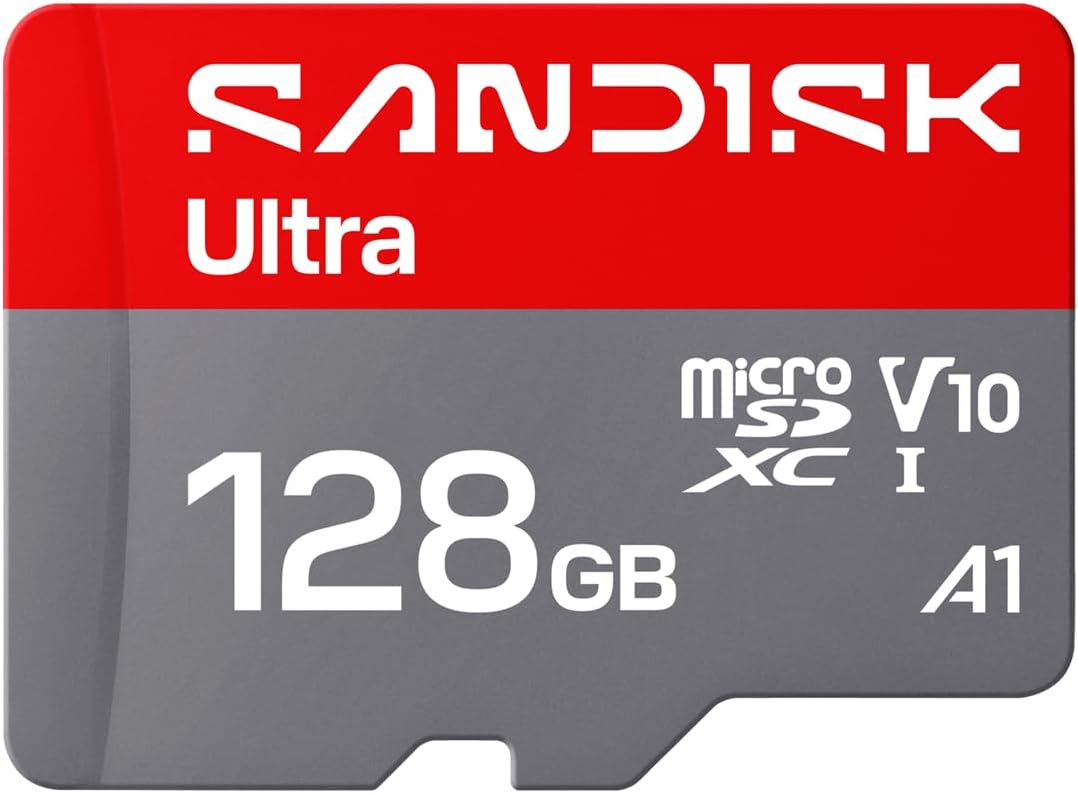
SanDisk 128GB Ultra microSD
SanDisk’s Ultra line is one of the most recognizable names in memory cards, and for good reason. Build quality and consistency across manufacturing batches tend to be more reliable than lesser-known brands, which matters more than raw speed for a dashcam that’s writing small, continuous video chunks rather than large single files.
The Ultra series wasn’t purpose-built as a “dashcam endurance” card the way some newer designations are, but real-world usage reports from dashcam communities consistently put it as a safe, dependable middle-ground choice. If you’re comparing this against something purpose-built like the 4K night-driving dashcams we’ve tested, pairing a well-known card brand with a demanding camera is generally the safer bet.
Pros
- Trusted, established brand
- Consistent read/write performance
- Good middle-ground capacity at 128GB
Cons
- Not marketed as a dedicated high-endurance card
- Premium pricing versus generic alternatives

Lexar 512GB Play Blue Micro SD Card
If your driving habits involve long commutes, road trips, or you simply hate reformatting your card every couple of weeks, capacity is the single biggest lever you can pull. The Lexar Play Blue at 512GB gives you dramatically more headroom before the loop recording cycle starts overwriting older footage, which is especially valuable if you’re running a front-and-rear dual-channel dashcam like the ones compared in our front vs dual dashcam breakdown.
More capacity doesn’t inherently mean more endurance, though. A larger card just delays the point at which old sectors get rewritten, it doesn’t necessarily make each individual write cycle safer. Still, for anyone tired of babysitting a small card, this is the pick that solves the “my footage disappeared before I could pull it” problem.
Pros
- Massive 512GB capacity
- Fewer overwrite cycles per sector over time
- Great for dual-channel and 4K dashcams
Cons
- Higher upfront cost
- Losing the card means losing far more footage at once

Gigastone 128GB Micro SD Card
Gigastone has increasingly leaned into dashcam and security-camera-specific card designs, and it shows. This is the card we’d recommend if you want something purpose-built for the constant write-erase-write cycle without paying the premium that some name-brand endurance lines charge. Owners running everything from a basic budget dashcam to a mid-range 1440p unit have reported fewer corruption errors compared to generic non-endurance cards at the same capacity.
128GB is also the sweet spot for most single-channel dashcams: enough for roughly a week or more of continuous loop footage depending on resolution, without the higher cost of jumping to 256GB or 512GB. If you’re deciding between capacities, our dashcam comparison page has a rough table mapping resolution to recommended card size.
Pros
- Designed with continuous recording in mind
- Excellent value at 128GB
- Fewer reported corruption issues in dashcam use
Cons
- Brand recognition lower than SanDisk or Lexar
- 128GB may feel limiting for 4K dual-channel rigs

Patriot LX Series Micro SD Flash Memory Card 32GB
The Patriot LX at 32GB is the entry point on this list, and it’s worth being honest about who it’s actually for: someone running an older or very basic dashcam that records at 720p or low-bitrate 1080p, where file sizes stay small and the card doesn’t fill up in a couple of hours. For that specific use case, it’s a perfectly serviceable, inexpensive option.
For anything modern shooting 1440p or 4K, 32GB fills up fast, which means the loop recording cycle is rewriting the same sectors far more frequently than it would on a higher-capacity card. That accelerates wear. If your camera falls into the higher-resolution category, models discussed in our 4K vs 1080p dashcam comparison will chew through 32GB in well under a day.
Pros
- Low cost, easy to keep as a spare
- Fine for basic, low-resolution dashcams
Cons
- Fills up quickly on modern high-resolution cameras
- More frequent overwrite cycles accelerate wear
Full Comparison Table
| Card | Capacity | Ideal Dashcam Type | Approx. Recording Window* | Value Rating |
|---|---|---|---|---|
| Amazon Basics microSDXC | up to 128GB | Single-channel 1080p | Several days | ★★★☆☆ |
| SanDisk 128GB Ultra | 128GB | Single-channel 1080p–1440p | Several days | ★★★★☆ |
| Lexar 512GB Play Blue | 512GB | Dual-channel / 4K | Multiple weeks | ★★★★☆ |
| Gigastone 128GB | 128GB | Continuous loop recording, any channel count | Several days | ★★★★★ |
| Patriot LX 32GB | 32GB | Basic 720p–1080p | Under a day to a couple days | ★★★☆☆ |
*Recording windows are rough estimates and vary significantly by resolution, bitrate, frame rate, and number of channels recording simultaneously.
Understanding Endurance Ratings
Endurance in the microSD world is typically expressed in TBW, or terabytes written — essentially how much total data can be written to the card over its lifetime before failure risk climbs. Standard consumer cards, the kind meant for cameras and phones that write occasionally and read often, are not designed around this metric at all. Dashcam-oriented cards are.
The practical difference shows up as your dashcam’s continuous loop recording rewrites the same physical memory cells over and over, sometimes thousands of times a year. A card without endurance-focused NAND and controller firmware will start showing symptoms: dropped frames, files that won’t play back, or the dashcam refusing to boot until you reformat. None of the cards on this list are marketed with an explicit endurance rating in the way some specialty brands do, which is worth knowing going in — but real-world reliability still varies meaningfully between them, as reflected in the pros and cons above.
How Much Capacity Do You Need?
Capacity needs come down to three variables: resolution, number of channels, and how often you’re willing to swap or reformat the card. A single-channel 1080p dashcam produces roughly 2-3GB per hour of footage depending on bitrate, while a 4K dual-channel setup can easily double or triple that.
- 32GB–64GB: Best for basic 720p–1080p single-channel cameras, or as a spare card you swap out regularly.
- 128GB: The sweet spot for most single-channel 1080p–1440p dashcams, giving roughly a week of loop footage.
- 256GB–512GB: Recommended for dual-channel or 4K dashcams, or for drivers who don’t want to think about their card for a month at a time.
If you’re still deciding on the camera itself, our best dash cams for car roundup lists resolution and channel count for each model, which makes it easier to reverse-engineer the card size you’ll actually need.
Speed Class Explained (Without the Jargon)
Manufacturers stamp a confusing array of symbols on microSD cards: Class 10, UHS-I, U1, U3, A1, A2. For dashcam purposes, what actually matters is sustained sequential write speed, since your camera is writing one continuous video stream rather than juggling many small random files the way a phone app does.
Class 10 and UHS-I ratings guarantee a minimum sustained write speed that’s generally sufficient for 1080p and most 1440p recording. If you’re running 4K, particularly at higher bitrates or from dual cameras simultaneously, checking your dashcam manufacturer’s minimum card speed recommendation is worth the two minutes it takes, since undersized speed classes are a common cause of dropped frames and stuttering playback.
Trusted vs. Risky Brands
Memory cards are, unfortunately, one of the most counterfeited electronics categories sold online. A card labeled “512GB” that costs a fraction of what genuine 512GB cards go for is almost never genuine, and it will typically report the correct capacity to your computer while silently failing to actually store data past a much smaller real limit. This is especially dangerous for a dashcam, because you won’t discover the problem until you actually need footage that was never really saved.
Sticking to established brands and buying from reputable listings (rather than unusually cheap third-party sellers) is the simplest way to avoid this. All five cards in this guide come from recognizable, established memory card manufacturers, which is part of why they made the list in the first place.
Care and Maintenance Tips
- Format regularly: Use your dashcam’s built-in format option every few weeks rather than deleting files manually.
- Avoid extreme heat: Cards left in a car during a heatwave degrade faster. Consider removing it during extended parking in direct sun.
- Don’t yank it mid-write: Always power down the dashcam (or wait for it to fully stop) before removing the card.
- Keep a spare: Rotating between two cards halves the wear each one accumulates over a year.
- Watch for early warning signs: Frequent “format needed” prompts or choppy playback are early indicators it’s time to replace the card, not necessarily the camera.
For a broader look at keeping your whole setup reliable, our wired vs wireless dashcam guide also touches on how power stability affects card health over time.
It’s also worth building a habit around periodically pulling a sample clip off the card and actually watching it back, rather than just trusting that recording is happening correctly in the background. A surprising number of drivers only discover a storage problem after an incident, when they go looking for footage that turns out to be corrupted, missing, or overwritten because the card had quietly stopped working correctly weeks earlier. A monthly spot-check takes less than a minute and catches this kind of silent failure long before it actually matters.
How Loop Recording Actually Wears Down a Card
To understand why dashcam memory cards fail differently from a card in your phone or point-and-shoot camera, it helps to understand exactly what loop recording is doing at a mechanical level. Most dashcams split footage into short clips, typically one to three minutes each, and store them in a dedicated folder. Once the card fills up, the oldest clip is deleted and the newly freed space is immediately reused for the next clip. This repeats endlessly, for as long as the camera has power.
Flash memory, the technology behind every microSD card, has a finite number of write-erase cycles per memory cell before that cell becomes unreliable. A phone camera might write to a given physical location on the card a handful of times over its life. A dashcam running loop recording writes to the same physical locations dozens or hundreds of times per week, simply because the total card capacity divided by hourly footage size determines how quickly the loop rotates back around to the beginning.
This is precisely why a 32GB card in a 4K dashcam wears out so much faster than the same 32GB card in a 1080p dashcam. The higher bitrate footage fills the card faster, which means the loop completes more often, which means the same memory cells are cycled through more frequently. It’s also why doubling your capacity doesn’t just buy you more storage, it directly extends the mechanical lifespan of the card by slowing down how often each cell gets rewritten.
Manufacturers that specifically target dashcam and security camera use, something you’ll notice reflected in how Gigastone markets its dashcam-focused lines, design their controllers to better manage this wear pattern through techniques like wear leveling, where the firmware deliberately spreads writes across the entire chip rather than always using the same physical blocks first. Standard consumer cards may implement basic wear leveling too, but it’s rarely tuned for the specific write pattern that loop recording produces.
Doing the Math: Resolution, Bitrate, and How Fast Your Card Fills Up
It’s worth actually running the numbers rather than relying on vague guidance like “get a big card.” Video file size is driven primarily by bitrate, which is itself driven by resolution and frame rate. A 1080p dashcam recording at 30 frames per second with a typical bitrate around 8-10 Mbps will produce roughly 3.6 to 4.5 gigabytes per hour of driving. Step up to 1440p and that climbs to somewhere in the 6 to 8 gigabyte per hour range. True 4K recording at 30fps, particularly with a front and rear channel both active, can easily exceed 15 gigabytes per hour combined.
| Resolution | Approx. GB per Hour | 32GB Card Loop Time | 128GB Card Loop Time | 512GB Card Loop Time |
|---|---|---|---|---|
| 1080p single-channel | ~4GB | ~8 hours | ~32 hours | ~128 hours |
| 1440p single-channel | ~7GB | ~4.5 hours | ~18 hours | ~73 hours |
| 4K dual-channel | ~15GB | ~2 hours | ~8.5 hours | ~34 hours |
These figures are approximations, since actual bitrate varies by dashcam model, scene complexity, and whether parking mode or motion-triggered recording is enabled, but the pattern holds regardless of the exact numbers: higher resolution dramatically shrinks your effective recording window on any given card size, and that in turn accelerates wear. If you commute an hour each way and want roughly a week of buffer before old footage starts getting overwritten, a 4K dual-channel setup essentially requires stepping up to 256GB or 512GB, while a 1080p single-channel setup can comfortably get by on 128GB or even 64GB.
Parking Mode and Why It Changes the Equation
Many modern dashcams include a parking mode that continues monitoring the vehicle while it’s turned off, either through continuous low-frame-rate recording, motion detection, or impact detection that triggers a short clip. This is a fantastic feature for catching hit-and-runs and vandalism, but it also means your card is being written to even when you’re not driving, which most people don’t factor into their capacity planning.
If you regularly park in areas where parking mode is likely to trigger often, such as a busy street with pedestrian and vehicle traffic passing by constantly, you’ll burn through capacity noticeably faster than the driving-only estimates above suggest. This is another point in favor of choosing a higher-capacity card if parking mode is something you rely on, and it’s worth checking how your specific dashcam handles parking mode power draw and storage, a topic covered in more depth in our dashcam buying guide.
Troubleshooting Common Card Corruption Symptoms
Even a good card can eventually show signs of trouble, and knowing what those signs mean helps you decide whether to reformat, replace, or dig deeper into a camera setting instead.
Files that won’t play or show as 0 bytes
This is typically a sign that the file was in the process of being written when power was cut, either from a sudden ignition-off event or a loose power connection. It can also indicate a card nearing end of life. If it happens rarely and only after abrupt power loss, it’s likely not the card’s fault. If it happens regularly during normal operation, the card is the more likely culprit.
Frequent “please format this card” prompts
Usually points to file system corruption from the constant overwrite cycle. A full format (not a quick format) through the dashcam’s own menu often resolves this, at least temporarily. Recurring prompts shortly after formatting suggest the card itself is failing.
Choppy or stuttering playback
Often a speed class mismatch, where the card’s sustained write speed can’t keep up with the bitrate the camera is trying to record at. This is more common with 4K dashcams paired with cards that only meet minimum Class 10 specifications.
Camera won’t boot with the card inserted
This is one of the more serious symptoms and frequently means the card has failed outright. Try the card in a computer’s card reader; if it isn’t recognized at all, or shows a drastically smaller capacity than labeled, it’s time to replace it.
Common Myths About Dashcam Memory Cards
- “Any Class 10 card will work fine.” Class 10 guarantees a minimum sustained write speed, but says nothing about how well a card handles the specific overwrite-heavy pattern of loop recording over months and years.
- “Bigger is always better.” Bigger capacity extends the time between overwrite cycles, which helps, but it doesn’t replace the need for a reasonably well-built card. A cheap 512GB card can still fail faster than a smaller but better-built one.
- “SD cards last forever if you don’t fill them up.” Loop recording fills the card by design, continuously, which is exactly the scenario that wears flash memory down fastest.
- “If the capacity shows correctly on my computer, the card is genuine.” Counterfeit cards can be programmed to report a false capacity to the operating system while actually only storing a fraction of that data, silently overwriting anything beyond the real limit.
A Quick Pre-Purchase Checklist
Before buying any card for a dashcam, it helps to run through a short mental checklist rather than just grabbing whatever’s cheapest or has the biggest number on the label.
- Check your dashcam manufacturer’s maximum supported capacity — some older models cap out well below 512GB.
- Match speed class to your resolution; 4K generally wants at least a solid UHS-I / U3 rating.
- Buy from a reputable seller to avoid counterfeit cards, especially for larger capacities like 256GB and 512GB.
- Decide whether you’d rather rotate two smaller cards or run one large card, based on how you use parking mode and how often you review footage.
- Set a reminder to reformat the card every few weeks directly through the dashcam menu.
Comparing a couple of camera and card combinations side by side can also help clarify what you actually need; our Viofo A129 vs Thinkware U1000 comparison and Thinkware U1000 review both include notes on recommended card specs for those specific units.
Seasonal and Climate Considerations
Cards don’t just wear from write cycles, they’re also affected by the environment they sit in. A car parked outdoors in summer heat can see interior temperatures climb well past what most microSD cards are officially rated to tolerate for sustained periods, and repeated heat cycling can accelerate degradation of the flash memory over time. Cold climates present a different but related issue: extreme cold can affect a card’s write reliability temporarily, though this is less of a long-term durability concern than sustained heat exposure.
If you live somewhere with harsh summers, it’s worth being a little more conservative about card selection and replacement schedule than the general guidance above, and considering whether your dashcam itself has a cutoff temperature that halts recording automatically, a feature some models in our 4K night-driving dashcam lineup include.
Power Stability and Its Effect on Card Health
A surprising number of card corruption issues actually trace back to power delivery rather than the card itself. If your dashcam loses power abruptly, whether from a loose 12V adapter, a failing hardwire kit, or a car battery that’s on its way out, the card can end up with a file mid-write at the exact moment power cuts, leaving a corrupted or zero-byte file behind. Do this often enough and the constant improper shutdowns can contribute to broader file system corruption beyond just the single affected clip.
A stable, properly installed hardwire kit reduces this risk substantially compared to a cigarette lighter adapter that can be nudged loose by a stray knee or shifting cargo. If you haven’t looked into the difference, our wired vs wireless dashcam comparison goes into how power setup affects both card longevity and parking mode reliability.
Capacity vs. Endurance: Which Should You Prioritize?
Given a fixed budget, buyers often have to choose between a larger card and a card that’s better built for continuous overwriting, since the two priorities don’t always line up on the same product. As a general rule of thumb, prioritize a well-reviewed, purpose-considered card first, and treat capacity as the second lever. A smaller but sturdier card that lasts three years is a better outcome than a huge card that starts throwing errors after eight months, if you genuinely have to pick one over the other on a tight budget.
That said, most drivers don’t actually have to choose, since options like the Gigastone 128GB in this guide land close to the middle of both priorities without commanding the premium that some specialty endurance-branded cards charge. If your budget stretches further, pairing high capacity with a reputable brand, as with the Lexar 512GB option here, removes the tradeoff almost entirely.
Frequently Asked Questions
Can I use a regular microSD card in my dashcam?
Yes, but it’s not ideal. A regular card will usually work for a while, but the constant overwrite cycle of loop recording wears it out faster than it would in a phone or camera used for occasional shooting.
How often should I replace my dashcam’s SD card?
Most drivers get anywhere from one to three years out of a quality card, depending on how heavily it’s used and how well it’s maintained. Frequent errors are a sign it’s time sooner rather than later.
What capacity SD card do I actually need for a dashcam?
128GB is a solid default for most single-channel setups. Dual-channel or 4K cameras benefit from 256GB or more.
Does a bigger SD card mean better performance?
Not necessarily. Capacity affects how long footage is retained before being overwritten, but write speed and build quality affect actual recording reliability.
Why does my dashcam keep saying “format card”?
This usually means the card’s file system has become corrupted from repeated overwrite cycles, or the card is nearing the end of its usable life.
Is UHS-I fast enough for 4K dashcam recording?
For most consumer 4K dashcams, yes, though it’s worth checking your specific camera’s minimum recommended speed class.
Should I buy two smaller cards or one large card?
Rotating two smaller cards can spread out wear and gives you a backup if one fails, while one large card means less frequent swapping and a longer loop-recording buffer.
Can a counterfeit SD card damage my dashcam?
It’s unlikely to damage the hardware, but it can silently fail to save footage, which defeats the entire purpose of having a dashcam.
Do I need to format a new SD card before using it?
Yes. Always format a brand-new card in the dashcam itself before first use to ensure the correct file system.
What happens when the SD card gets full?
In loop recording mode, the dashcam automatically overwrites the oldest footage first, so you never run out of space during normal use.
Can I use the same SD card for a front and rear dashcam?
Some dual-channel dashcams use a single card for both streams, while others require a card in each unit. Check your specific model’s setup, and compare options like those in our Viofo A129 Pro Duo review.
Does temperature affect SD card lifespan in a car?
Yes. Prolonged exposure to extreme heat or cold can accelerate wear and increase the risk of data corruption over time.
How We Evaluated These Cards
Rather than relying purely on manufacturer marketing copy, this guide weighs each card against the specific demands of dashcam use: sustained write performance under a continuous loop-recording pattern, real-world reliability as reported by drivers using them day to day, capacity relative to price, and how well each option lines up with common dashcam resolution tiers from basic 720p units up through 4K dual-channel systems. Brand reputation and manufacturing consistency were also factored in heavily, since counterfeit and inconsistent-quality cards are a genuine risk category in this specific product space, more so than in most other consumer electronics accessories.
We also considered how each card fits into different ownership situations. A driver who reviews footage weekly and reformats regularly has different needs than someone who installs a dashcam and largely forgets about it until an incident happens. Both use cases are valid, and the five cards above were selected specifically because, between them, they cover a reasonable spread of budgets, capacities, and reliability expectations rather than all clustering around one narrow price point.
Who Should Read This Guide
This guide is aimed at three overlapping groups of drivers. First, anyone setting up a dashcam for the first time and unsure whether the bundled card, if one came with the camera at all, is actually good enough for long-term use. Bundled cards are frequently the weakest link in an otherwise solid dashcam package, since manufacturers often include a baseline capacity card to keep the overall product price down rather than optimizing for longevity.
Second, existing dashcam owners who’ve started noticing corruption errors, missing footage, or a camera that seems to be malfunctioning, when the actual root cause is frequently the card rather than the camera hardware itself. Swapping to one of the more dependable options above is often a cheaper and more effective fix than replacing the entire dashcam.
Third, drivers upgrading to a higher-resolution or dual-channel dashcam who haven’t yet realized that their existing card, which worked fine on their old 1080p single-channel unit, may be undersized or too slow for the new camera’s demands. If you’re in the process of upgrading hardware, it’s worth reading a card guide like this one alongside a camera-focused resource such as our best dash cams for car roundup, since the two purchases genuinely need to be considered together.
Quick Glossary of Terms
| Term | What It Means |
|---|---|
| microSDXC | A microSD card format supporting capacities above 32GB and up to 2TB. |
| UHS-I | Ultra High Speed bus interface generation that determines maximum theoretical transfer speed. |
| Class 10 | Guarantees a minimum sustained write speed of 10MB/s, generally sufficient for 1080p recording. |
| TBW (Terabytes Written) | A measure of total data that can be written to a card over its lifetime before failure risk increases significantly. |
| Loop recording | The recording mode where a dashcam automatically deletes the oldest clips to make room for new footage once storage fills up. |
| Wear leveling | A firmware technique that spreads write operations evenly across a card’s memory cells to extend overall lifespan. |
| Parking mode | A dashcam feature that continues recording or monitoring while the vehicle is parked and powered off. |
When to Consider Something Beyond a Standard microSD Card
For the overwhelming majority of dashcam setups, a good microSD card remains the right tool for the job, but it’s worth knowing when that stops being true. High-end professional or fleet dashcam systems sometimes support onboard SSD storage or cloud-upload configurations specifically because they’ve outgrown what a microSD card can reliably sustain at scale, particularly across multiple always-recording channels or extended parking mode use across an entire vehicle fleet.
For personal, single-vehicle use, this level of infrastructure is almost always overkill, and a well-chosen microSD card from the options above will comfortably meet the demands of daily driving, commuting, and even fairly aggressive parking mode use. It’s really only fleet operators, rideshare drivers running multiple simultaneous high-resolution feeds for extended periods, or users with unusually specific redundancy requirements who need to look past standard microSD storage entirely.
A Closer Look at Brand Reliability Patterns
It’s worth spending a little more time on why brand matters so much in this specific category, beyond just avoiding outright counterfeits. Established manufacturers like SanDisk and Lexar have decades of NAND flash manufacturing experience and tend to maintain more consistent quality control across production batches, which matters because two cards with identical spec sheets can have meaningfully different real-world lifespans depending on which factory run they came from and which grade of flash memory was used internally.
Newer or less established brands entering the dashcam-specific card space, including options like Gigastone, have generally had to compete on either price or specialization to gain a foothold, which is part of why some of them lean specifically into continuous-recording use cases as a differentiator rather than trying to compete head-on with the biggest names across every category. This can work out well for buyers, since it means the product design is at least conceptually aligned with dashcam demands, but it also means the track record is shorter and slightly less proven at scale compared to a brand that’s been shipping memory cards for well over a decade.
Amazon’s own basics line occupies a slightly different position, functioning more as a value-oriented generalist option rather than something engineered around any particular workload. That’s not a knock against it, plenty of buyers genuinely just need an inexpensive card that works, but it does mean it’s a reasonable starting point rather than an ending point for anyone whose dashcam use grows more demanding over time, whether that’s from adding a rear camera, upgrading resolution, or simply driving more.
Matching a Card to Real-World Driving Scenarios
The daily commuter
Someone driving thirty to sixty minutes each way, five days a week, on a single-channel 1080p dashcam is well served by a 128GB card from either the SanDisk or Gigastone options above. This comfortably covers a week or more of footage before old clips begin cycling out, giving ample time to pull footage after any incident.
The road-tripper
Infrequent but long-duration drives benefit disproportionately from higher capacity, since you may not have convenient access to offload footage mid-trip. The Lexar 512GB card is the strongest fit here, essentially removing storage anxiety for the length of most trips.
The rideshare or delivery driver
Extended daily hours behind the wheel combined with frequent parking mode triggers in high-traffic pickup areas make this one of the more demanding use cases on this list. A higher-capacity, reliability-focused card, ideally 256GB or above, paired with a habit of reformatting weekly, is the safest approach.
The occasional or backup driver
If the vehicle sits unused for days at a time between drives, a smaller and less expensive card like the Patriot LX 32GB or Amazon Basics option can be perfectly adequate, since the total write volume over any given month stays relatively low.
Popular Dashcams and Which Card Makes Sense for Each
Different dashcam models have different sweet spots when it comes to storage, largely driven by resolution, channel count, and whether parking mode is a heavily used feature. Here’s a quick rundown of how the cards in this guide map onto some widely used dashcams.
Garmin Dash Cam Mini 2
A compact, single-channel unit that doesn’t demand extreme write speeds. Our Garmin Dash Cam Mini 2 review covers its modest footprint, and a 128GB SanDisk or Amazon Basics card is more than sufficient here.
Garmin Dash Cam 67W
A wider field-of-view, higher-resolution step up from the Mini 2. As detailed in our Garmin Dash Cam 67W review, this model benefits from a 128GB or 256GB card with solid sustained write performance, making the Gigastone or SanDisk options strong fits.
Nextbase 622GW
A premium 4K-capable dashcam that also supports image stabilization and What3Words emergency location integration. Given the higher bitrate footage discussed in our Nextbase 622GW review, pairing it with the Lexar 512GB card helps avoid the frequent overwrite cycles that smaller cards would experience.
BlackVue DR900X 2CH
A dual-channel 4K front-and-rear system, reviewed in depth in our BlackVue DR900X 2CH review, that produces substantial data volume from two simultaneous 4K streams. This is a clear case for prioritizing the highest capacity option on this list, or at minimum the 128GB Gigastone card reformatted frequently.
Rexing V1
A budget-friendly, widely recommended single-channel option covered in our Rexing V1 dashcam review. Its moderate bitrate pairs well with the Patriot LX 32GB for light use, or the SanDisk 128GB for drivers wanting a bigger buffer.
70mai Dash Cam 4K
An affordable entry into 4K recording, discussed in our 70mai Dash Cam 4K review. Given the jump in file size that comes with true 4K capture, a 128GB or larger card built for continuous recording, such as the Gigastone, is the more sensible pairing than a smaller budget card.
Vantrue N4 Pro
A three-channel dashcam capturing front, interior, and rear simultaneously, reviewed in our Vantrue N4 Pro review. Three simultaneous recording streams push storage demands higher than almost anything else in this guide, making the 512GB Lexar card the clear recommendation for anyone running this level of setup without wanting to reformat constantly.
Common Mistakes to Avoid When Buying a Dashcam SD Card
A few recurring mistakes show up again and again among dashcam owners dealing with storage problems, and most are easy to avoid once you know what to look for.
- Buying based on capacity alone. A cheap, unbranded 256GB card is not automatically a better purchase than a well-reviewed 128GB card from an established manufacturer, especially once real-world reliability is factored in.
- Ignoring the dashcam manufacturer’s supported capacity limit. Some older dashcam models cap out at 128GB or even 32GB, and inserting a larger unsupported card can cause the camera to fail to recognize it at all.
- Never reformatting the card. Manually deleting files instead of using the in-camera format option allows file system fragmentation to build up over time, which is a common precursor to corruption errors.
- Buying suspiciously cheap large-capacity cards from unfamiliar third-party sellers. This is the single most common way buyers end up with counterfeit cards that silently fail to store data beyond a fraction of their labeled capacity.
- Assuming the bundled card that came with the dashcam is sufficient long-term. Bundled cards are frequently a baseline, budget-oriented inclusion rather than the manufacturer’s actual recommended long-term storage solution.
Final Verdict
If you just want a dependable, no-fuss card for a single-channel dashcam, the SanDisk 128GB Ultra is the safest bet thanks to its brand consistency. If you’re running heavier 4K or dual-channel setups and don’t want to think about storage for weeks at a time, the Lexar 512GB Play Blue gives you the most breathing room. And if continuous, uninterrupted loop recording is your top priority without paying a premium, the Gigastone 128GB earns our overall Editor’s Choice for this list.
Whichever card you land on, remember that the camera and the card are a system, not two separate purchases. Pairing a great dashcam with the wrong storage is one of the most common — and most avoidable — reasons drivers end up with gaps in their footage exactly when it mattered most.