
Viofo A129 vs Thinkware U1000: Which Dash Cam Is Actually Worth Your Money?
Two of the most recommended cameras in the dash cam market, one budget-conscious pick and one premium contender — tested, compared, and dissected so you don’t have to guess.
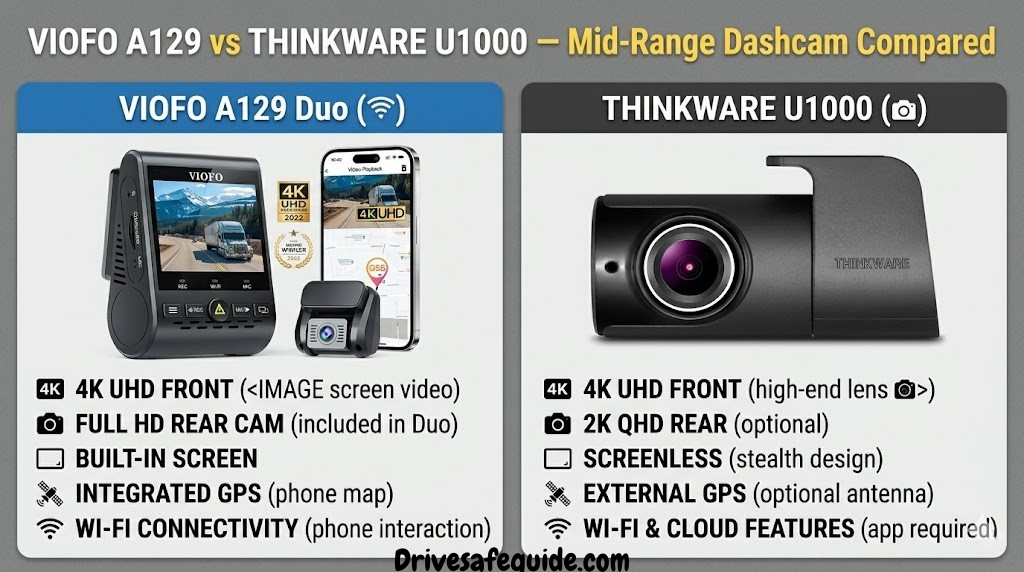
Quick Overview: What You’re Choosing Between
The dash cam market has matured significantly. Where early cameras were little more than loop-recording accident witnesses, today’s top-tier units serve as sophisticated safety ecosystems — logging GPS speed data, alerting you to lane departures, monitoring your parked vehicle, and sending clips directly to your phone. Two cameras that consistently appear at the top of informed buyers’ shortlists are the Viofo A129 and the Thinkware U1000. They’re both well-engineered, both carry credible reputations, and both are available as dual-channel front-and-rear systems. Yet they are fundamentally different products aimed at different buyers.
The Viofo A129 family — including the A129, A129 Plus, A129 Pro, and their Duo (dual-channel) variants — represents one of the best-known names in the “enthusiast value” tier. Viofo has spent years iterating on a core design that delivers Sony STARVIS sensor quality in an accessible, well-supported package. The A129 is the camera many drivers recommend when someone asks “what’s the best dash cam under $150?”
The Thinkware U1000, by contrast, sits at the premium end of the spectrum. It uses 4K resolution on the front lens and is built around a more comprehensive safety and connectivity ecosystem. Thinkware targets drivers who want more than footage — they want forward collision warnings, safety camera alerts, cloud backup, live mobile streaming, and polished hardware that integrates cleanly into a professional installation.
Both cameras have earned their reputations. What this comparison will determine is which one is the right fit for you — because that answer depends on your budget, your technical comfort, your parking situation, and how you plan to use the footage.
Viofo A129 Series
- 1080p / 1440p / 4K (by variant)
- Sony STARVIS sensor
- Built-in Wi-Fi; GPS optional
- Buffered parking mode
- ~$80–$200 depending on variant
- Strong community support
Thinkware U1000
- 4K UHD front, 2K rear
- Sony STARVIS 2 sensor
- Built-in Wi-Fi + GPS
- Advanced parking mode options
- ~$300–$400 with rear camera
- ADAS + cloud ecosystem
Both cameras are frequently listed together on buying guides, yet their price gap is large enough to fund a weekend road trip. Before you click “Add to Cart” on either, it’s worth understanding exactly where each dollar of the premium goes — and whether you’ll actually use what you’re paying for. If you’re building out a comprehensive car safety kit, the right dash cam is a cornerstone purchase you don’t want to get wrong.
Full Specifications Comparison Table
Before we go deep on individual performance categories, here is the full technical breakdown of both cameras. This table compares the Viofo A129 Pro (the top-tier A129 model with Sony STARVIS sensor) against the Thinkware U1000 with the optional rear camera — the configurations most buyers are actually choosing between when they spend time in this price bracket.
| Specification | Viofo A129 Pro Duo | Thinkware U1000 |
|---|---|---|
| Front Resolution | 2160p 4K UHD | 2160p 4K UHD |
| Rear Resolution | 1080p Full HD | 1440p QHD |
| Frame Rate | 30fps (4K); 60fps (1080p) | 30fps (4K); 30fps (2K rear) |
| Front Sensor | Sony IMX335 (STARVIS) | Sony IMX663 (STARVIS 2) |
| Front FOV | 140° | 150° |
| Rear FOV | 140° | 140° |
| GPS | Built-in (Pro); Accessory (base) | Built-in |
| Wi-Fi | 2.4 GHz built-in | 2.4 GHz built-in |
| Screen | 1.5″ LCD | None (app-only viewing) |
| Parking Mode | Buffered, time-lapse, motion | Buffered, energy saving, motion, time-lapse |
| Battery / Capacitor | Supercapacitor | Supercapacitor |
| Max microSD | 256 GB | 256 GB |
| ADAS Features | None | FCWS, LDWS, Safety Camera Alerts |
| Cloud / Live View | No | Yes (Thinkware Connected, paid) |
| Operating Temp | -20°C to 70°C | -20°C to 70°C |
| Approx. Price (dual) | $150–$200 | $300–$400 |
| Warranty | 1 year | 1 year |
On paper the two cameras appear close. Both hit 4K on the front, both use supercapacitors instead of lithium batteries (which matters enormously for longevity in a hot car), and both support up to 256 GB storage. The meaningful divergence lies in the rear camera resolution (1080p vs 1440p), the sensor generation (STARVIS vs STARVIS 2), the presence or absence of ADAS features, and the price tag.
Video Quality & Resolution: Can You Really Tell the Difference?
Both the Viofo A129 Pro and the Thinkware U1000 record at 4K UHD (3840 × 2160) on their front channels. In broad daylight, the footage from either camera is genuinely impressive — licence plates are legible at distance, road markings are sharp, and you can make out faces in adjacent vehicles. If your primary concern is daytime footage quality, either camera will satisfy.
Where distinctions emerge is in dynamic range, colour accuracy, and how each camera handles high-contrast scenes — for instance, driving toward a bright sky while the road ahead sits in shadow. The Thinkware U1000 uses the newer Sony IMX663 sensor paired with a Thinkware-developed ISP, and the combination handles these challenging exposures slightly more gracefully. Highlights are less likely to clip to pure white, and shadow detail retains more information.
The Viofo A129 Pro uses the Sony IMX335, which is a generation older but still well-regarded. Viofo has spent considerable firmware effort optimising how the camera processes footage from this sensor. The result is footage that ranks among the best in its price class and will hold up in any insurance or legal scenario.
Viofo A129 Pro — Video
Sony IMX335 delivers solid 4K with accurate colour in good light. Footage looks sharp on a monitor, with readable plates at typical highway distances. Dynamic range is competitive but shows some highlight clipping in extreme backlit scenes. The small 1.5″ LCD screen allows quick playback checks without needing a phone.
Thinkware U1000 — Video
Sony IMX663 (STARVIS 2) with a wider 150° FOV captures slightly more scene width. The newer sensor generation handles high-contrast lighting more gracefully. The lack of a built-in screen means you rely on the app or PC viewer to review footage — a minor but real workflow difference for non-tech-savvy users.
A notable aspect of the 4K versus 1080p debate applies here even though both cameras offer 4K — the rear channel resolution difference (1080p on the A129 vs 1440p on the U1000) matters more than it sounds. Rear footage is critical in rear-end collision claims, and the extra resolution on the Thinkware’s rear channel gives you meaningfully more detail on approaching vehicles’ plates.
For the highest-quality night video from either camera, always pair your dash cam with a high-endurance microSD card and format the card in-camera once a month. Degraded cards are a leading cause of corrupted footage — right when you need it most.
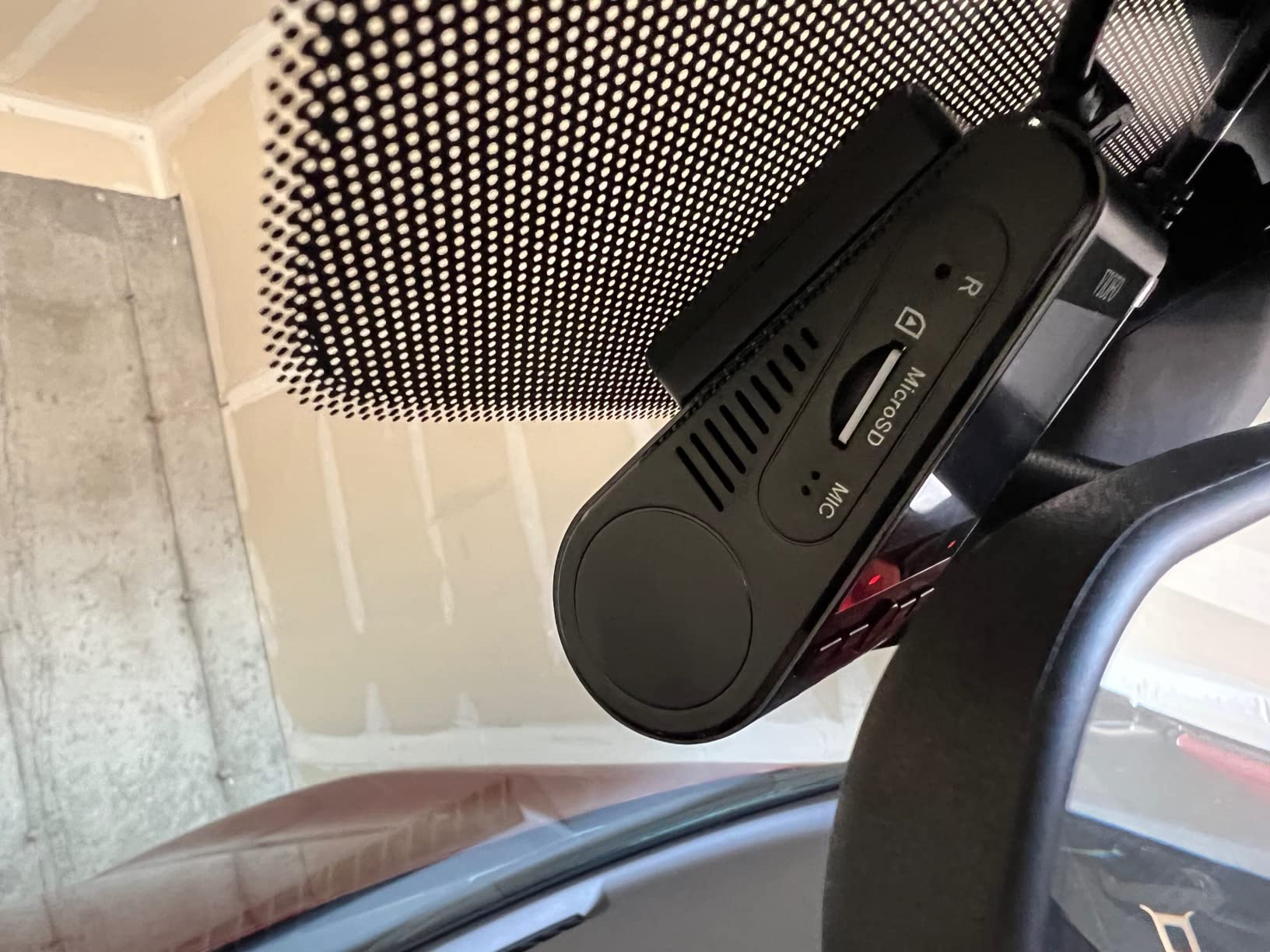
Viofo A129 Pro Duo
4K front + 1080p rear, Sony STARVIS sensor, buffered parking mode, built-in GPS. The enthusiast’s value pick.
View on Amazon →Night Vision Performance: When the Sun Goes Down
Night driving is where dash cam quality truly matters. Most incidents that benefit from footage review — hit-and-runs, road rage altercations, parking lot dings — happen in reduced-light conditions. If your camera can’t capture a licence plate at night, it’s dramatically less useful as evidence. Both cameras carry Sony sensors, both brand-market their low-light performance — so which actually delivers?
The Thinkware U1000’s Sony IMX663 STARVIS 2 sensor represents a meaningful generational leap over STARVIS 1. STARVIS 2 implements back-illuminated structure on a larger photodiode, which translates to better light gathering at the pixel level. In practical terms: at 11 PM on a wet, poorly lit city street, the U1000’s footage retains more colour information and less noise. Plate text on approaching vehicles is legible at slightly greater distances than the A129 Pro, and ambient scene colour — distinguishing red versus grey vehicles, for instance — is more reliable.
The Viofo A129 Pro is not a night-vision failure by any means. Its IMX335 sensor has earned consistent praise across review platforms, and for most users its low-light performance is more than adequate for insurance and legal purposes. The gap to the U1000 is real but not dramatic under typical night driving conditions — city streets with streetlights, for example. The difference becomes more pronounced on unlit rural roads or in underground car parks where ambient light falls very low.
For drivers who regularly commute on poorly lit roads at night, the Thinkware’s sensor advantage is a meaningful argument for the higher price. For urban commuters who rarely leave well-lit environments, the Viofo’s night performance is entirely sufficient.
Parking Mode: Protecting Your Vehicle Around the Clock
Parking mode transforms a dash cam from a driving recorder into a continuous security system. Both the Viofo A129 Pro and the Thinkware U1000 support parking surveillance, but they implement it with different sophistication levels and power management strategies.
To enable parking mode on either camera, you will need to hardwire it to a constant 12 V source — either via the OBD-II port with an appropriate cable or by tapping into the fuse box. The included cigarette socket adapters do not power the camera when the ignition is off. If you’re not comfortable with automotive wiring, this is worth factoring into the total cost of ownership (professional installation typically runs $50–$100 for a clean hardwire job).
Viofo A129 Parking Mode: The A129 Pro supports three modes — motion detection (camera starts recording when movement is detected), time-lapse (constant low-frame-rate recording of the parking area), and buffered mode (pre-event buffer captures what happened in the seconds leading up to a collision). The buffered mode is particularly valuable in hit-and-run scenarios where the impact is the only triggering event and there’s no visible motion beforehand.
Thinkware U1000 Parking Mode: The U1000 offers the same three fundamental modes plus an “Energy Saving” mode, which is a sophisticated power management feature. In Energy Saving mode, the camera enters a low-power standby state and only activates fully when the radar sensor detects a nearby heat signature or the G-sensor detects impact. This dramatically extends how long the camera can survive on the vehicle’s battery without draining it — an important consideration for those who leave their car parked for multiple days.
Viofo A129 — Parking
Solid buffered and motion-detect parking. Requires a hardwire kit (sold separately). No built-in power management to protect vehicle battery — recommended to use with a voltage-cut hardwire kit that cuts power at 12.2 V to avoid draining the battery. Works well for daily-use vehicles.
Thinkware U1000 — Parking
Energy-saving mode extends parking surveillance significantly. Built-in radar for motion detection reduces false triggers from environmental movement like shadows or rustling trees. Better suited for vehicles parked for extended periods, such as in airport long-stay car parks.
For drivers who park in high-risk urban environments or travel frequently and leave their vehicle at long-stay lots, the Thinkware U1000’s energy-saving parking mode is a tangible advantage. If you drive daily and park in a relatively secure location, the Viofo’s parking modes will more than suffice.
Any dash cam running in parking mode can drain your car battery if the vehicle sits unused long enough. Always use a hardwire kit with a battery voltage cutoff. Most quality kits cut the dash cam power when the battery drops below 11.8–12.2 V to ensure you can still start the engine. Check our full guide to car batteries if you’re concerned about your battery’s health before adding a constant-draw device.

Thinkware U1000 (with Rear Camera)
4K front, 2K rear, ADAS features, GPS, energy-saving parking mode, and Thinkware Connected cloud access. The premium choice for serious buyers.
View on Amazon →GPS Tracking and ADAS Safety Features
The jump from dash cam to safety co-pilot is where the Thinkware U1000 most clearly differentiates itself. ADAS — Advanced Driver Assistance Systems — is a suite of software-driven safety alerts derived from the camera’s view of the road ahead. Thinkware has integrated several ADAS functions that operate in real time while you drive.
Forward Collision Warning (FCWS)
Alerts you audibly when the gap between your vehicle and the one ahead closes too rapidly at speed. Derived from object detection in the live video stream.
Lane Departure Warning (LDWS)
Monitors lane markings and alerts if your vehicle drifts without an active turn signal. Useful on monotonous highway stretches where fatigue is a factor.
Speed Camera Alerts
The U1000 uses its built-in GPS against a database of known speed camera locations. You receive an audible warning as you approach, helping avoid unintentional violations.
Front Vehicle Departure Alert
At traffic lights, the camera alerts you if the vehicle ahead has moved but you haven’t — a gentle nudge to prevent you from holding up traffic while distracted.
The Viofo A129 Pro has no ADAS features. It records GPS coordinates, speed, and heading data onto footage — which is valuable for insurance and legal purposes — but it does not perform real-time analysis of the road. If you want audible lane departure warnings or forward collision alerts, you need the Thinkware or a different camera entirely.
It is worth noting that ADAS features on dash cams are less sophisticated than those built into modern vehicles’ sensor arrays. They rely purely on the single front camera’s video analysis, and their accuracy is affected by weather, lighting, and road conditions. They are useful alerting tools but should not be treated as a substitute for active defensive driving habits.
For GPS specifically, both cameras record the data stamped onto footage — but the Thinkware’s GPS is fully built in and immediately functional, while the base Viofo A129 requires purchasing a separate GPS module. The A129 Pro includes GPS by default, which eliminates this extra step.
If you’re a frequent highway driver who wants real-time safety coaching, or if you regularly experience highway drowsy driving situations, the LDWS on the Thinkware U1000 provides genuine value. It won’t replace a good night’s sleep, but an audible lane drift alert at 70 mph is a meaningful safety net.
Installation, Build Quality, and Physical Design
Both cameras mount to the windshield via adhesive or suction. Adhesive mounts are the default choice for both — they’re slimmer, vibrate less, and look cleaner on a finished installation. Suction mounts allow easier repositioning but can lose grip in temperature extremes. For a permanent setup, adhesive is strongly preferred.
The Viofo A129 Pro features a compact rectangular body with a 1.5-inch colour LCD screen on the rear — a feature not found on the Thinkware. For many users, this small screen is genuinely useful: you can glance at recording status, check that the card is present, or do a quick playback check without reaching for your phone. The cable management can take some patience; Viofo includes a 3.5 M long cable for the rear camera, though tucking it neatly behind headliner and along the door sills rewards anyone willing to spend 45 minutes on a clean install.
The Thinkware U1000 has a more premium physical aesthetic with a slimmer profile and no screen — it’s designed to be installed and forgotten. Footage review happens on your phone via the app or on a computer using the free Thinkware PC Viewer software. The mount system is arguably more refined, and the cable management design is well thought out for a clean windshield line. The rear camera cable on the U1000 also runs 6 M, giving more routing flexibility in larger vehicles.
Build quality on both units is solid. Both use supercapacitors instead of lithium-ion batteries — a critical detail for longevity in a car that heats to extreme temperatures in summer. Lithium batteries degrade and swell at temperatures routinely reached inside a parked car. Supercapacitor-based cameras may cost a little more up front but don’t have a battery that can fail catastrophically over time. Our full guide on top 4K dash cams discusses why supercapacitors are now the industry standard recommendation for high-temperature climates.
One practical consideration: the Viofo A129’s small LCD screen makes initial setup easier — you can verify the camera is recording and the GPS has locked on without touching your phone. The Thinkware requires you to open the app for any setup verification, which requires the camera and phone to be paired via Wi-Fi first. This isn’t a major obstacle, but it’s a minor friction point during first-time install.
Whether you’re installing the Viofo or the Thinkware, take an hour to route cables cleanly through headliner trim and door sills. A tidy install looks professional, reduces cable visibility (which can distract), and prevents cable wear from constant vibration. A plastic trim removal tool (under $5) makes the job dramatically easier. See our full camera installation guide for step-by-step trim routing tips.
✔ Viofo A129 — Build Pros
- Built-in LCD screen for standalone operation
- Compact form factor
- Supercapacitor (no battery degradation)
- Excellent mounting adhesive quality
- Simple, intuitive button layout
✘ Viofo A129 — Build Cons
- Shorter rear camera cable (3.5M)
- Busier aesthetic than competitors
- GPS sold separately on base model
- CPL filter (glare reduction) is an extra purchase
✔ Thinkware U1000 — Build Pros
- Sleek minimal design, very discrete
- Longer rear cable (6M, fits large vehicles)
- GPS and radar built in standard
- Premium mount mechanism
- Supercapacitor (no battery degradation)
✘ Thinkware U1000 — Build Cons
- No built-in screen (app required for playback)
- Cloud features need a paid subscription
- Significantly higher price
- Setup is app-dependent
App Experience, Wi-Fi Connectivity, and Cloud Features
A dash cam is only as useful as your ability to access its footage. Both cameras connect to your smartphone via built-in Wi-Fi, creating a direct local network between the camera and your phone. Neither camera connects to your home Wi-Fi network — the phone connects to the camera’s Wi-Fi hotspot, which is a separate connection. This means you’ll temporarily lose cellular data when connected to either camera’s Wi-Fi unless your phone supports simultaneous Wi-Fi and mobile data connections.
VIOFO App: Viofo’s companion app is functional and covers the essential tasks: live preview, footage download, settings adjustment. The interface is clean but not the most polished in the industry. File transfers over Wi-Fi can be slow for large 4K files — expect a few minutes per clip if you’re downloading full-resolution footage. For on-the-go spot checks of footage, the live preview function works reliably. There’s no cloud backup, no trip history, and no remote access outside the local Wi-Fi range.
Thinkware Connected App: The Thinkware app is considerably more feature-rich. It handles all the same local functions — live preview, settings, file download — but adds cloud connectivity through Thinkware’s subscription service. With a paid cloud plan, you can remotely view your camera’s live feed from anywhere in the world (using the vehicle’s cellular connection, which requires a separate hotspot or OBD-II cellular adapter), access trip history, receive real-time impact notifications, and automatically back up incident clips to cloud storage.
The Thinkware’s cloud features come with a cost — both a monthly/annual subscription fee and a cellular data requirement (the camera itself doesn’t have a built-in SIM; cloud features depend on having a connected hotspot in the vehicle). For most users, cloud connectivity is a “nice to have” rather than a necessity. For fleet operators or parents monitoring a new driver, it’s genuinely transformative.
For a broader look at how dash cam connectivity options are evolving alongside other vehicle monitoring solutions, our comparison of wired vs wireless dash cams covers the connectivity tradeoffs in detail, and our essential driver apps guide includes recommendations for apps that complement your dash cam ecosystem.
Viofo A129 Duo
Front + rear dual recording, Sony sensor, built-in Wi-Fi for app access. The no-subscription, set-it-and-forget-it option.
Check on Amazon →Storage, Memory Card Requirements, and Recording Loop
Both cameras use microSD cards and support up to 256 GB. Neither uses internal built-in storage — the card is the storage. This is standard in the dash cam industry and actually desirable, as it makes footage retrieval easy (pop the card into a laptop) and allows you to upgrade storage independently of the camera.
What matters more than raw capacity is the card’s write durability. Dash cams write continuously, which is the most demanding use case for flash memory. Regular consumer cards — even fast ones — can fail within months under constant-write conditions. High-endurance cards from Samsung, Sandisk, or the manufacturers’ own branded options are essential. We dive into this in detail in our 4K dash cam buyer’s guide.
| Resolution | Bitrate (approx) | 64 GB Loop Duration | 128 GB Loop Duration |
|---|---|---|---|
| 4K @ 30fps (A129 Pro / U1000 Front) | ~30–40 Mbps | ~2.5–3 hours | ~5–6 hours |
| 2K @ 30fps (U1000 Rear) | ~15–20 Mbps | ~5–7 hours | ~10–14 hours |
| 1080p @ 60fps (A129 Front alt) | ~20 Mbps | ~6–7 hours | ~12–14 hours |
| 1080p @ 30fps (A129 Rear) | ~8–12 Mbps | ~12–15 hours | ~24–30 hours |
Loop recording automatically overwrites the oldest footage when the card fills — the camera never stops recording. Incident and parking event recordings are locked so they cannot be overwritten. Both cameras partition their storage into normal, event, and parking categories, with configurable proportions in settings.
One practical difference: because the Thinkware U1000’s rear channel records in 2K rather than 1080p, the combined front+rear recording consumes significantly more card space than the Viofo’s 4K front + 1080p rear. With a 128 GB card, a Thinkware U1000 dual-channel setup at maximum quality will fill up faster than an equivalent A129 Pro Duo setup. If long recording loops are important to you — for instance, if you want several hours of footage available for review after a long drive — this is worth factoring into your card size choice and budget for the Thinkware.
For either camera recording in 4K, use a minimum 128 GB high-endurance microSD card. Format the card in-camera once a month to prevent write corruption. Replace the card after 1–2 years of continuous use regardless of apparent function — flash memory write endurance is finite. A dead card at the wrong moment is the most preventable dash cam failure mode.
Price, Total Cost of Ownership, and Value Assessment
Let’s talk about the money. The raw camera price is only part of the story when you factor in everything you need for a complete, fully functional dual-channel dash cam installation.
| Item | Viofo A129 Pro Duo Setup | Thinkware U1000 Setup |
|---|---|---|
| Camera (with rear) | ~$150–$200 | ~$300–$400 |
| High-Endurance 128GB MicroSD | ~$20–$30 | ~$20–$30 |
| Hardwire Kit | ~$10–$15 | ~$20–$30 (Thinkware brand) |
| CPL Filter (optional, glare) | ~$10–$15 | ~$15–$20 |
| Professional Install (optional) | ~$50–$100 | ~$50–$100 |
| Cloud Subscription (optional) | $0 | ~$50–$100/yr |
| Total (DIY, no cloud) | ~$190–$260 | ~$355–$480 |
| Total (pro install, cloud, 2yr) | ~$240–$360 | ~$505–$730 |
Over a typical two-year ownership period, a fully loaded Thinkware U1000 setup with professional installation and cloud subscription can run $200–$300 more than a Viofo A129 Pro Duo. Whether that gap is worth it depends entirely on how much you value the U1000’s specific advantages: the generational sensor improvement in night vision, the ADAS alerts, the better rear camera resolution, and the optional cloud connectivity.
For a straightforward “record my commute and protect myself in an accident” use case, the Viofo A129 Pro delivers exceptional performance for its price. It appears consistently at the top of enthusiast community recommendations, and its value proposition is difficult to argue with. If you’re equipping multiple vehicles — for a family or a small fleet — the cost savings of going Viofo over Thinkware across three or four cars becomes very significant.
The Thinkware U1000 makes the most financial sense for buyers who genuinely use the ADAS features on a daily basis, who park in high-risk areas and rely heavily on parking mode, who manage a vehicle that needs remote monitoring, or who simply want the best available hardware without budget constraints. If you’re in the market for more vehicle safety tools alongside your dash cam, check our guide to budget car gadgets that make the biggest safety upgrades for complementary products at different price points.
Viofo A129 Pro Duo
Best-value dual 4K dash cam. Sony STARVIS, GPS, buffered parking mode. No subscriptions required.
View on Amazon →
Thinkware U1000
4K front + 2K rear, ADAS safety alerts, built-in GPS, cloud-ready. Premium all-in-one package.
View on Amazon →Who Should Buy the Viofo A129 vs the Thinkware U1000
Every comparison ultimately comes down to this question. Not which camera is objectively “better” in isolation, but which one is the right tool for a specific driver’s situation. Here is a practical buyer guide to help you land on the right answer.
Buy the Viofo A129 if:
✔ Your budget is under $200 for the full setup
✔ You drive primarily in well-lit urban areas
✔ You want a proven, community-supported camera
✔ You park in a secured garage or low-risk lot
✔ You prefer a camera with a built-in screen
✔ You don’t need or want ADAS alerts
✔ You dislike recurring subscription costs
✔ You’re equipping multiple vehicles on a budget
✔ You’re comfortable with a DIY install
Buy the Thinkware U1000 if:
✔ Budget is secondary to getting the best
✔ You frequently drive unlit rural roads at night
✔ ADAS lane departure / collision warnings are valuable to you
✔ You park in public lots or on-street regularly
✔ You want cloud remote monitoring
✔ You need extended parking surveillance capability
✔ You manage a vehicle remotely (parents, fleet managers)
✔ You want the best available rear camera quality
✔ You prefer a premium aesthetic install
There are a few scenarios worth calling out specifically. If you’re a rideshare driver who clocks high mileage daily, the Viofo A129 Pro’s value proposition is compelling — the footage quality is more than sufficient for incident documentation, and keeping per-vehicle cost low matters. For a parent equipping a teen driver’s car, the Thinkware’s remote live view and trip history features are a meaningful safety and peace-of-mind upgrade worth the premium. Our guide on practical gifts for teen drivers lists several other safety upgrades worth pairing with a dash cam.
For drivers focused on winter driving safety, either camera works effectively, but note that supercapacitor cameras can have a brief startup delay in extreme cold (-20°C) while the capacitor charges. This is brief (under 30 seconds) and expected — it’s a minor trade-off for the long-term reliability advantage over lithium batteries. Our guide to winter car emergency kit essentials provides a checklist of other cold-weather preparedness items that complement a good dash cam setup.
Both cameras are worthwhile companions when you consider your broader road trip safety setup. Having a working, properly mounted dash cam with a healthy microSD card is one of the most practical safety investments available — comparable in importance to keeping a well-stocked car emergency kit and maintaining awareness of defensive driving fundamentals.
If you’re still on the fence, our broader complete dash cam buying guide covers every major camera category, and our dash cam comparison hub lists the Viofo A129 Pro Duo and Thinkware U1000 alongside other top contenders including the BlackVue DR900X and Nextbase 622GW. For a solo front-only budget option, our best budget dash cam guide has picks starting under $50.
Frequently Asked Questions
Which is better for night driving — the Viofo A129 or Thinkware U1000?
The Thinkware U1000 has a meaningful edge in low-light performance. Its Sony IMX663 STARVIS 2 sensor captures more colour detail and less noise in dark conditions, and its plate legibility distance at night is slightly longer than the A129 Pro’s IMX335. For most urban night driving the difference is modest; on unlit rural roads it becomes more significant. Both cameras are adequate for insurance and legal purposes, but if night-time footage quality is your top priority, the U1000 wins.
Does the Viofo A129 have parking mode?
Yes. The Viofo A129 supports buffered parking mode, which saves a clip of the seconds before and after a parking impact, plus motion detection and time-lapse modes. It requires a hardwire kit to power the camera while the ignition is off. The hardwire kit should include a voltage cutoff to protect your car battery — the Viofo-branded kit ($10–$15) works well and includes this protection.
Does the Thinkware U1000 work without a subscription?
Yes. All core recording functions work without any subscription: front and rear loop recording, parking mode, GPS logging, ADAS alerts, and incident clip locking all function offline. Cloud backup, remote live view, and trip history are the features that require a paid Thinkware Connected plan. The camera is fully useful out of the box without spending anything beyond the purchase price.
Can the Viofo A129 record front and rear simultaneously?
Yes — but only with the Duo (dual-channel) variant. The base A129 is front-only. The A129 Plus Duo and A129 Pro Duo include a separate rear camera in the box. Always verify the variant name before purchasing: “A129” without “Duo” means front only. The Duo variants are worth the small price premium for the added rear-end protection they provide.
What memory card do I need for the Thinkware U1000?
Use a high-endurance microSD card rated for continuous write cycles — Class 10, UHS-I minimum, with an endurance rating of at least 3,000 TBW (terabytes written). Thinkware sells its own branded cards, or third-party options like the Samsung PRO Endurance or Sandisk High Endurance series are proven and widely used. Minimum 64 GB is recommended for dual 4K recording; 128 GB gives a more comfortable loop buffer for most drivers. The camera supports up to 256 GB.
Is the Viofo A129 good for fleet vehicles?
The A129 is a solid choice for small fleets due to its lower unit cost, straightforward installation, and reliable performance. For small commercial fleets — tradespeople, delivery drivers, rideshare operators — it hits the right balance of quality and affordability. For larger fleets requiring centralised cloud management, remote monitoring, and fleet telematics integration, the Thinkware U1000 with the Thinkware Connected platform is the better ecosystem.
Does the Thinkware U1000 have built-in GPS?
Yes. GPS is fully built into the Thinkware U1000 — no accessory purchase required. The GPS module logs speed, heading, and coordinates directly onto footage. This data is visible in the Thinkware PC Viewer and mobile app, and the GPS also powers the safety camera location alerts and ADAS speed-based sensitivity calibration.
Can I use both cameras without hardwiring?
Yes. Both cameras include a standard 12 V cigarette socket power adapter and operate normally through it while driving. Parking mode on either unit requires hardwiring to a constant-on power source, since the cigarette socket powers off when the ignition is cut on most vehicles. For driving-only use, the cigarette socket adapter is perfectly functional and the easiest setup option.
Which camera has a better app experience?
The Thinkware Connected app is more comprehensive by a clear margin. It supports cloud features, trip history, and remote monitoring in addition to the standard local Wi-Fi functions. The VIOFO app is functional and covers essential local tasks well, but lacks cloud and remote capabilities. If app experience and ecosystem depth matter to you, the U1000’s software side is significantly more developed.
Which camera is easier to install as a DIY project?
The Viofo A129 is generally rated the easier DIY install. Its built-in screen means you can confirm operation without relying on app connectivity, and there is a large online community with detailed install tutorials for almost every vehicle model. The Thinkware U1000 installs similarly at the hardware level, but app-dependent setup verification and the optional rear camera cable run add minor complexity. Both are DIY-friendly for anyone who has spent time routing cables in a car interior before.
Is the Thinkware U1000 4K really better than the Viofo A129’s 4K?
In strict daytime conditions the difference is minor — both record high-quality 4K footage that serves the same evidentiary purpose. The U1000’s sensor advantage becomes measurable in challenging lighting (night, backlit scenes, weather) and the rear channel resolution difference (2K vs 1080p) is the most practically significant distinction for documenting rear-end incidents. If you’re comparing the two side-by-side in good daylight, most viewers wouldn’t identify which is which without close inspection.
Are there alternatives worth considering besides these two cameras?
Yes. The BlackVue DR900X-2CH is another premium 4K dual-channel option with excellent cloud connectivity (Cloud 4.0) and is worth comparing directly with the Thinkware U1000 at similar price points. The Vantrue N4 Pro offers a triple-channel option (front, interior, rear) at a mid-range price — excellent for rideshare drivers. Our Vantrue N4 Pro review and Vantrue E1 Lite review cover the brand’s other strong offerings. For a purely budget-focused option, our best budget dash cam guide has strong sub-$80 picks.
Viofo A129 Pro Duo
Best value. 4K front + 1080p rear, Sony STARVIS, built-in GPS, no subscription needed.
Buy on Amazon →
Thinkware U1000
Premium pick. 4K front + 2K rear, ADAS, GPS, energy-saving parking, cloud-ready.
Buy on Amazon →As an Amazon Associate, DrivesSafeGuide earns from qualifying purchases made through links on this page. Product prices and availability are subject to change. Always verify current pricing on Amazon before purchasing.