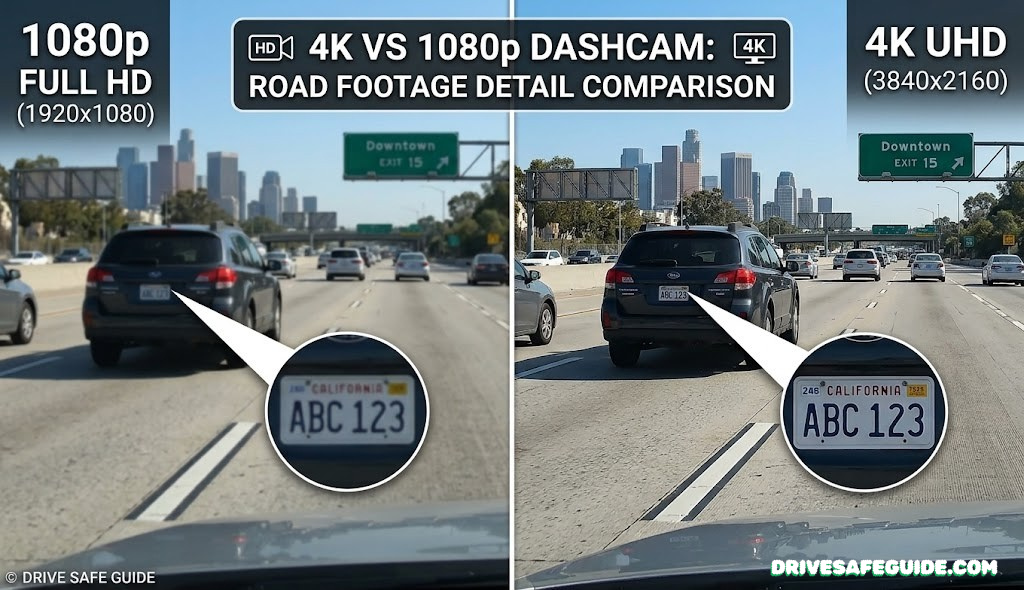
4K vs 1080p Dashcam: Which Resolution Actually Protects You?
A no-nonsense breakdown of image quality, storage costs, night performance, and when each resolution truly earns its place on your windshield.
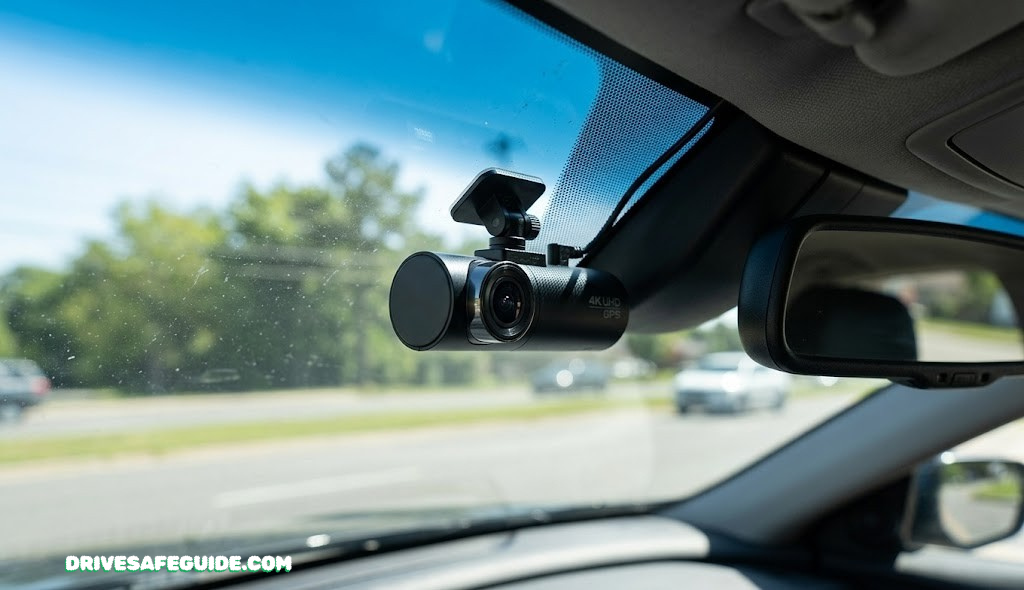
The dashcam market has exploded with 4K models promising cinema-grade clarity on your windshield — but is that resolution jump actually useful, or just a marketing number? Whether you’re shopping for your first dashcam or upgrading from a unit you’ve had for years, the resolution decision touches everything: storage costs, night performance, battery life, price, and — critically — whether you can actually read a fleeing driver’s plate after a hit-and-run.
This guide cuts through the spec sheet noise. You’ll get a genuine head-to-head on every dimension that matters, honest verdicts on who each resolution suits, and a look at why 1440p might quietly be the smartest pick neither camp is talking about.
1. Dashcam Resolution Basics: What the Numbers Actually Mean
When you see “1080p” on a dashcam box, that number is telling you the vertical pixel count of the video it records. A 1080p sensor captures 1920 pixels wide by 1080 pixels tall — roughly 2.1 million pixels per frame. Step up to 4K and you’re looking at 3840 × 2160, or about 8.3 million pixels per frame. That’s not a modest improvement; it’s four times the data in every single frame.
Resolution is usually described three ways in dashcam specs:
- Pixel dimensions — the raw number (e.g., 3840 × 2160)
- Marketing shorthand — “4K”, “2K”, “1080p”, “Full HD”
- Megapixels — total pixel count (4K ≈ 8.3 MP)
Resolution frame comparison — 4K captures 4× more data per frame than 1080p
What matters beyond raw pixel count is how those pixels are used. A 4K dashcam with a mediocre lens, poor image signal processor (ISP), and a cheap sensor can produce muddier footage than a well-engineered 1080p camera. That said, resolution does provide a ceiling on detail — and that ceiling absolutely matters in specific real-world situations, especially night driving scenarios where you need to enlarge and crop footage.
To check out how these cameras actually perform in nighttime conditions, our guide on the best 4K dash cam for night driving covers sensor-by-sensor comparisons with actual low-light footage analysis.
The practical question isn’t which resolution is technically superior — it’s which resolution gives you enough detail for the situations you actually encounter as a driver. That breakdown follows in each section below.

Front 4K + interior IR + rear 1080p. STARVIS 2 sensor, 170° wide angle, capacitor-based (heat-resistant), loop recording.
🛒 Check Price on Amazon*As an Amazon Associate we earn from qualifying purchases.
2. Pixel Count and Image Detail: The Real-World Difference
More pixels per frame means you can crop deeper into footage and still retain usable detail. In the context of dashcams, this matters most when you’re reviewing footage after an incident and need to zoom in on a specific vehicle, road sign, or figure.
What 4× More Pixels Actually Gets You
Imagine a 1080p frame as a 2-megapixel photograph. If you crop 25% of that image to zoom in on a license plate, you’re left with roughly half a megapixel — blurry enough to make reading a plate nearly impossible at any meaningful distance. The same crop in 4K leaves you with 2 megapixels after the crop, which is equivalent to an entire 1080p frame just for that zoomed section.
Digital zoom comparison: 4K preserves plate-reading quality after a 25% crop; 1080p does not
This matters enormously for insurance claims and police reports. According to many traffic safety attorneys, the inability to clearly read a license plate is one of the most common reasons dashcam footage fails to hold up as decisive evidence. 4K eliminates this gap in most scenarios.
That said, sensor quality and codec compression have a huge influence on the actual sharpness delivered. A premium 1080p sensor like the Sony IMX291 can still produce sharper-looking footage than a low-grade 4K sensor with aggressive HEVC compression artifacts.
Bit Rate Matters Too: Resolution alone doesn’t tell the full story. A 4K dashcam recording at a very low bitrate (under 40 Mbps) may look worse than a 1080p cam recording at 20 Mbps. Look for 4K models that record at 50–80 Mbps for meaningful quality gains.
3. Reading License Plates: Where Resolution Makes or Breaks Evidence
License plate legibility is the single most cited reason to upgrade from 1080p to 4K — and for good reason. After a hit-and-run, a parking lot scrape, or a road rage incident, a dashcam that can’t capture a readable plate is far less useful than one that can.
How Distance Affects Readability
The typical dashcam is mounted high on a windshield, pointing forward at a roughly 20° downward angle. A vehicle directly ahead occupies only a fraction of the full frame width. Here’s how the two resolutions compare:
| Distance to Vehicle | 1080p Readability | 4K Readability | Winner |
|---|---|---|---|
| 0–15 ft (close follow) | ✓ Clear | ✓ Very Clear | Draw |
| 15–40 ft (normal gap) | Depends on camera quality | ✓ Usually clear | 4K |
| 40–80 ft (highway gap) | ✗ Often blurred | Readable with good cam | 4K |
| 80+ ft (distant capture) | ✗ Not readable | Difficult but possible | 4K |
| Moving/night scenario | ✗ Very difficult | Better with good sensor | 4K |
The distance sweet spot for 1080p is roughly under 30 feet in good daylight. Beyond that, plate readability degrades quickly. 4K extends the readable range considerably, though it still struggles in low light at distances beyond 60 feet — which is why sensor quality becomes even more critical than raw resolution at night.
Verdict: License Plate Capture
4K wins definitively for real-world plate capture at typical driving distances. If capturing plate evidence is your primary reason for mounting a dashcam, 4K is worth the premium. For city driving under 30 mph with tight gaps, a quality 1080p cam is still workable — but it’s a compromise.

Sony STARVIS sensor, 4K front + 1080p rear, built-in GPS, cloud connectivity, and excellent night performance for license plate capture.
🛒 Check Price on Amazon*As an Amazon Associate we earn from qualifying purchases.
For a detailed breakdown of camera choices in this segment, our dashcam comparison guide walks through sensor performance across multiple brands side-by-side.
4. Night Vision Performance: Resolution vs. Sensor Size
Here’s where the 4K vs 1080p debate gets genuinely complicated. More pixels technically give you more detail — but more pixels on a smaller sensor also means each individual pixel captures less light. This is the fundamental physics tension that governs night performance.
The Pixel Size Trade-off
Consumer dashcam sensors are tiny — typically around 1/2.8″ to 1/3″ in size. Spreading 8.3 million pixels across that chip produces smaller individual photodiodes than a 2.1-megapixel 1080p sensor of the same size. Smaller pixels = less light per pixel = more noise in low-light conditions.
This is why some well-made 1080p dashcams with large pixels (like those using the Sony IMX291 or IMX307 sensors) genuinely outperform cheap 4K sensors in night conditions. The numbers on the box aren’t telling the whole story.
Same sensor area: 1080p packs fewer, larger pixels — each capturing more light. 4K packs far more smaller pixels, which can struggle in low light without advanced processing.
How Top 4K Cameras Overcome This
Premium 4K dashcam manufacturers compensate for smaller pixels through several technologies:
- Sony STARVIS / STARVIS 2 sensors — designed for back-illuminated low-light capture, significantly improving noise performance compared to standard CMOS sensors
- Wide aperture lenses (f/1.6–f/1.8) — let in more light to the sensor overall
- HDR (High Dynamic Range) processing — merges multiple exposures to handle bright headlights and dark shadows simultaneously
- Multi-frame noise reduction (MFNR) — uses AI processing to stack and clean frames in real time
A 4K dashcam using Sony STARVIS 2 — like those reviewed in our guide on the best 4K dash cams for night driving — genuinely outperforms most 1080p cameras in all but the darkest rural conditions. The key word is “premium.” Budget 4K sensors without these compensating technologies can perform significantly worse at night than a quality 1080p camera.
Budget 4K Warning: Many sub-$60 “4K” dashcams interpolate 4K from a 2K or 1080p sensor. The native resolution is actually lower, and the “4K” label is just marketing upscaling. Always verify the sensor spec (not just the output resolution) before purchasing.

Genuine Sony STARVIS sensor, native 4K recording, built-in GPS, front + optional rear cam support. Excellent value for true 4K night performance.
🛒 Check Price on Amazon*As an Amazon Associate we earn from qualifying purchases.
5. Storage Requirements and Battery Impact
This is one of the most under-discussed practical costs of upgrading to 4K — and for many drivers, it ends up being the deciding factor.
Storage: How Much Card Do You Actually Need?
| Resolution | Typical Bitrate | Storage Per Hour | Hours on 64GB | Hours on 128GB | Rec. Card Size |
|---|---|---|---|---|---|
| 1080p | 15–20 Mbps | ~1.1–1.5 GB/hr | ~43–58 hrs | ~85–116 hrs | 32–64 GB |
| 1440p | 25–35 Mbps | ~2–2.6 GB/hr | ~25–32 hrs | ~49–64 hrs | 64–128 GB |
| 4K UHD | 50–80 Mbps | ~3.8–6 GB/hr | ~11–17 hrs | ~21–34 hrs | 128–256 GB |
Since most dashcams use loop recording (constantly overwriting the oldest footage), the real-world impact of storage is how long your most recent incident window extends back. A 4K camera on a 64GB card might overwrite footage within 11 hours of driving. For daily commuters who drive 1–2 hours a day, that still covers several days of footage — but it’s a narrower safety net than a 1080p camera would provide on the same card.
SD Card Requirements for 4K
Standard SD cards are not rated for the sustained write speeds needed for 4K video. You need:
- Speed class: U3 or V30 minimum — ensures write speeds of at least 30 MB/s sustained
- High-endurance rated cards — designed for continuous overwrite cycles (standard cards will fail prematurely)
- Recommended brands: Samsung PRO Endurance, SanDisk High Endurance, Lexar Professional
Pro Tip: A $15 standard microSD card in a 4K dashcam will likely fail within months. Budget $25–40 for a proper high-endurance U3 card. It’s not optional — it’s part of the real cost of owning a 4K dashcam.
Power Consumption
4K processing is computationally intensive. A typical 4K dashcam draws 1.5–2.5W, compared to 0.8–1.3W for a 1080p model. This matters most in two scenarios:
- Parking mode — where the camera runs on battery/capacitor overnight. A 4K cam in parking mode can drain a battery buffer pack 30–50% faster
- Hot climates — higher power draw means more heat generation. Budget 4K cameras can throttle their resolution or shut down in high ambient temperatures
This is worth cross-referencing with considerations from our extreme heat engine care guide — heat management in your car extends to electronics too, especially anything on your windshield.

Specifically rated for dashcam, security cam, and continuous recording. U3/V30, up to 100 MB/s read. The right card for any 4K dashcam.
🛒 Check Price on Amazon*As an Amazon Associate we earn from qualifying purchases.
6. Cost Comparison: What You Pay for Higher Resolution
The price gap between 1080p and 4K dashcams has narrowed considerably as 4K sensors have become commoditized. But a meaningful premium still exists, especially when you factor in the full cost of ownership.
| Cost Component | 1080p | 1440p | 4K |
|---|---|---|---|
| Camera (budget) | $25–$55 | $50–$80 | $80–$130 |
| Camera (premium) | $80–$150 | $130–$200 | $200–$400+ |
| MicroSD (optimal) | 32–64 GB (~$12–$18) | 64–128 GB (~$18–$30) | 128–256 GB (~$28–$55) |
| Entry-level total | ~$40–$75 | ~$70–$115 | ~$110–$185 |
| Value assessment | Best bang-for-buck | Strong value | Premium justified by use case |
The verdict on cost depends heavily on your motivation. For basic incident recording and peace of mind, the $40–75 range for a quality 1080p setup is genuinely sufficient. For professional drivers, fleet operators, rideshare drivers, or anyone who needs legally persuasive footage, the 4K premium pays for itself in the evidence quality of a single incident.
If you’re unsure where to start, our best budget dashcam guide covers quality 1080p options under $60 that punch well above their price point.
✅ 4K Pros
- License plate legibility at distance
- Massive crop reserve in evidence footage
- Superior detail in complex scenes
- Better future-proofing
- Wide digital zoom without pixelation
❌ 4K Cons
- Higher upfront cost
- Requires larger, more expensive SD cards
- Greater power consumption
- More heat = higher failure risk in summer
- Larger files to manage and store
✅ 1080p Pros
- Lower total cost of ownership
- Smaller files, longer loop coverage
- Standard SD cards work fine
- Lower power draw (better parking mode)
- Mature, reliable sensor technology
❌ 1080p Cons
- Limited digital zoom in evidence review
- Plate reading at distance unreliable
- May look dated in 3–5 years
- Less detail in complex multi-vehicle scenes
7. The Case for 1440p: The Middle Ground Worth Considering
If the resolution conversation only offered 1080p or 4K, the choice would be simpler. But a growing number of dashcams record at 2560 × 1440 — commonly marketed as “2K” or “QHD” — and for many drivers, this resolution deserves its own section because it quietly outperforms expectations for both quality and practicality.
Why 1440p Hits the Sweet Spot
At 3.7 megapixels, 1440p gives you 78% more pixels than 1080p. That’s a meaningful jump that significantly improves plate readability at moderate distances without the storage penalty of 4K. You can still use standard 64GB high-endurance cards with reasonable coverage, while recording quality is genuinely superior to 1080p in most daylight conditions.
1440p sits in the value zone — significantly better than 1080p detail while avoiding 4K’s storage demands
When to Choose 1440p Over 4K
Consider 1440p your primary target if you:
- Want noticeably better plate capture than 1080p without paying the full 4K premium
- Drive in mixed conditions (urban + highway) where storage management matters
- Run a dual-channel setup — front 1440p + rear 1080p is an excellent and cost-efficient combination
- Live in a hot climate where 4K heat throttling is a real concern
The Vantrue E1 Lite and similar 1440p cameras reviewed in our Vantrue E1 Lite review demonstrate just how much the 1440p tier has matured.
🎯 1440p Recommendation
For the majority of private drivers who want a meaningful upgrade from 1080p without the storage headaches of 4K, a well-made 1440p dashcam is the most rational choice. It covers 80% of 4K’s real-world benefits at roughly 60% of the storage cost.

1440p QHD recording, ultra-wide 180° field of view, Garmin Vault cloud storage, voice control. The benchmark for 1440p quality.
🛒 Check Price on Amazon*As an Amazon Associate we earn from qualifying purchases.
8. Real-World Use Cases: Matching Resolution to Driving Scenarios
The right resolution depends entirely on how and where you drive. Here’s how each resolution category maps to specific real-world driving patterns.
Highway & Freeway Driving
High speeds mean large gaps between vehicles. Plate capture at 60–80 ft is far more reliable with 4K when highway incidents occur.
Urban City Commute
Shorter gaps and slower speeds mean a quality 1080p cam can still capture plates. 4K is better but not essential in stop-and-go traffic.
Rideshare / Uber / Lyft
Passenger recording and incident documentation are mission-critical. 4K triple-channel cams provide interior + front + rear evidence.
Occasional Road Trips
For mostly rural or low-traffic driving where you want a safety backup, a quality 1080p cam provides sufficient incident coverage.
Commercial / Fleet Drivers
Professional liability and insurance requirements demand the clearest possible footage. 4K is the industry standard for commercial dashcam fleets.
Parking Lot Monitoring
Parking mode incidents typically involve stationary vehicles at close range. 1080p is usually sufficient; 4K helps if your lot is large.
Teen / New Drivers
For monitoring a new driver’s habits and basic incident coverage, a reliable 1080p cam is the most cost-effective starting point.
Night Driving (Premium Cam)
With a STARVIS 2 sensor, a premium 4K cam beats most 1080p cameras in night detail — especially for plate capture under streetlights.
Safe driving habits remain the first line of defense regardless of what’s mounted on your windshield. Our defensive driving habits guide covers techniques that reduce the chance of needing your dashcam footage in the first place — complementing whatever camera you choose.
For specific night driving concerns, the detailed advice in our night driving safety checklist pairs well with understanding which dashcam resolution performs best after dark.
9. Top 4K and 1080p Dashcam Models Head-to-Head
To give this comparison teeth, here’s how leading models in each resolution tier stack up across the dimensions that matter most for real-world use:
| Model | Resolution | Sensor | Night Score | Plate Capture | Storage/hr | Price Range |
|---|---|---|---|---|---|---|
| BlackVue DR900X | 4K | Sony STARVIS | 9/10 | Excellent | ~5–6 GB | $350–$430 |
| Vantrue N4 Pro | 4K front | Sony STARVIS 2 | 9/10 | Excellent | ~5 GB | $240–$290 |
| 70mai 4K A800S | 4K | Sony IMX415 | 8/10 | Very Good | ~4–5 GB | $130–$160 |
| Garmin 67W | 1440p | Custom CMOS | 7/10 | Good (mid-range) | ~2.5 GB | $160–$195 |
| Nextbase 622GW | 4K | Sony STARVIS | 8.5/10 | Excellent | ~4.5 GB | $200–$240 |
| VIOFO A129 Pro | 4K | Sony IMX415 | 7.5/10 | Very Good | ~4.5 GB | $110–$150 |
| Rexing V1 | 1080p | Generic CMOS | 5.5/10 | Moderate | ~1.2 GB | $45–$65 |
You can dig deeper into individual model performance via our dedicated reviews: the BlackVue DR900X review, the Nextbase 622GW review, the 70mai 4K review, and the VIOFO A129 Pro Duo review all offer hands-on testing notes beyond what a spec sheet shows.

One of the best-built 4K dashcams available. Includes emergency SOS, built-in Alexa, 140° lens, exceptional night footage. Premium but worth it.
🛒 Check Price on Amazon*As an Amazon Associate we earn from qualifying purchases.
10. Who Actually Needs 4K — And Who Should Stick with 1080p
The dashcam industry’s push toward 4K has created a misleading sense that 1080p is becoming obsolete. It isn’t. Understanding where the resolution line genuinely matters — versus where it’s a marketing upgrade — helps you make a decision based on your actual driving life.
Choose 4K If:
- You’re a rideshare, delivery, or commercial driver who needs legally defensible footage
- You frequently drive on highways at 65+ mph where vehicles change lanes rapidly
- You’ve experienced a hit-and-run or near-miss where a plate number would have been critical
- You want the highest-quality parking mode recording for unattended vehicle protection
- Your insurance company or employer requires high-resolution fleet documentation
Choose 1080p (or 1440p) If:
- You’re a first-time dashcam buyer and want a reliable, affordable starting point
- You primarily drive in city conditions with slow speeds and close proximity
- You want the lowest total ownership cost — camera, card, and power draw
- You park your vehicle in a hot climate and worry about heat-related throttling
- You use parking mode extensively and run off a battery buffer pack
Simplified decision flow for choosing dashcam resolution
The resolution upgrade makes most financial sense when you can clearly identify a driving pattern that benefits from it. If the decision tree above lands you in a grey zone, 1440p is almost always the right hedge — it’s an upgrade that practically every driver benefits from without the full cost of 4K.
11. Complete Buying Guide Checklist: Beyond Resolution
Resolution is the headline spec, but it’s only one of a dozen variables that determine whether a dashcam actually serves you well over the years. Here’s a complete checklist for evaluating any dashcam regardless of resolution tier:
Sensor Quality
Look for cameras listing their actual sensor model in the spec sheet. Sony STARVIS and STARVIS 2 are the gold standards for low-light performance. Samsung ISOCELL and OmniVision sensors are also found in quality units. Cameras that only advertise “high-sensitivity sensor” without naming it are often using generic, lower-quality chips.
Field of View
Most dashcams offer 140°–170° wide-angle lenses. Wider angles capture more of the surrounding road but introduce more lens distortion at the edges, which can slightly impact the legibility of plates at angles. A 140°–150° angle is often the practical sweet spot for front-facing cameras.
Loop Recording and Incident Lock
Confirm the camera supports automatic loop recording (overwriting oldest footage) and G-sensor triggered incident file locking — both should be standard but aren’t always enabled or configured well on budget models.
GPS Logging
GPS embeds speed and location data into footage metadata, which is highly useful in insurance and legal contexts. Our guide on GPS tracker guides provides context on how location data enhances vehicle documentation overall.
Parking Mode
For parking lot protection, look for hardwire kit support with voltage cutoff protection — this lets the camera monitor your vehicle while parked without draining the battery dangerously low. This is covered in our dedicated wired vs wireless dashcam comparison.
Front-Only vs. Dual Channel
A dual-channel setup adds meaningful rear coverage for rear-end collisions and parking lot scrapes. Our detailed front vs dual dashcam guide walks through when rear coverage is worth the added cost and complexity.
App and Connectivity
Wi-Fi connectivity lets you pull footage directly to your phone without removing the SD card. Cloud-capable cameras (BlackVue, Garmin) let you access footage remotely — particularly useful for monitoring parked vehicles in commercial contexts.
Build Quality and Heat Tolerance
Check whether the camera uses a capacitor or lithium battery for power backup. Capacitors handle heat far better than batteries — critical if you live somewhere warm. Look for IP ratings if you’re considering exterior mounting positions.
| Feature | Must-Have | Good-to-Have | Premium Add-on |
|---|---|---|---|
| Loop recording | ✓ Essential | ||
| G-sensor incident lock | ✓ Essential | ||
| High-endurance SD card | ✓ Essential | ||
| Capacitor (not battery) | ✓ Recommended | ||
| GPS logging | ✓ Recommended | ||
| Wi-Fi / app access | ✓ Convenient | ||
| Rear channel | ✓ Recommended | ||
| Cloud connectivity | Useful for fleet/commercial | ||
| Parking mode hardwire | Needed for overnight monitoring | ||
| Emergency SOS | Nextbase-specific premium feature |
For a broader look at car safety tech that pairs with dashcams, our car safety accessories guide and budget car gadgets guide cover the broader ecosystem of tools that collectively improve your safety on the road.

Front 4K + rear 1080p, Sony IMX415 sensor, GPS, dual-band Wi-Fi, CPL filter compatible. The best price-to-performance ratio in the 4K dual-channel segment.
🛒 Check Price on Amazon*As an Amazon Associate we earn from qualifying purchases.
12. Frequently Asked Questions
-
Is 4K really worth it for a dashcam?
4K is worth it if you frequently need to read license plates, capture fine details in accidents, or drive in well-lit urban environments. For basic incident recording, a well-made 1080p dashcam is often sufficient and more storage-efficient. The upgrade is most justified for professional drivers, highway commuters, and anyone who’s already experienced a frustrating incident where plate readability was critical. -
Can you read a license plate on a 1080p dashcam?
Yes, a high-quality 1080p dashcam can read license plates at close to medium range (within roughly 20–30 feet) under good lighting. 4K provides a significant advantage for plates captured at greater distances or during fast-moving encounters on highways. The camera’s lens quality and sensor also matter significantly — a premium 1080p cam often outperforms a cheap 4K cam at the same distance. -
How much storage does a 4K dashcam need?
A 4K dashcam typically uses 3–6 GB per hour of footage, depending on the bitrate. A 1080p cam uses 1–1.5 GB per hour. You generally need a 128GB–256GB high-endurance U3/V30 card for adequate continuous recording with a 4K cam. Don’t use standard cards — they aren’t rated for the sustained write speeds needed. -
Does 4K dashcam drain car battery faster?
4K dashcams consume roughly 30–50% more power than 1080p models due to higher processing demands. This matters most in parking mode, where the camera runs off a battery buffer while the car is off. A quality 4K camera in parking mode may deplete a standard hardwire buffer pack in 12–18 hours vs. 18–24 hours for a 1080p camera under similar settings. -
Is 1440p a good middle ground between 1080p and 4K?
Absolutely. 1440p (2K/QHD) offers roughly 78% more pixels than 1080p at roughly half the storage cost of 4K. Many drivers find it the sweet spot for detail and practicality — especially those who want noticeably better plate capture without the full storage and power overhead of 4K. Models like the Garmin 67W demonstrate how strong the 1440p tier has become. -
What is the best 4K dashcam for night driving?
The best 4K dashcams for night driving use Sony STARVIS or STARVIS 2 image sensors. Models like the Vantrue N4 Pro, BlackVue DR900X, and 70mai Dash Cam 4K A800S are highly regarded for their low-light performance. Our dedicated guide on the best 4K dash cams for night driving covers sensor-by-sensor analysis with real low-light test results. -
Does higher dashcam resolution affect video file size?
Yes, significantly. 4K dashcam files are typically 3–4× larger than equivalent 1080p files. This affects how long your loop recording lasts before overwriting and how much memory you need. If you’re reviewing footage on a laptop, 4K files also require more processing power to play back smoothly. -
Does 4K dashcam footage hold up in court better than 1080p?
4K footage provides more detail that can be critical in legal disputes — especially for reading license plates, identifying other vehicles, or capturing road markings. While both resolutions are admissible as evidence, higher resolution footage tends to be more conclusive in contested cases where precise detail matters. GPS data embedded in footage also strengthens any resolution of video as evidence. -
Can I use any SD card with a 4K dashcam?
No. 4K dashcams require a high-endurance microSD card rated at U3/V30 or higher to handle the sustained write speeds needed for 4K video. Standard cards will overheat, fail prematurely, or produce corrupted footage. Look for Samsung PRO Endurance, SanDisk High Endurance, or Lexar Professional series cards specifically. -
Do 4K dashcams overheat more than 1080p?
They can. Higher resolution processing generates more heat, which is a real concern in hot climates or in a car left parked in direct sun. Quality 4K cameras manage this through capacitor-based power systems and thermal management circuits. Budget 4K cameras may throttle their resolution or shut down entirely when ambient temperatures exceed their rated range — so always check the operating temperature spec before buying. -
What resolution should a beginner dashcam user choose?
For a first dashcam, a quality 1080p or 1440p camera is the best starting point. It offers excellent incident coverage, lower storage costs, simpler file management, and lets you learn what features matter most before investing in a premium 4K setup. The best budget dashcam guide covers excellent entry-level options that provide real protection without overcomplicated setup. -
How do I choose between a front-only and dual-channel dashcam?
If your main concern is recording vehicles ahead and capturing plates, a front-only camera works well. A dual-channel setup adds rear coverage for rear-end collisions and hit-and-run incidents in parking lots — highly recommended for city drivers, rideshare operators, and anyone who’s experienced a parking scrape. The added rear channel is typically the better investment over upgrading from 1080p to 4K for most private drivers.
Bottom Line: Which Resolution Is Right for You?
4K delivers genuine, meaningful benefits — license plate readability at distance, deep crop reserve for evidence, and future-proof detail. But it comes with real trade-offs in storage, cost, and power draw. 1080p remains a perfectly capable choice for most private drivers, especially those on a budget or with limited storage management appetite. And 1440p? It’s the quiet winner for anyone who wants a clear upgrade without overcommitting.
Match resolution to your actual driving pattern — not to the highest number on the box. Then pair it with a quality SD card, a reliable hardwire kit, and the driving habits that mean you’ll rarely need to review the footage at all.
🔍 Browse Top-Rated Dashcams on Amazon*As an Amazon Associate we earn from qualifying purchases at no extra cost to you.
Continue reading: Best Dashcam Guide · Dashcam Comparison Hub · Front vs. Dual Dashcam · Wired vs. Wireless Dashcam · Night Driving Safety Checklist