Best Dashcam Guide: Expert Picks, Key Features & Everything You Need to Know Before You Buy
From 4K front-and-rear setups to ultra-compact clip-ons, we break down every feature that matters — and cut through the spec-sheet noise to help you pick the right dashcam for your car, budget, and driving style.
A dashcam is one of the most valuable — and most underrated — safety investments you can make for your car. A single piece of clear footage can resolve an insurance dispute in minutes, prove your innocence at a fault-disputed intersection, or capture the license plate of a hit-and-run driver before they disappear. This guide covers everything: what to look for, how each feature actually works on the road, and which specific models earn our recommendation.
A dual-channel dashcam captures both road ahead and the vehicle approaching from behind — the most dangerous blind spot in any accident scenario.
What Is a Dashcam — And Why Do You Actually Need One?
A dashboard camera (dashcam) is a small, dedicated video recorder that mounts to your windshield or dashboard and records continuous footage of your drive. Unlike a phone camera, a dashcam is built specifically for this purpose: it powers on automatically when you start the car, records in a continuous loop so the card never fills up, and uses a G-sensor to automatically lock and preserve any footage captured during a collision.
They’ve been standard equipment in countries like Russia, South Korea, and China for over a decade — partly because of insurance fraud, partly because road conditions make documentation essential. In the US, UK, and Australia, adoption has grown sharply as drivers realize how often disputed accidents come down to one side’s word against another. Having video evidence that can play in real-time on an insurance adjuster’s screen changes the entire dynamic.
Why footage changes the outcome
According to data from dashcam insurance programs in the UK, drivers who submitted dashcam footage with their claims were found not-at-fault in contested accidents at a significantly higher rate than those without. The footage eliminates he-said-she-said entirely.
Beyond accident documentation, a quality dashcam catches things you’d never notice while driving: another driver running a red light ten seconds after you’ve passed, a pothole that cracked your rim (useful for municipal road damage claims), or the specific moment a semi-truck’s tire blew out. It also serves as a deterrent. Visibly mounted cameras reduce the likelihood of road rage escalation and opportunistic parking lot dings.
Safety-conscious drivers who already invest in defensive driving habits or who keep a car safety kit in their trunk will find a dashcam to be the logical next addition — it doesn’t prevent accidents, but it ensures you’re protected when one happens.
Who Needs a Dashcam? (More People Than You Think)
Almost every driver benefits from a dashcam, but certain driving situations make one nearly essential. Understanding which category fits you best will help determine what type and tier of camera to prioritize.
Daily Commuters
High-frequency driving in traffic means higher exposure to accidents. A basic front-facing 1080p or 1440p camera is sufficient for most commuters.
Rideshare Drivers
Uber, Lyft, and taxi drivers need interior (cabin) coverage for passenger disputes, plus front and rear for road incidents. A 3-channel cam is ideal.
Night Drivers
If you regularly drive after dark, prioritize a camera with a Sony STARVIS 2 sensor and HDR. Not all “night vision” cameras are equal. See our best 4K dashcams for night driving list.
Urban Parkers
If you park on city streets, a dashcam with hardwired parking mode catches hit-and-run drivers and theft attempts while you’re away from the vehicle.
Road Trippers
Long-haul drivers face more varied road conditions — weather events, wildlife, unfamiliar roads. A road trip essentials checklist should include a quality dashcam.
Fleet & Commercial
GPS-enabled, cloud-connected dashcams protect business assets, verify driver behavior, and simplify insurance claims across multiple vehicles.
New & Teen Drivers
Families often install dashcams to monitor new drivers. Combined with a teen driver safety kit, it builds accountability and confidence.
Winter Drivers
Drivers in snowy climates — dealing with black ice, winter traction challenges, or whiteout conditions — have a higher incident rate and benefit enormously from documentation.
Quick Rule of Thumb
If you park on the street or in a public lot: get parking mode. If you drive professionally or carry passengers: get interior camera coverage. If you’re primarily protecting against fault disputes: a quality front-facing 4K or 2K camera is sufficient.
Our Top 7 Dashcam Picks: Every Budget, Every Driver
We evaluated these models across video quality (day and night), parking mode reliability, build quality, heat tolerance, ease of setup, and long-term reliability reports. Each pick earns its spot for a specific reason — not just spec numbers.
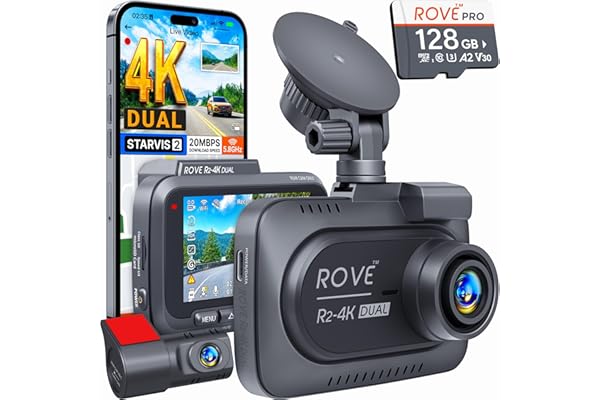
ROVE R2-4K Dual STARVIS Dashcam
The ROVE R2-4K is the benchmark for balanced all-around performance in its price bracket. Up front, 4K resolution with a Sony STARVIS sensor delivers footage sharp enough to read license plates two or three car lengths ahead. The rear camera handles 1080p, which is more than adequate for capturing the plate of a car tailgating or rear-ending you.
What separates this from lookalike budget cams is build consistency. The magnetic mount is genuinely practical for quick removal when you need to swap footage. The included GPS module logs speed and coordinates alongside every clip — indispensable for insurance or legal disputes. The companion app is intuitive, and Wi-Fi transfer keeps things cable-free.
✅ Pros
- True 4K front footage with impressive clarity
- GPS included in the box, not an add-on
- Strong night performance via STARVIS sensor
- Magnetic mount for easy daily removal
- Solid companion app with Wi-Fi transfer
❌ Cons
- Hardwire kit sold separately (for parking mode)
- Hardwire kit is one of the pricier options available
- Touchscreen can be unresponsive in extreme cold
ROVE R2-4K Dual STARVIS Dashcam
4K front + 1080p rear, GPS included, Sony STARVIS sensor — currently Amazon’s bestselling dual cam.
Check Price on Amazon
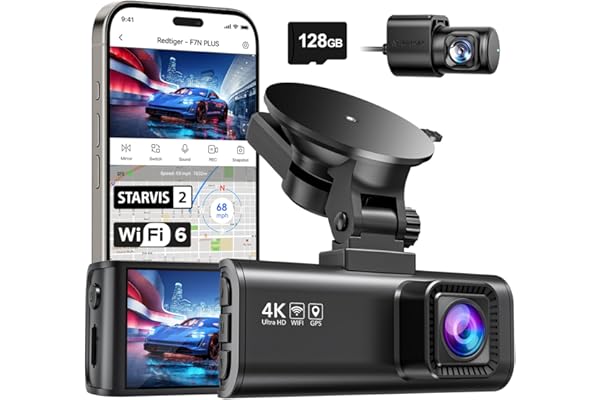
REDTIGER 4K Dual Dashcam with GPS
Consumer Reports named the REDTIGER (F7NP variant) their highest-rated dashcam in their most recent evaluation — a significant endorsement for a camera at this price tier. The 170° ultra-wide angle is one of the widest available, capturing full lane width and even some of the sidewalk on both sides. This reduces blind spots and ensures you capture a wider scene around any incident.
The 4K front camera produces genuinely sharp footage with good color rendering. Night footage benefits from REDTIGER’s proprietary Sony sensor configuration. The rear 1080p camera ships in the box with enough cable to reach most vehicles without an extension. GPS tracks both speed and route.
✅ Pros
- Highest Consumer Reports score in its category
- 170° ultra-wide front angle
- Front and rear camera in one box
- GPS included, no subscription required
- Excellent price-to-quality ratio
❌ Cons
- App file upload process described as fiddly
- Slightly overstates its FoV spec on paper
- Build feels slightly less premium than ROVE
REDTIGER 4K Dual Dashcam
Consumer Reports’ top-rated dashcam. 4K front, 1080p rear, 170° wide angle, GPS — all in the box.
Check Price on Amazon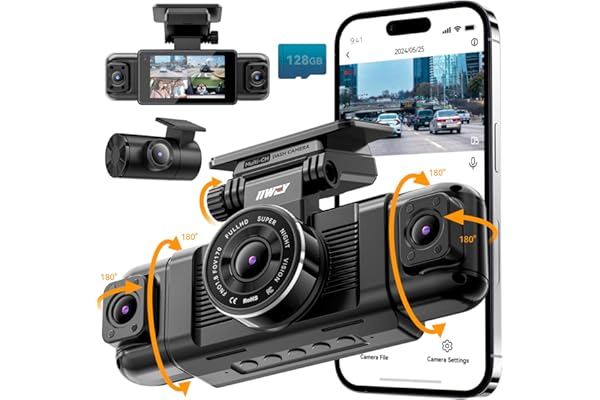
IIWEY 3-Channel Inside Dashcam
Rideshare drivers face a unique liability landscape: every passenger interaction is a potential dispute. The IIWEY three-channel setup covers the road ahead, the view behind the vehicle, and the cabin simultaneously. The interior-facing IR (infrared) camera captures passenger behavior in complete darkness without intrusive cabin lighting.
This type of camera is also useful for families carrying children, as it provides a way to monitor rear-seat activity without turning around. The G-sensor auto-locks collision footage across all three channels simultaneously, giving you a complete picture of any incident.
✅ Pros
- Interior IR camera covers cabin at night
- Three-channel recording from one device
- G-sensor locks all three feeds simultaneously
- Strong parking mode performance
❌ Cons
- Interior camera reduces front cam quality vs single-channel 4K
- More wiring to route through the vehicle
- Larger form factor
IIWEY 3-Channel Inside Dashcam
Front, rear, and interior IR coverage in one system. The rideshare driver’s complete protection package.
Check Price on Amazon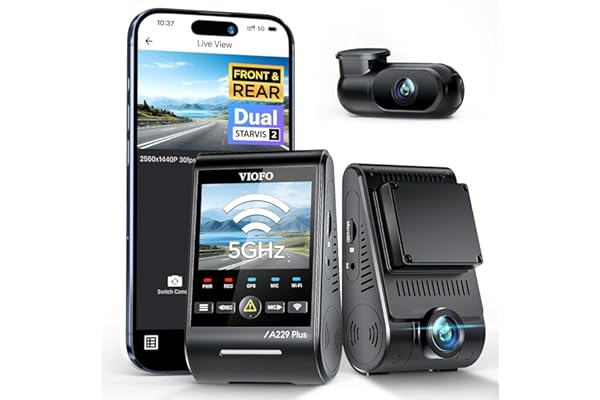
VIOFO A229 Plus 2CH
The VIOFO A229 Plus represents the current benchmark in consumer dashcam performance. It earns top billing from independent testers like Vortex Radar and Wirecutter (who have repeatedly recommended VIOFO models) for a reason: the Sony STARVIS 2 IMX678 sensor is simply in a different class for low-light performance. Night footage resolves license plates, faces, and road signs that cheaper sensors smear into noise.
The supercapacitor power system makes this exceptionally heat-tolerant — critical for anyone in the American South, Southwest, or any hot climate where a standard lithium-ion dashcam battery swells and dies within its first summer. The Wi-Fi 6 connection transfers 4K clips to your phone in seconds. For serious documentation needs — fleet, legal exposure, or simply wanting the sharpest footage available — the A229 Plus is the right tool. You can read our full breakdown in the VIOFO review archive.
✅ Pros
- Industry-leading night performance (STARVIS 2)
- Supercapacitor survives extreme heat (no battery swelling)
- 4K front with full 60fps option
- 2K HDR rear camera — best-in-class rear quality
- Wi-Fi 6 for fast app transfer
- Buffered parking mode (captures 15 sec pre-impact)
❌ Cons
- Requires app for some basic settings changes
- Premium price vs consumer-tier competition
- Setup can be complex for first-time dashcam users
VIOFO A229 Plus 2CH — 4K + Sony STARVIS 2
The enthusiast choice. 4K 60fps, Sony STARVIS 2 sensor, supercapacitor, buffered parking mode, Wi-Fi 6.
Check Price on Amazon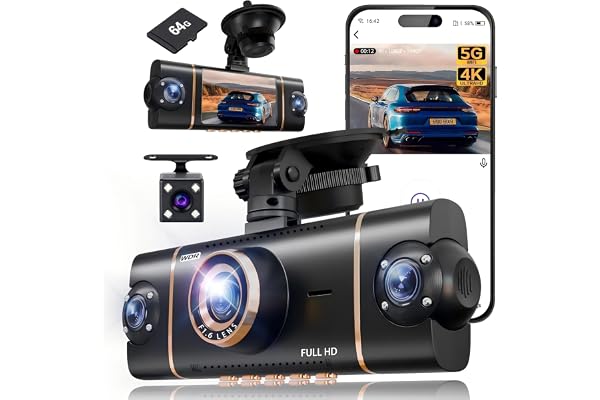
XYGCACO 3-Channel Inside Dashcam
The XYGCACO offers a compelling alternative for drivers who want tri-channel coverage without the IIWEY’s price premium. The inside-facing infrared camera captures the full cabin field in darkness, making it suitable for delivery drivers, parent monitoring setups, or commercial vehicles where documentation of every occupant interaction matters.
The G-sensor sensitivity is calibrated well — it triggers on genuine impact without falsely locking clips every time you drive over a speed bump. Combined with loop recording, this means your important clips stay saved while routine footage cycles out correctly.
✅ Pros
- Budget-accessible 3-channel coverage
- Well-calibrated G-sensor
- IR interior camera works in full darkness
- Wide parking mode compatibility
❌ Cons
- Interface less polished than premium options
- Screen resolution modest
XYGCACO 3-Channel Interior Dashcam
Tri-channel coverage — front, rear, and full IR cabin — at a price that makes full coverage accessible.
Check Price on Amazon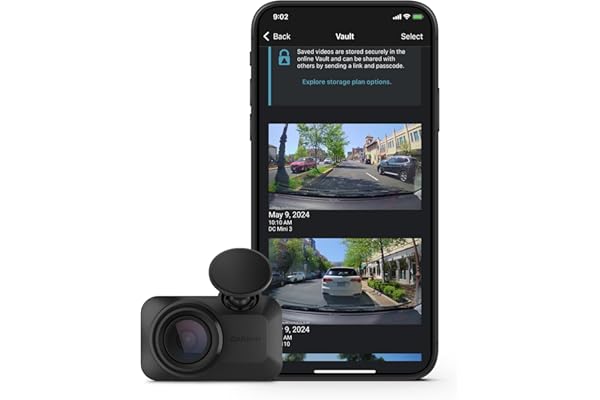
Garmin Dash Cam Mini 3
If you’ve ever watched someone reach over and pocket a dashcam from a parked car, you understand why a discreet form factor matters. The Garmin Mini 3 is genuinely tiny — nearly invisible behind the rearview mirror to anyone glancing through the windshield. Despite its size, it packs a clean 1080p image with Garmin’s ClarityTM HDR processing, which handles the high-contrast challenge of bright sky and shaded road better than most entry-level cameras.
Voice control lets you save a clip, take a photo, or start/stop recording hands-free — a feature borrowed from Garmin’s GPS heritage. You’ll want the Garmin Clarity app to configure it, since there are only two physical buttons. You can also explore our Garmin Dash Cam Mini 2 review and the Garmin 67W review for context on how the family compares.
✅ Pros
- Nearly invisible when installed — theft deterrence
- Garmin’s trusted ecosystem and app quality
- Voice control works reliably without distraction
- Garmin Clarity HDR handles bright/dark contrast well
- Good choice for rental car-style setup you barely notice
❌ Cons
- No built-in screen — requires app for everything
- Parking guard requires additional subscription or hardwire
- 1080p only (no 4K option)
Garmin Dash Cam Mini 3
Ultracompact, practically invisible, voice-controlled. The stealthiest quality dashcam on the market.
Check Price on Amazon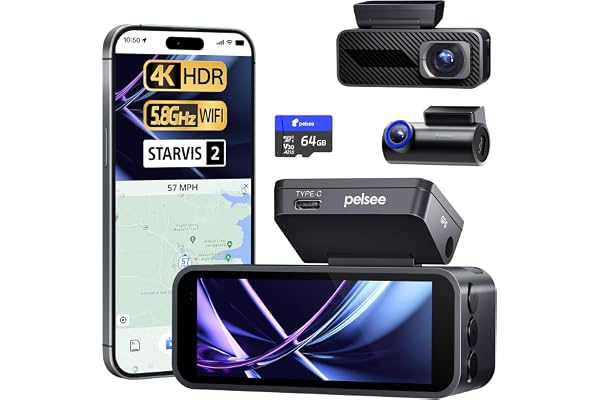
P1 Pro STARVIS Full-Color Night Vision
Most dashcams produce grainy, desaturated footage in low-light conditions. The P1 Pro uses Sony’s STARVIS sensor with a wide aperture to produce genuinely full-color footage even in near-darkness — a meaningful capability for night drivers where identifying a vehicle’s color from footage matters (insurance, police reports, hit-and-run documentation).
The trade-off vs the VIOFO A229 Plus is that full-color sensitivity sometimes produces slightly more noise in truly dark conditions — where the STARVIS 2 in the VIOFO would resolve slightly more detail. But for most practical night driving scenarios — lit streets, parking lots, highway exits — the P1 Pro’s color footage is genuinely impressive for the price.
✅ Pros
- Full-color night footage rare at this price
- Sony STARVIS sensor
- Clean app interface
- Compact design
❌ Cons
- Slightly more noise in truly dark conditions vs STARVIS 2
- Front-only in base configuration
P1 Pro — Full-Color STARVIS Night Vision Dashcam
Sony STARVIS sensor for vivid, full-color night footage — ideal if you do most of your driving after dark.
Check Price on AmazonKey Dashcam Features Explained — What Actually Matters vs. Marketing Noise
Dashcam spec sheets can feel overwhelming — and many specs are marketing inflation rather than real-world differentiators. Here’s what actually matters when footage is reviewed after an incident, separated from the noise.
Sensor Size & Quality
The image sensor is the single most important component. Two cameras can both claim “4K” resolution while producing vastly different footage in low light, because the underlying sensor differs. Sony STARVIS sensors (particularly STARVIS 2, also known as the IMX678 and IMX415 series) are currently the gold standard in dashcam sensors. They use back-illuminated pixel architecture that captures significantly more light per pixel — the key to clear, low-noise night footage. A 1080p camera with a Sony STARVIS sensor will outperform a 4K camera with a generic CMOS sensor in practically every real-world condition that matters. For dedicated night driving coverage, see also our best 4K dashcam for night driving roundup.
HDR (High Dynamic Range)
HDR in a dashcam means the camera blends multiple exposures in real time to handle scenes where there is both very bright and very dark content simultaneously — a common challenge when driving out of a tunnel, entering bright sunlight from shade, or facing an oncoming car’s headlights at night. Without HDR, you get either a blown-out sky or an underexposed road. With HDR, both areas retain usable detail in the same frame.
G-Sensor (Impact Detection)
The G-sensor is an accelerometer built into the camera that detects sudden changes in velocity — specifically, the kind caused by a collision. When triggered, it automatically locks the current video segment so loop recording cannot overwrite it. Sensitivity is adjustable on most cameras; you’ll typically calibrate it so speed bumps and rough roads don’t trigger false locks, but a genuine impact definitely does.
G-Sensor Sensitivity Warning
If your G-sensor sensitivity is too high, routine road vibrations will constantly lock footage clips, eventually filling your card with locked files that can’t be overwritten — and new incidents won’t be recorded. Start at medium sensitivity and adjust based on your typical road surface.
Supercapacitor vs. Battery Power
Cheaper dashcams store power in a lithium-ion or lithium-polymer battery — the same type used in smartphones. These batteries degrade in heat. A dashcam mounted behind a windshield in summer can reach internal temperatures of 140–160°F. Over one or two summers, the battery in a cheap camera swells, loses capacity, or fails entirely. Supercapacitors (used in VIOFO models and others) store charge differently — they’re significantly more heat-tolerant and last far longer. If you’re in a hot climate or park in direct sun, supercapacitor is a meaningful real-world advantage, not just a spec number.
Wide-Angle Lens
Most dashcams offer between 130° and 170° field of view. A wider angle captures more of the scene — lane width, sidewalks, and vehicles approaching from an angle. However, extreme wide-angle lenses introduce barrel distortion (fisheye effect) that can make footage harder to use as evidence of specific positions. A 140°–160° range is typically the sweet spot: wide enough to capture full lane context, tight enough to avoid severe distortion.
GPS Logging
GPS embeds your exact location, speed, and heading into every video frame as metadata. When you review footage later, you can see your route overlaid on a map along with speed at any moment. In a legal dispute, this is extraordinarily useful: it demonstrates you were below the speed limit at the time of impact, that the other driver entered your path from a specific street, or that the intersection camera missed the relevant segment. Some cameras include GPS built-in; others require an add-on module. If yours doesn’t include GPS and you drive at highway speeds regularly, the add-on is worth purchasing separately.
Wi-Fi & App Connectivity
Built-in Wi-Fi lets you connect your smartphone directly to the dashcam’s hotspot and pull footage to your phone without removing the memory card. Older Wi-Fi standards (802.11n/ac) can make transferring a long 4K clip tediously slow. Newer dashcams with Wi-Fi 5 or Wi-Fi 6 (VIOFO A229 Plus) transfer the same clip in seconds. If you regularly review footage, this quality-of-life difference is significant. For drivers who use their phones as a primary interface for multiple car gadgets, see our guide on apps every driver should use.
Related: 4K vs 1080p — Does Resolution Matter?
We break this down in much more detail in our 4K vs 1080p dashcam comparison guide, including real-world license plate legibility tests at different distances and speed. The short answer: 4K matters most at highway speeds where plates are further away, less so in city driving under 40mph.
Resolution Guide: 1080p vs 1440p vs 4K — Which Do You Actually Need?
Resolution determines how much detail you can extract from a frozen frame — specifically, whether you can read a license plate. Here’s the practical breakdown at different distances and speeds:
For most daily city and suburban drivers, 1440p (2K) resolution with a quality sensor hits the sweet spot — it’s meaningfully sharper than 1080p for license plate capture, generates smaller files than 4K, and doesn’t demand as much storage. If you drive primarily at highway speeds or in low-light conditions, genuine 4K with a Sony STARVIS sensor is the right investment.
It’s worth noting that many budget cameras falsely claim “4K” in marketing while recording in 2.5K or even interpolated 1080p. The test: check whether the camera specifies the actual sensor (e.g., Sony IMX678, IMX577, OmniVision OV4689) and what the maximum file bitrate is. A genuine 4K recording at 30fps typically requires 60–80Mbps bitrate; anything claiming 4K at 15–20Mbps is not true 4K. The dashcam comparison guide on our site breaks down which models actually hit their claimed specs.
Does Frame Rate Matter?
For dashcam purposes, 30fps is sufficient for documentation. The key exception: high-speed incidents where vehicle movement between frames needs to be tracked. At 60fps, you can freeze a frame mid-accident and still see license plate characters that would be blurred at 30fps due to motion. The VIOFO A229 Plus’s 4K 60fps capability is genuinely useful for this — though it roughly doubles storage consumption.
Parking Mode Deep Dive: How It Works, What You Need, and Which Cameras Do It Best
Parking mode is where dashcam purchases most frequently go wrong. Buyers assume their camera includes it; the camera ships without the necessary power source to make it functional; the feature never gets used. Let’s clarify exactly what’s involved.
How Parking Mode Works
In normal operation, your dashcam draws power from the car’s 12V socket (cigarette lighter). When you turn off the ignition, that socket cuts power — and the dashcam shuts off. Parking mode requires a continuous power source even when the car is off. This typically means one of three things:
Hardwire Kit
A hardwire kit connects the dashcam directly to the car’s fuse box via a low-voltage cutoff cable. The cutoff prevents the dashcam from draining the battery below a safe level (typically around 11.6–12V). Most dashcam manufacturers sell hardwire kits for $20–$40 that are specific to their connectors. This is the most reliable and permanent solution for parking mode.
External Battery Pack
Dedicated dashcam battery packs (like the VIOFO BP100 or Cellink NEO series) are large-capacity 12V batteries that mount in the trunk or under the seat. They charge while you drive and then power the dashcam for hours or even days while parked. They’re the best option if you want maximum parking coverage without any risk to the vehicle battery, but cost $100–$200 on top of the dashcam itself.
Built-in Battery (Limited)
Some dashcams have a small internal battery that provides 5–10 minutes of buffer power after the ignition cuts off — enough to save the current clip and shut down gracefully, but not enough for true parking surveillance. Don’t confuse this with full parking mode capability.
Buffered vs. Standard Parking Mode
Standard parking mode activates recording when an impact or motion event triggers it — meaning the camera only captures what happened after the event. If someone bumps your car and drives away in under five seconds, you may only get the tail end of their car.
Buffered parking mode keeps a 15-second rolling loop in memory at all times. When an event triggers, the camera saves the 15 seconds before the trigger plus the following recording. This captures the full approach of the vehicle that hit you — license plate, driver, the approach angle — not just the aftermath. The VIOFO A229 Plus and A329S include this feature; it’s the reason professional testers consistently recommend it for fleet and legal use cases.
Parking Mode Quick-Check Before Buying
Ask these three questions: (1) Does it require a hardwire kit or battery pack for parking mode? (2) Is parking mode buffered or unbuffered? (3) What is the voltage cutoff to protect the car battery? Any reputable camera answers these clearly in its documentation.
Drivers in urban environments where parking lot damage is common will find parking mode one of the most practically valuable features. Those who already carry a complete car emergency kit will recognize that parking mode documentation fits naturally alongside other vehicle protection tools.
Full Dashcam Comparison Table
Use this at-a-glance comparison to identify which camera fits your priorities before diving into the individual reviews above.
| Model | Resolution (Front) | Rear Cam | Sensor | GPS | Parking Mode | Supercapacitor | Best For |
|---|---|---|---|---|---|---|---|
| ROVE R2-4K Dual | 4K UHD | ✔ 1080p | Sony STARVIS | ✔ Included | ✔ w/ hardwire kit | ✗ | Best Overall |
| REDTIGER 4K | 4K UHD | ✔ 1080p | Sony-based | ✔ Included | ✔ Motion/Impact | ✗ | Best Value / Budget 4K |
| IIWEY 3-Channel | 4K | ✔ + IR Interior | CMOS | Optional | ✔ | ✗ | Rideshare / Family |
| VIOFO A229 Plus | 4K 60fps | ✔ 2K HDR | Sony STARVIS 2 | ✔ Included | ✔ Buffered 15s | ✔ | Best Image Quality |
| XYGCACO 3-Ch. | 1080p+ | ✔ + IR Interior | CMOS | Optional | ✔ | ✗ | Budget 3-Channel |
| Garmin Mini 3 | 1080p HD | ✗ Front only | Clarity HDR | Optional | ✔ w/ Parking Guard | ✗ | Discreet / Compact |
| P1 Pro STARVIS | 2K+ | Optional rear | Sony STARVIS | Optional | ✔ | ✗ | Night Driving Focus |
* GPS and rear camera availability may vary by bundle/variant. Always verify current package contents on the product listing before purchasing.
For deeper model-vs-model analysis, see our dedicated front vs. dual dashcam guide and the VIOFO A129 vs Thinkware U1000 comparison. For wired vs. wireless setups, see wired vs. wireless dashcam: which is better?
Dashcam Installation Guide: Plug-In vs. Hardwired
There are two ways to power and install a dashcam. Which you choose affects how clean the installation looks, whether parking mode works, and how permanent the setup is.
Method 1: 12V Socket (Easiest)
Most dashcams come with a 12V car charger adapter that plugs into your cigarette lighter socket. You route the cable along the headliner, down the A-pillar, and behind the dashboard trim to keep it tidy. This takes about 20–30 minutes with plastic trim removal tools and is fully reversible with no permanent modification.
Method 2: Hardwired to Fuse Box (Recommended for Parking Mode)
A hardwire kit connects the dashcam to your fuse box via a low-voltage cutoff module. The camera draws power from an always-on fuse (one that provides power even when the car is off) and from a switched fuse (one that only has power when the ignition is on) — the cutoff monitors which is active to switch between driving and parking modes automatically.
Important: Don’t Skip the Low-Voltage Cutoff
Never hardwire a dashcam directly to the battery without a low-voltage cutoff module. A dashcam in parking mode draws 100–200mA continuously. Over 8–10 hours, this can discharge a standard car battery enough to prevent starting. The cutoff module protects against this automatically.
Mounting Position
Mount your dashcam behind the rearview mirror, centered on the windshield, with the lens aimed slightly downward so it captures both the road ahead and the sky (for intersection context). Mounting too high captures mostly sky; too low and the hood obstructs the bottom quarter of the frame. Most states have windshield obstruction rules — check windshield legal standards in your state if you’re uncertain about placement rules.
Memory Cards & Storage: What You Need and What to Avoid
The memory card is the single most overlooked component of a dashcam setup — and the single most common cause of failure. Many drivers buy a dashcam, pop in whatever microSD card was in an old phone, and wonder why the camera stops recording three weeks later or why footage is corrupted when they need it.
Why Regular SD Cards Fail in Dashcams
Consumer microSD cards are designed for occasional writes: saving a photo, transferring a video, writing a file. A dashcam writes continuously, every second of every drive. Standard cards are not rated for this duty cycle. The write cells wear out quickly — typically within weeks to a few months of continuous use. Consumer-grade cards also handle heat poorly, which compounds the problem in a sun-exposed dashcam.
What to Look For: High-Endurance Cards
High-endurance microSD cards are specifically engineered for continuous write applications (security cameras, dashcams, CCTV). They use higher-grade NAND flash and more robust error correction. Look for cards rated for at least 10,000 hours of continuous recording. Recommended options:
| Card | Endurance Rating | Max Capacity | Class | Notes |
|---|---|---|---|---|
| Samsung PRO Endurance | Up to 43,800 hrs | 256GB | Class 10 / U3 | Most popular choice; excellent reliability |
| SanDisk High Endurance | 20,000+ hrs | 256GB | Class 10 / U3 | Well-priced; wide availability |
| Lexar High Endurance | Up to 20,000 hrs | 256GB | Class 10 / V30 | Good for 4K recording with V30 speed class |
| Kingston Endurance | 20,000 hrs | 256GB | Class 10 / U3 | Reliable and often cheaper than Samsung |
Always use the manufacturer’s maximum-rated card capacity. Some cameras cap at 128GB or 256GB; using a larger card may cause formatting errors.
Recommended Storage by Use Case
- Short daily commuter (under 45 min/day): 64GB is sufficient. A 4K cam fills this in ~2 hours of footage with typical bitrates.
- Average driver (1–2 hours/day): 128GB covers roughly 4–8 hours of looped recording before the oldest footage cycles out.
- Parking mode users: 128GB–256GB. Parking mode footage adds up quickly, especially with motion-triggered recording in a busy lot.
- Rideshare/commercial drivers: 256GB or pair with the manufacturer’s companion app for cloud backup of flagged incidents.
Format your card using the dashcam itself (not your computer) every 2–3 months to prevent file system fragmentation that slows write performance and can cause recording dropouts.
Dashcams for Legal Protection & Insurance Claims: What the Footage Actually Does
The legal value of dashcam footage is most clearly demonstrated by what it replaces: a he-said-she-said dispute with two versions of events and no objective evidence. Insurance adjusters, police officers, and judges respond very differently to clear video evidence than to driver testimony alone.
Insurance Claims
When you file an insurance claim after an accident and submit footage showing the other driver clearly at fault, two things happen: (1) fault determination moves faster, because there’s nothing to dispute, and (2) your own rates are protected from an at-fault premium increase. The at-fault party’s insurer faces the same clear evidence and typically settles without drawn-out negotiation.
Some insurers in the UK and Europe offer explicit premium discounts for dashcam owners. In the US, the discount is less formalized — but the protection against at-fault rate increases is a de-facto financial benefit. If you pay $1,200 annually in insurance and being found not-at-fault prevents a 15% rate increase ($180/year), a dashcam pays for itself in the first relevant incident.
Hit-and-Run Incidents
A dashcam with parking mode running is the only realistic way to capture the license plate of a driver who hits your parked car and drives away. Without it, you have no evidence for a police report or insurance claim. With it, the plate, vehicle make/color, and time of impact are all documented. You can pair this protection with a complete vehicle safety kit to ensure you’re prepared for every scenario.
Fraud Prevention
Insurance fraud (staged accidents, “swoop and squat” schemes where a car pulls in front of you and brakes suddenly) costs insurers — and ultimately all policyholders — billions annually. A dashcam recording from the front camera immediately identifies staged accidents, as the other driver’s movement pattern before the collision is clearly recorded. Countries with high fraud rates (Russia, China, some Eastern European markets) have seen dashcam adoption rates of 60–80% among private drivers for precisely this reason.
Traffic Citation Disputes
GPS-logging dashcams provide speed data that can be used to dispute a speeding citation where you believe the radar reading was incorrect or misattributed. Similarly, footage of an intersection incident can demonstrate that a light was still yellow when you entered, or that a stop sign was obscured by foliage. See our related resources on safe driving habits and understanding your rights on the road.
Audio Recording Laws Vary by State
Most dashcams also record audio from a built-in microphone. In “all-party consent” states (California, Illinois, Florida, Pennsylvania, and others), recording audio of conversations in your car may require notifying passengers. When in doubt, disable audio recording in the camera’s settings — the video itself is typically sufficient for most insurance and legal purposes.
Dashcam Buying Tips by Driver Type: Match Your Camera to Your Situation
Rather than recommending a single universal answer, here’s a specific buying matrix based on the most common driving profiles. Your actual pick should match the scenarios you’re most likely to face.
Thinking About Total Cost of Ownership
Factor in the full cost beyond the camera price: a high-endurance memory card ($20–$35), a hardwire kit if you want parking mode ($25–$40), and optionally a battery pack for extended parking coverage ($100–$200). For most drivers, the camera + card + hardwire kit combination represents the complete investment. Rideshare drivers should also consider whether the camera’s companion app requires a subscription for cloud backup — most do not, but some premium cloud features carry monthly fees.
For broader vehicle safety investment context, our guides on road trip safety, budget car gadget upgrades, and safety gifts for new car owners offer additional perspective on where dashcams fit in a complete vehicle safety plan.
Front-Only vs. Dual Channel: The Short Answer
Front-only cameras are sufficient if you’re primarily concerned about at-fault disputes where you’re the driver hitting something or running a light — because the relevant footage is always from your perspective. Dual-channel setups add critical coverage for rear-end collisions (the most statistically common accident type) and for documenting what a car behind you was doing before impact. If you’re choosing between a mediocre dual cam or a quality front-only cam at the same price, pick the quality front-only. Our full breakdown is in front vs dual dashcam guide.
Frequently Asked Questions
-
At minimum, look for 1080p Full HD. For readable license plates at highway distances, 1440p (2K) is more reliable. True 4K (2160p) with a quality sensor like Sony STARVIS 2 captures the clearest detail for both day and night driving, but it also increases file sizes and storage demands. The sensor quality matters as much as the resolution number — a Sony STARVIS 2 at 2K will outperform a generic sensor at 4K in low light.
-
During normal driving, a dash cam draws minimal power from your car and will not drain the battery. In parking mode, however, it continues drawing power while the engine is off. Most hardwired dash cams include a voltage cutoff that stops recording before the battery drops below a safe level, typically around 11.6–12V. Always use the manufacturer’s recommended hardwire kit with the voltage cutoff feature included.
-
Loop recording means the camera automatically overwrites the oldest footage on the memory card when it fills up, so it always has space to record. The G-sensor protects any footage captured during an impact by locking that clip so it cannot be overwritten. This is a standard feature in virtually every dashcam today and requires no manual intervention once set up.
-
A front-only camera covers the most common scenarios — someone pulling out in front of you, a red-light runner, or a fender-bender. A dual-channel setup adds rear coverage, which is critical for rear-end collisions (the most common type of car accident) where you’d otherwise have no footage of the approaching vehicle. If budget is the deciding factor, prioritize a quality front camera over a mediocre dual-channel setup.
-
Parking mode keeps the dashcam active when your engine is off. It activates recording via motion detection, impact (G-sensor), or both. Buffered parking mode is the gold standard — the camera records in a continuous 15-second loop so you capture what happened before an impact, not just after. It requires a hardwire kit or external battery pack to function, as the 12V socket cuts power when the ignition is off.
-
Cameras using Sony STARVIS or STARVIS 2 sensors with HDR perform best in low light. Top performers include the VIOFO A229 Plus (Sony STARVIS 2 IMX678), ROVE R2-4K (Sony STARVIS), and REDTIGER F7NP, all of which use large-pixel sensors specifically designed for low-light performance. The P1 Pro adds full-color night recording at a competitive price point.
-
In the United States, dashcams are legal in all 50 states. Some states restrict where you can mount a camera on the windshield (usually not obstructing the driver’s line of sight). In most of Europe, Canada, and Australia they are also legal, though some countries require you to inform passengers before recording audio. Always check local laws if driving internationally.
-
A 64GB card holds roughly 4–6 hours of 1080p footage and about 2–3 hours of 4K. For most daily commuters, 64GB is the minimum. Drivers who want longer parking coverage or record in 4K should use 128GB or 256GB. Always use a high-endurance microSD card rated for continuous write cycles, such as Samsung Pro Endurance or SanDisk High Endurance — standard consumer SD cards wear out quickly in dashcam applications.
-
GPS stamps your footage with speed, coordinates, and route data — extremely valuable when filing an insurance claim or disputing a ticket. It strengthens your legal case by corroborating your account with objective location and speed data. If you frequently drive on highways or are concerned about speeding accusations, GPS is worth the upgrade. Highway drivers in particular should consider it near-essential.
-
Some insurers in the UK and parts of Europe offer direct discounts for dashcam owners. In the US, most insurers don’t offer a formal dash cam discount, but a clear recording of an accident that proves you were not at fault can prevent your rates from increasing after a claim — which is effectively a significant financial benefit over the lifetime of your coverage.
-
A supercapacitor replaces the lithium-ion battery as the power storage component. Supercapacitors are significantly more heat-tolerant than batteries — critical because a dashcam mounted behind a windshield can reach 140°F+ in summer. Cameras like the VIOFO A229 Plus use supercapacitors to avoid battery swelling and failure issues that plague cheaper cameras in hot climates. If you park in direct sunlight, a supercapacitor model is strongly recommended.
-
Always use a high-endurance microSD card. Standard cards fail quickly under the constant write cycles of a dashcam. Top recommendations include Samsung PRO Endurance (up to 43,800 hours rated), SanDisk High Endurance, and Lexar High Endurance — all rated for 20,000+ hours of continuous recording. Format the card in the dashcam itself every 2–3 months to maintain peak performance.
Ready to Protect Your Drive?
A dashcam is one of those purchases you’ll only regret not making sooner. The first time it saves you from an at-fault accusation, a hit-and-run parking lot dent, or an insurance dispute that would have cost thousands — you’ll understand its value instantly. Our top pick for most drivers remains the ROVE R2-4K for overall balance, the REDTIGER 4K for best value, and the VIOFO A229 Plus for anyone who wants the sharpest footage available. Pair whichever camera you choose with a high-endurance card and a hardwire kit if parking coverage matters to you.
Related reading: Defensive Driving Habits · Build a Car Safety Kit · Best LED Road Flares