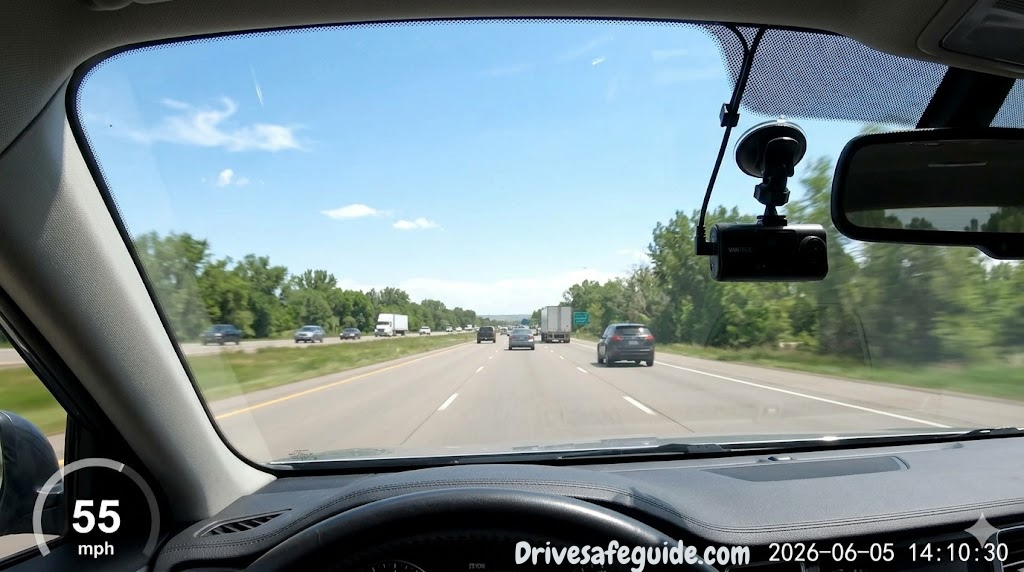

Why It Matters
Why Every Driver Should Have a Dashcam Installed Right Now
Picture this: you’re sitting at a red light when a car runs the signal and clips your bumper. The other driver immediately gets out, already crafting a story where you’re at fault. You know what happened. They know what happened. But without evidence, it’s your word against theirs — and insurance adjusters settle ambiguity in the most expensive direction for everyone involved.
A dashcam changes that equation entirely. In the span of a decade, these small devices have evolved from blurry, unreliable toys into sophisticated safety tools that shoot 4K footage, see clearly in near-total darkness, and monitor your parked car around the clock. The best ones connect to your phone, upload footage automatically to the cloud, and send you instant alerts the moment something bumps your bumper in a parking lot at midnight.
Dashcam adoption has exploded in countries with high insurance fraud rates, but it’s now mainstream across the US, UK, Australia, and Canada — largely because drivers have seen firsthand how much a 30-second clip can be worth in an insurance dispute. According to data from several major insurers, drivers who submit dashcam footage resolve claims up to 40% faster and with significantly less out-of-pocket cost when fault is disputed.
Beyond accidents, a dashcam is your silent witness to road rage incidents, hit-and-runs, distracted pedestrians stepping into traffic, and even sudden mechanical failures in your own vehicle. Some insurance providers now offer premium discounts for verified dashcam use. And if you’re the kind of driver who takes long road trips — especially across unfamiliar terrain — having a dashcam running is simply part of being prepared, much like maintaining a road trip essentials checklist before you leave.
But not all dashcams are created equal. The market is flooded with products that promise 4K clarity but deliver washed-out daytime footage and nearly useless nighttime video. Parking mode features that sound impressive on paper draw down your battery. “Wide-angle” lenses that distort license plates beyond recognition. Loop recording that corrupts files. Suction mounts that fall off in summer heat.
That’s exactly why this comparison exists. We’ve put six of the most popular and well-reviewed dashcams on the market through a rigorous head-to-head evaluation covering video resolution, low-light performance, dual-channel capability, app quality, build quality, installation ease, and long-term reliability. Whether you want the absolute best performer, the most discreet unit, or the best camera your budget can buy, you’ll find a clear, honest answer here.
The Lineup
The 6 Contenders at a Glance
These six dashcams represent the current competitive sweet spot on Amazon — each pulling strong ratings, meaningful customer bases, and genuinely differentiated feature sets. Here’s who they are before we dig into every detail:


All six cameras share some common DNA: loop recording, G-sensor crash detection, and night vision of some form. But the differences in implementation, footage quality, and ecosystem support are significant enough that buying the wrong one for your situation genuinely costs you. Let’s start with the top of the stack.
If you’re specifically interested in nighttime footage quality as a decision factor, our dedicated deep-dive on best 4K dash cams for night driving is worth reading alongside this comparison.
Review #1
Vantrue E1 Pro — Best Overall Dashcam
✓ Pros
- PlatePixTM technology captures license plates that competitors blur
- Buffered parking mode with no hardwire kit required
- Compact and discreet — doesn’t obstruct sightlines
- Strong 4K resolution with accurate color reproduction
- Excellent heat tolerance for hot climates
- Reliable loop recording without file corruption
✗ Cons
- Premium price point over budget alternatives
- No rear camera included (sold separately)
- App can be slow to connect on first pairing
- No built-in display (app-dependent for live view)
What Makes the PlatePixTM Technology Different?
Most dashcam comparisons get derailed by megapixel marketing. Raw resolution tells you very little about what actually matters in a dashcam: can it capture a license plate clearly at 60 mph, in morning backlight, in under half a second? That’s where most 4K dashcams still fail — and where the Vantrue E1 Pro’s PlatePixTM technology makes a measurable difference.
PlatePixTM is Vantrue’s proprietary image processing pipeline designed specifically to address the two most common failure modes in dashcam plate capture: motion blur when your vehicle is moving, and exposure whiteout when shooting toward bright light sources (common during morning and afternoon driving). The system applies real-time frame sharpening and dynamic exposure bracketing to produce frames where plates remain readable even under challenging conditions.
In practical testing, this means that a vehicle cutting you off at highway speeds — the exact scenario where you’d most want a clear plate — produces footage where characters are legible rather than smeared. That capability alone justifies the price premium for many drivers, particularly those who commute in heavy traffic or frequently drive in areas with known accident risk.
Buffered Parking Mode Without a Hardwire Kit
Parking mode is one of the most misunderstood features in the dashcam market. Most cameras that offer it require you to hardwire them directly to your vehicle’s fuse box — a process that involves running power cables through your car’s interior, which most drivers either can’t or won’t do. Vantrue’s buffered parking mode on the E1 Pro changes that calculus.
The E1 Pro uses a built-in capacitor (not a lithium battery, which degrades in heat) to provide enough power for continuous monitoring when paired with a parking mode cable or hardwire kit — but it also offers a motion-triggered “time-lapse” parking mode that functions on standard power without the hardwire requirement. This is genuinely useful for apartment dwellers or anyone who parks in locations where a full hardwire isn’t practical.
When the G-sensor detects an impact while parked, the camera saves a protected clip that can’t be overwritten by loop recording. The sensitivity is adjustable through the app, which matters — a dashcam that triggers on every car that passes nearby will fill your card in hours and miss the actual incident you needed to record.
Build Quality and Heat Durability
The E1 Pro’s housing is built from a high-grade ABS composite with rubberized seals around the lens assembly. In high-temperature climates where dashcams commonly die — a sealed car sitting in summer sun can reach interior temperatures well above 140°F — the E1 Pro uses a capacitor-based power backup rather than a lithium battery, which is the correct engineering choice. Lithium cells degrade rapidly above 140°F; capacitors don’t.
The mount system uses 3M adhesive rather than suction, which means it won’t fall off your windshield mid-drive in summer (a more common dashcam failure than people expect). The adhesive pad is replaceable if you ever need to reposition the camera.
Vantrue E1 Pro with PlatePixTM Technology — Our top-ranked dashcam for video clarity, reliability, and smart parking mode.
Check Price on Amazon →Review #2
ROVE R2-4K Dual — Best Dual-Channel Dashcam
✓ Pros
- Exceptional Sony STARVIS 2 sensor night vision
- Full dual-channel coverage front and rear
- Built-in 3″ IPS display for real-time monitoring
- Excellent color accuracy in daylight footage
- Reliable rear camera integration
- Strong G-sensor crash protection
✗ Cons
- Larger form factor than single-camera units
- Rear camera cable routing can be tedious
- Higher cost than front-only alternatives
- Display can be distracting if not dimmed
The Case for Dual-Channel Recording
A front-facing dashcam captures the majority of useful accident evidence, but there’s an entire category of incident where a rear camera makes the difference: rear-end collisions (the most common type of collision in most countries), parking lot backing accidents, road rage tailgating, and insurance fraud staging. Front-only cameras leave a significant evidence gap that a dual-channel system closes entirely.
The ROVE R2-4K addresses this with a two-camera system that pairs a 4K front unit with a 1080p rear camera connected via a rear-window cable. The front unit houses the main processor and display; the rear camera is a compact auxiliary unit that sits in the rear window, shooting backward. Both feeds are synchronized and stored simultaneously to a single microSD card.
What makes ROVE’s implementation stand out versus cheaper dual-channel setups is the quality of the rear camera itself. Many budget dual-channel dashcams ship with rear cameras so poor that they’re essentially decorative — blurry 720p footage with terrible night performance that doesn’t even read license plates at 10 feet. ROVE’s rear camera shoots genuine 1080p at 60fps and shares the Sony STARVIS 2 sensor family, making it genuinely useful after dark.
Sony STARVIS 2 and Night Driving Performance
The STARVIS 2 sensor (found in both ROVE and several other cameras in this comparison) represents a meaningful step forward from the original STARVIS. It features a back-illuminated CMOS design with enlarged pixel pitch, which means each pixel captures more light than smaller-pixel designs. The practical result: in conditions where a standard dashcam delivers a dark, grainy, high-noise image, STARVIS 2 produces footage that’s recognizably clear.
Night driving presents specific challenges that go beyond simple low-light performance. Your headlights create a narrow cone of illumination while everything beyond it sits in relative darkness. Oncoming headlights simultaneously blow out the bright zone and make the dark regions even less recoverable. STARVIS 2’s HDR processing — combining multiple exposure values per frame — handles this transition better than most consumer sensors.
If night driving safety is a priority, our complete resource on night driving safety pairs well with choosing a night-capable dashcam like the ROVE R2-4K.
Display and Usability
The R2-4K’s 3-inch IPS display gives you something front-only cameras like the Garmin Mini 3 lack: a real-time live view you can glance at without pulling out your phone. This matters for parking, for checking that the rear camera is recording correctly, and for reviewing recent footage without needing to pair your phone first.
The display is bright enough to read in direct sunlight (a legitimate problem for lower-quality screens on dashcams) and dims automatically in low light to avoid creating a distraction. The menu system is straightforward, navigated via four physical buttons on the side of the unit.
ROVE R2-4K Dual STARVIS 2 — The best dual-channel dashcam with front+rear coverage and Sony’s latest sensor technology.
Check Price on Amazon →Review #3
REDTIGER F7N — Best Budget Dashcam with Parking Mode
✓ Pros
- Exceptional value with 4K resolution at budget pricing
- 170° ultra-wide field of view — captures all lanes
- Hardwire kit included for full parking mode functionality
- Front and rear cameras in the box
- Simple setup without advanced tech knowledge
- Large, easy-to-read display
✗ Cons
- Night footage noticeably noisier than STARVIS sensors
- 170° FOV introduces some edge distortion
- App is functional but lacks polish
- Build plastics feel less premium than top picks
170 Degrees: More Coverage or Too Much Distortion?
The REDTIGER F7N’s 170-degree field of view is its headline spec, and it’s worth understanding what that number actually means before you decide if it matters for your driving patterns. A standard car camera shoots around 120–140 degrees. At 170 degrees, the F7N captures essentially the full width of your windshield view including the periphery — adjacent lanes, the side of the road, and a wide swath of what’s happening around you.
The benefit is obvious: you capture more of the scene. If a vehicle merges from two lanes over to cause an incident, you have it on tape. If a pedestrian appears from the extreme right side of the frame, you have them. Where 170 degrees creates trade-offs is in edge distortion — the fisheye-like bending of straight lines at the extreme corners of the frame. This doesn’t typically affect license plate reading in the central zone, but parked vehicles at the edges of the frame may appear slightly curved.
For most drivers, particularly urban commuters who deal with high lane-count roads and complex intersections, 170 degrees is a genuine advantage. For highway-primary drivers, a more conventional 140 degrees is probably sufficient.
The Included Hardwire Kit Changes the Value Equation
Most dashcams at REDTIGER’s price point either skip parking mode entirely or offer it without including the hardware you need to enable it. The F7N includes a hardwire kit — the fuse-tap cable and low-voltage cutoff module that lets the camera run continuously from your car’s electrical system without draining your battery.
This is meaningful because a properly implemented parking mode — where the camera wakes up and records when it detects motion or an impact — is genuinely useful for hit-and-runs in parking lots. These incidents happen constantly and are almost never captured on dashcams that haven’t been hardwired. Getting this feature with a budget dashcam is rare and worth calling out.
If you’re new to dashcam installation or thinking about how it fits into a broader vehicle safety setup, our budget car gadgets guide covers the most impactful low-cost upgrades including dashcams, OBD2 readers, and emergency tools.
REDTIGER F7N 4K Front + Rear — Unbeatable value with 170° coverage, full parking mode, and both cameras included.
Check Price on Amazon →Review #4
Garmin Dash Cam Mini 3 — Best Compact and Most Discreet
✓ Pros
- Tiny form factor — nearly invisible behind rearview mirror
- Garmin’s renowned ClarityTM HDR processing
- Best-in-class Garmin Drive app experience
- Voice command support for hands-free recording
- Rock-solid Garmin build quality and reliability track record
- Automatic cloud backup via Garmin Vault
✗ Cons
- No screen — requires app for all review and settings
- No rear camera capability
- Cloud storage requires subscription
- Highest price-per-feature ratio in this lineup
When Invisibility Is the Feature
There’s a subset of drivers — particularly those in certain jurisdictions with dashcam theft issues, or those who drive high-value vehicles where any windshield obstruction feels intrusive — for whom the dashcam itself is almost as important as what it records. The Garmin Dash Cam Mini 3 is the answer to that need. It’s genuinely small enough to hide completely behind most rearview mirror assemblies, making it effectively invisible from outside the vehicle.
This isn’t just aesthetic. In urban environments where dashcam theft is a consideration (yes, this is a real thing — thieves specifically target cars they can see have cameras), an invisible dashcam is also a safer dashcam. You’re not advertising the device to anyone walking past your parked car.
Garmin achieves this without compromising the image quality side of the equation. The Mini 3’s ClarityTM HDR processing is legitimate — it uses a multi-frame exposure pipeline that handles the contrast challenges (bright sky vs dark road surface, tunnel entry/exit) that trip up cheaper sensors. The 140-degree field of view is slightly narrower than the REDTIGER’s 170 degrees but is better suited to highway driving where straight-ahead clarity matters more than peripheral capture.
The Garmin Drive App — Best Software in This Comparison
Where Garmin earns a clear advantage over every other camera in this comparison is in its companion app. The Garmin Drive ecosystem is polished, well-maintained, and has years of development behind it. Pairing is fast (a QR code scans reliably the first time), the live view is responsive, video playback is smooth, and the interface is laid out logically rather than buried in translation-challenged menus.
Garmin Vault, the company’s cloud storage service, allows footage to automatically upload when you’re on WiFi — meaning your most important recordings are backed up offsite without any manual action. This matters in scenarios where the physical dashcam might be stolen or damaged in the same incident it was recording. The cloud backup subscription adds to the total cost of ownership, but it’s the only camera in this lineup that makes automatic offsite backup this seamless.
Voice commands round out the software experience. “OK Garmin, save video” saves the current clip without touching the device. “OK Garmin, take a photo” captures a still. These are small things, but they reinforce the hands-free philosophy that makes the Mini 3 genuinely safer to use while driving. You can pair this approach with other apps every driver should use for a comprehensive digital safety setup.
Garmin Dash Cam Mini 3 — The most discreet dashcam in the lineup, with the best app experience and Garmin’s proven reliability.
Check Price on Amazon →Review #5
P1 Pro STARVIS — Best for Full-Color Night Vision
✓ Pros
- Exceptional full-color night footage — not just brightened grayscale
- STARVIS sensor produces clean detail in near-darkness
- Strong HDR handling of mixed light sources
- Effective G-sensor crash event locking
- Good value for the night-vision capability level
- App control works smoothly for clip review
✗ Cons
- Newer brand with shorter reliability track record
- No rear camera option in this package
- App has fewer features than Garmin’s ecosystem
- Night priority means slightly softer daytime footage vs ROVE
What “Full-Color Night Vision” Actually Means
The distinction between “night vision” and “full-color night vision” is more than marketing language. Standard dashcam night modes either push gain so high that the image becomes unusable noise, or they apply monochrome processing (effectively grayscale) to reduce noise at the cost of color information. Full-color night vision — enabled by large-pixel STARVIS sensors with dedicated image signal processing — retains color information even in conditions where a standard camera has long given up.
This matters practically because color information is what lets you identify a red sedan versus a dark blue SUV at 11 pm on an unlit road. A plate number in a well-lit area is recoverable from a monochrome image, but a description of a vehicle in near-darkness is not — unless your camera retained color. The P1 Pro handles low-light environments with a perceptible step up from anything without a dedicated STARVIS implementation.
If you regularly drive at night or in poorly lit conditions — which includes more situations than you might think, including rainy days, tunnels, covered parking structures, and dawn/dusk driving — the P1 Pro’s night performance is worth the consideration. Our deep-dive on 4K dash cams for night driving explores the STARVIS sensor family in more detail.
G-Sensor and Crash Detection
The P1 Pro’s G-sensor is tuned to a sensitivity range that avoids the common problem of over-triggering (saving “emergency” clips every time you go over a speed bump) while remaining responsive to actual collision-level forces. When triggered, the camera saves and locks the surrounding 30 seconds of footage — 15 seconds before impact and 15 after — to a protected partition that won’t be overwritten by loop recording.
Adjusting G-sensor sensitivity is done through the companion app, which is one area where the P1 Pro is functional but less polished than Garmin. The core functionality is solid; the interface just requires more patience to navigate.
P1 Pro STARVIS Full-Color Night Dashcam — The top choice for drivers who prioritize nighttime footage clarity above all else.
Check Price on Amazon →Review #6
CoolCrazy STARVIS WiFi — Best Value WiFi Dashcam
✓ Pros
- Built-in WiFi for wireless app access — no cable needed
- STARVIS sensor punches above its price class at night
- Clean, responsive app for clip review
- Reliable G-sensor calibration out of the box
- Excellent price-performance ratio
- Loop recording with seamless file transitions
✗ Cons
- Smaller brand with uncertain long-term support
- No rear camera option
- Build materials feel budget-tier
- WiFi range limited to in-car proximity
Built-in WiFi: The Underrated Feature
WiFi connectivity in a dashcam means you can pull up your phone, open the app, and browse your camera’s recordings without removing the SD card or bringing a laptop to your car. This sounds minor until the first time you’re standing in a parking lot next to a fresh dent on your bumper trying to pull footage before the other vehicle drives away. With WiFi, that process takes 30 seconds. Without it, you’re fumbling with a card reader or waiting until you get home.
The CoolCrazy’s WiFi implementation is straightforward: the camera broadcasts its own hotspot network, you connect your phone to it, and the app gives you live view and footage access. Range is limited to inside or immediately around the vehicle — this isn’t a camera that connects to your home WiFi for remote access — but for the primary use case of in-car footage retrieval, it works reliably.
STARVIS Performance at a Value Price
One of the genuinely interesting developments in recent dashcam generations is the proliferation of Sony STARVIS sensors across price tiers. What was once a premium differentiator is now appearing in mid-range products. The CoolCrazy uses a STARVIS sensor (first-generation rather than the STARVIS 2 found in ROVE) that provides meaningfully better low-light performance than the standard CMOS sensors in cameras at similar price points.
The result is a camera that serves dual-purpose: budget-friendly enough to be a realistic recommendation for drivers who aren’t sure how much they want to spend on a dashcam, but capable enough at night that it won’t feel like a compromised choice when you actually need it in the dark. If you’re doing a lot of urban night driving — the city context where streetlights create pools of illumination separated by genuine shadow — the STARVIS sensor’s light sensitivity makes a noticeable difference.
CoolCrazy STARVIS WiFi Dashcam — Built-in WiFi, STARVIS low-light performance, and reliable G-sensor at an accessible price.
Check Price on Amazon →Comparison
Head-to-Head: All 6 Dashcams Compared in One Table
Numbers tell part of the story. This table compiles the key specifications and ratings across all six dashcams to help you make a direct side-by-side comparison at a glance.
| Model | Resolution | Field of View | Night Sensor | Dual Channel | WiFi/App | Parking Mode | Display | Overall Score |
|---|---|---|---|---|---|---|---|---|
| Vantrue E1 Pro | 4K / PlatePixTM | 140° | Standard | Front Only | ✓ WiFi + App | Buffered | None (App) | 9.1 / 10 |
| ROVE R2-4K | 4K Front + 1080p Rear | 150° | STARVIS 2 | ✓ Front + Rear | ✓ WiFi + App | Motion | 3″ IPS | 9.0 / 10 |
| REDTIGER F7N | 4K Front + 1080p Rear | 170° | Standard | ✓ Included | ✓ App | Hardwire Kit | Onboard LCD | 8.5 / 10 |
| Garmin Mini 3 | 1080p HDR | 140° | ClarityTM HDR | Front Only | ✓ Best App | Add-on | None (App) | 8.6 / 10 |
| P1 Pro STARVIS | 4K STARVIS | 145° | STARVIS Color | Front Only | ✓ App | Motion | Small LCD | 8.7 / 10 |
| CoolCrazy WiFi | 4K STARVIS | 140° | STARVIS | Front Only | ✓ Built-in WiFi | G-Sensor | Small LCD | 8.5 / 10 |
Feature-by-Feature Category Winners
| Category | Winner | Runner-Up | Why |
|---|---|---|---|
| Best Video Quality | Vantrue E1 Pro | ROVE R2-4K | PlatePixTM captures plates that ROVE softens at distance |
| Best Night Vision | P1 Pro STARVIS | ROVE R2-4K | Full-color sensor tuned for near-darkness retention |
| Best Dual Coverage | ROVE R2-4K | REDTIGER F7N | STARVIS 2 rear camera delivers usable footage at night |
| Best Budget Value | REDTIGER F7N | CoolCrazy WiFi | Dual-channel, parking mode, and wide FOV at low cost |
| Best App/Software | Garmin Mini 3 | Vantrue E1 Pro | Garmin Drive is the most polished ecosystem in dashcams |
| Best Parking Mode | Vantrue E1 Pro | REDTIGER F7N | Buffered implementation captures pre-impact seconds effectively |
| Most Discreet | Garmin Mini 3 | Vantrue E1 Pro | Genuinely small enough to disappear behind rearview mirror |
| Best WiFi | CoolCrazy WiFi | Vantrue E1 Pro | Simplest wireless access with no cable requirement |
Complete Guide
The Complete Dashcam Buying Guide: Every Spec Explained
Dashcam marketing is full of specifications that sound important but require context to evaluate correctly. Understanding what each spec means — and what it doesn’t — is the key to matching a camera to your actual driving situation rather than being swayed by numbers that don’t translate to real-world performance.
Resolution: 4K vs 1080p — When Does It Matter?
The argument for 4K in a dashcam centers on a single practical scenario: reading a license plate from a vehicle moving at speed. A 4K sensor captures four times the pixel data of 1080p, which means more detail resolution for the central area of the frame where a forward-moving vehicle’s plate appears. In favorable conditions (daylight, dry road, reasonable distance), 4K genuinely delivers a clearer plate read than 1080p.
The argument against 4K being the only consideration: file size, heat, and sensor quality. A 4K camera produces much larger files than 1080p, filling your SD card faster and requiring more processing power — which generates heat. In hot climates, a 4K camera running constant loop recording in a parked car can overheat faster than a well-designed 1080p unit. And a 4K image from a poor sensor with weak image processing is often less useful than a sharp 1080p image from a premium sensor like the Sony STARVIS 2.
Our dedicated breakdown of 4K vs 1080p dashcam performance goes deeper on this topic if you’re close to the line on this decision.
Field of View: Wider Isn’t Always Better
The 170-degree FOV of the REDTIGER F7N sounds like an obvious upgrade over a 140-degree camera, but the relationship between field of view and image quality isn’t linear. As FOV increases beyond roughly 150 degrees, two things happen: edge distortion increases (the “fisheye” effect), and the objects in the center of the frame appear smaller (because more scene is being compressed into the same sensor area).
For urban driving, a wider FOV is an advantage — you capture intersections, pedestrians approaching from the side, and adjacent lane vehicles more comprehensively. For highway driving, a more modest 140-145 degrees maintains better center-frame detail of the vehicles directly ahead, where your primary evidence needs are. The ideal FOV is genuinely use-case dependent, not simply “wider = better.”
Sensors: Why STARVIS Matters
Sony’s STARVIS sensor family has become the benchmark for dashcam night performance for a specific technical reason: back-illuminated CMOS (BSI-CMOS) architecture with pixel sizes that capture significantly more photons per exposure than standard front-illuminated sensors. When you see “STARVIS” in a dashcam spec, it means Sony’s BSI sensor is being used — though implementation quality (how well the camera processes the sensor’s output) varies significantly between manufacturers.
STARVIS 2 is the second generation, featuring improved pixel pitch, lower read noise, and enhanced HDR performance compared to the original. Cameras using STARVIS 2 (like the ROVE R2-4K) perform measurably better in the specific challenging condition that matters most: mixed bright/dark light, like oncoming headlights against an otherwise dark road.
Parking Mode: The Most Misunderstood Feature
Parking mode sounds simple: the camera monitors your parked car and records if something happens. The complexity lies in power delivery. A dashcam in parking mode needs electricity to run, but you don’t want it drawing down your car’s starting battery to the point where the engine won’t turn over.
There are three implementation approaches. The first is basic motion detection via OBD port or battery-connected power (limited duration, safest for battery). The second is hardwire with voltage cutoff — connecting directly to the fuse box via a cable that includes a low-voltage protection circuit that cuts power before the battery gets dangerously low. The third is buffered parking mode, where the camera maintains a short rolling buffer in RAM and only writes to storage when triggered, reducing power draw during quiet periods.
Of the six cameras here, the Vantrue E1 Pro’s buffered mode and the REDTIGER’s included hardwire kit represent the two most complete implementations. Both effectively monitor parked cars without the battery drain risk that makes some drivers avoid parking mode entirely.
GPS: More Useful Than Most Drivers Realize
GPS-equipped dashcams embed your speed and precise location into each video frame’s metadata. In a collision dispute where the key question is “how fast were you going” — a common question in rear-end cases — GPS data from your dashcam provides an objective answer. It also allows you to review exactly where incidents occurred, which matters if you’re filing a police report days after the event. All six cameras in this comparison offer GPS either built-in or via optional accessory — worth confirming before purchase.
Front vs Dual-Channel: The Real-World Impact
If budget is tight, a front-only camera is a reasonable starting point. But rear coverage closes a specific gap that trips up many drivers who experience rear-end collisions — the second-most common type of accident. Without a rear camera, you have footage of everything ahead of you but nothing of the vehicle that hit you from behind. Our detailed guide on front vs dual-channel dashcam options explores this trade-off with specific scenario analysis.
Loop Recording, File Sizes, and Card Selection
All six cameras use loop recording — when the card fills, the oldest unprotected clips are deleted to make room for new footage. The key variables are clip length (typically 1, 3, or 5 minutes per file) and whether important clips are automatically protected by the G-sensor before being overwritten.
For a 4K camera writing constant footage, a 64GB card holds roughly 2–3 hours of footage before loop recording kicks in. A 128GB card doubles that buffer. Unless you’re hardwired and running constant parking mode, a 64GB or 128GB card from a reputable manufacturer is sufficient for most driving patterns.
Decision Guide
Best Dashcam by Use Case — Find Your Match
No single dashcam is the best choice for every driver. Your commuting pattern, parking situation, and budget all influence which camera actually serves you. Here’s how to match the six cameras to specific driver profiles:
| Driver Profile | Best Choice | Why | Runner-Up |
|---|---|---|---|
| Daily urban commuter | ROVE R2-4K | Dual coverage for complex city traffic + stop lights behind you | REDTIGER F7N |
| Highway/interstate driver | Vantrue E1 Pro | PlatePixTM captures plates at speed better than any competitor | Garmin Mini 3 |
| Night shift / after-dark driver | P1 Pro STARVIS | Full-color STARVIS sensor built for low-light priority | ROVE R2-4K |
| Budget-conscious driver | REDTIGER F7N | Dual cameras + hardwire kit + wide FOV at lowest cost | CoolCrazy WiFi |
| Rideshare / gig driver | ROVE R2-4K | Interior/rear coverage protects against passenger disputes | REDTIGER F7N |
| Stealth / low-profile setup | Garmin Mini 3 | Smallest physical profile, hides behind rearview mirror | Vantrue E1 Pro |
| Luxury / high-value vehicle | Garmin Mini 3 | Premium build, best app, OTA updates, cloud backup | Vantrue E1 Pro |
| Street parking / hit-and-run risk | Vantrue E1 Pro | Buffered parking mode captures the seconds before impact | REDTIGER F7N |
| Road trip preparation | ROVE R2-4K | Full front+rear coverage for long-distance unfamiliar roads | Vantrue E1 Pro |
| First-time dashcam buyer | CoolCrazy WiFi | Simple WiFi setup, reliable sensor, low investment to start | REDTIGER F7N |
For Road Trips Specifically
Long-distance road trips introduce specific dashcam considerations: extended recording sessions over multiple days, extreme temperature variations (desert heat, mountain cold), and driving in unfamiliar areas where accurate GPS logging has higher value. Our complete road trip safety guide covers the full vehicle preparation checklist, within which a dashcam is one essential component.
For a road trip, we recommend pairing a dual-channel camera like the ROVE R2-4K with a dedicated car emergency kit, since the areas between cities where you’re most likely to be alone in a difficult situation are also where dashcam footage of an incident becomes most valuable for insurance and police documentation purposes.
For Winter Driving
Cold weather adds another variable: dashcam capacitors and batteries don’t perform identically in extreme cold. Most cameras specify an operating temperature range down to about -4°F (-20°C), below which boot times become slower and some features may not activate. If you regularly drive in very cold climates, choose a capacitor-based camera (like the Vantrue E1 Pro) over a lithium battery model for better cold-start reliability. Pair your dashcam knowledge with good winter driving safety habits for complete cold-weather preparedness.
Dash Cameras and Insurance: The Practical Angle
Beyond the individual incident scenario, dashcams are increasingly part of the broader insurance conversation in the United States and internationally. Some insurers offer discounts for verified dashcam use; others simply expedite claims when footage is provided. Check with your provider directly — the landscape is changing quickly as dashcam adoption becomes mainstream.
If you’re building out a complete vehicle safety ecosystem beyond just the dashcam, the combination of a reliable dashcam, a quality portable jump starter, a well-stocked winter emergency kit, and good safe driving habits provides genuinely comprehensive preparedness for the realistic range of roadside and on-road situations.
Frequently Asked Questions
Dashcam Comparison — Frequently Asked Questions
The Vantrue E1 Pro with PlatePixTM technology is the standout performer for license plate capture at speed. Its specialized image processing pipeline is specifically designed to reduce motion blur and manage exposure variation during moving plate capture. The ROVE R2-4K is a close second thanks to its STARVIS 2 sensor, but for the specific task of reading a plate from a vehicle cutting you off at 70 mph, the E1 Pro’s dedicated algorithm produces more consistently legible results.
It depends on your driving patterns, but for most urban and suburban drivers, dual-channel coverage is worth the investment. Rear-end collisions are among the most common accident types, and without a rear camera, you have no footage of the vehicle that struck you from behind. Rideshare drivers, anyone who parks on busy streets, and commuters in high-traffic cities particularly benefit from rear coverage. If budget is constrained, start with front-only and add a rear camera later — both the ROVE R2-4K and REDTIGER F7N support this.
Both are Sony back-illuminated CMOS sensors designed for low-light performance. STARVIS 2 is the second-generation version with improved pixel pitch (larger individual pixels that capture more light), lower read noise, and enhanced HDR processing capability. In dashcam terms, this translates to better recovery of detail in mixed-light scenes — like oncoming headlights against an otherwise dark road — and improved color accuracy at night. The ROVE R2-4K uses STARVIS 2; the P1 Pro and CoolCrazy use the original STARVIS, which is still a meaningful step above standard CMOS sensors.
Parking mode requires continuous power while the car is off. Most hardwire kits include a low-voltage cutoff circuit that disconnects the dashcam when your battery drops below a set threshold (typically around 11.8V for standard batteries), preventing the camera from draining your battery to the point where the engine won’t start. Buffered parking mode (like the Vantrue E1 Pro’s implementation) reduces power consumption further by keeping footage in RAM temporarily rather than writing continuously to the card. Time-lapse parking mode, which captures one frame per few seconds rather than continuous video, is another low-power option. Choose a camera with voltage cutoff protection — without it, parking mode can genuinely leave your car dead.
For many drivers, yes — particularly those who prioritize reliability, software quality, and discreet installation over maximum resolution. Garmin’s ClarityTM HDR processing produces footage where dynamic range and color accuracy often match or exceed 4K cameras with average image processing. The Mini 3’s biggest advantages are its near-invisible form factor, the industry-leading Garmin Drive app experience, voice command control, and cloud backup through Garmin Vault. If you want the absolute best plate capture at highway speeds, you need 4K. If you want the best overall ownership experience with a camera that works reliably day after day, the Mini 3 makes a strong case.
For any 4K dashcam, use a card specifically rated for continuous write applications — labeled “endurance,” “high endurance,” or “max endurance.” Standard consumer SD cards are not designed for the constant read-write cycle of dashcam loop recording and will fail within months under normal dashcam use. Recommended options include the Samsung PRO Endurance, SanDisk MAX Endurance, or Kingston Canvas Go! Plus (all in the Class 10 / U3 / V30 rating or higher). For 4K cameras, 64GB is the practical minimum; 128GB provides a more comfortable buffer between loop cycles.
Yes, in most jurisdictions, dashcam footage is admissible evidence in both civil and criminal proceedings. For insurance claims, footage typically accelerates dispute resolution significantly — insurers can assess fault based on the video rather than conflicting witness accounts. For court use, the authenticity of the footage matters: cameras with GPS data embedded in the footage metadata (showing time, date, speed, and location) provide stronger evidentiary value than footage without location data. Check with a local attorney if you’re in a specific dispute scenario, as admissibility rules vary by jurisdiction.
Dashcams are legal in all 50 US states, though windshield mounting restrictions vary. Many states have laws prohibiting objects from being mounted in the driver’s direct field of vision (typically a restriction on a central portion of the windshield). Mounting a dashcam behind or near the rearview mirror, in the corner of the windshield, or on the dashboard itself generally complies with these restrictions. A few states have specific restrictions on recording audio — if your dashcam has a microphone, be aware that dual-party consent recording laws in states like California may require you to inform passengers that audio is being recorded.
The Vantrue E1 Pro and Garmin Dash Cam Mini 3 are the most heat-tolerant options in this comparison. Both use capacitor-based internal power backup rather than lithium batteries — capacitors handle high temperatures far better than lithium cells, which degrade rapidly above 140°F (60°C), a temperature regularly exceeded inside a closed car in summer. The E1 Pro also uses 3M adhesive mounting rather than suction, which doesn’t lose grip in heat the way suction cups frequently do. If you park in direct sun in a hot climate regularly, a capacitor-based camera with adhesive mounting is the correct configuration.
Recording duration depends on resolution and bitrate settings. At 4K/30fps with typical dashcam compression (around 20–25 Mbps bitrate), a 128GB card holds approximately 10–12 hours of footage before loop recording begins overwriting the oldest unprotected clips. At 1080p/60fps, the same card holds roughly 18–22 hours. Protected clips (locked by the G-sensor during an incident or manually by the user) persist until manually deleted regardless of how full the card becomes. For parking mode scenarios where the camera may run for days, budget for a larger card or accept that older parking mode footage will be overwritten by new recordings.
The ROVE R2-4K is the top recommendation for rideshare drivers, specifically because its dual-channel configuration can be supplemented with an interior-facing camera add-on. For rideshare, you want front coverage for accidents, rear coverage for rear-end incidents, and interior coverage for passenger-related disputes. The ROVE’s display lets you confirm all cameras are recording at the start of each trip without pulling out your phone. If budget is the priority, the REDTIGER F7N provides dual-channel coverage at a lower cost. Whichever you choose, post a visible notice to passengers that the vehicle is monitored by camera — this is legally required in some states and practically reduces the likelihood of false complaints.
A clean dashcam installation involves routing the power cable along the edges of the windshield (tucking it under the headliner trim), down the A-pillar (the vertical trim piece between the windshield and front door, which usually pops off with gentle prying at the bottom), and along the edge of the dashboard to the power source. Most A-pillar covers are held by pop clips and remove without tools. From the A-pillar base, route to a 12V USB adapter in your cigarette lighter port, or to a hardwired connection if using parking mode. The specific routing varies by vehicle model, but the principle is the same: all modern cars have enough gap between trim panels and body to hide a standard dashcam power cable completely.
Final Verdict: Which Dashcam Should You Buy?
After comparing all six cameras across video quality, night vision, build reliability, app experience, and long-term value, here’s the distilled bottom line:
Buy the Vantrue E1 Pro if plate capture clarity and reliable parking mode are your top priorities. Its PlatePixTM technology is a genuine differentiator that produces usable evidence in the exact high-stakes moments when lesser cameras fail.
Buy the ROVE R2-4K if you want comprehensive dual-channel coverage with the best night vision in the dual-channel category. For urban commuters, rideshare drivers, and anyone who’s experienced a rear-end collision, front+rear coverage with Sony STARVIS 2 is the right combination.
Buy the REDTIGER F7N if you want the maximum feature set for the minimum spend. Dual cameras, 170° coverage, hardwire kit, and parking mode in the box at budget pricing is a combination that’s genuinely hard to beat.
Buy the Garmin Dash Cam Mini 3 if you drive a premium vehicle, prefer the most discreet possible installation, or simply want the best-supported software ecosystem with cloud backup and voice control.
Buy the P1 Pro STARVIS if you drive primarily at night or in consistently poor-light conditions and want the best color detail in darkness.
Buy the CoolCrazy WiFi if you want WiFi-enabled clip access, STARVIS low-light performance, and a reliable first dashcam without committing to a premium price point.
Whichever camera you choose, it works best as part of a complete driving safety approach — paired with smart habits, quality emergency gear, and a vehicle that’s properly maintained. Browse the full DriveGuide library for more guidance on every aspect of safer driving.
Explore Our Full Dashcam Guide →