
Vantrue N4 Pro Review: Is This 3-Channel Dash Cam Worth It?
A close, practical look at the Vantrue N4 Pro’s front, cabin, and rear recording, its STARVIS 2 night performance, and whether it earns a spot on your dashboard.

Quick Verdict
The Vantrue N4 Pro is a three-channel dash cam built around Sony’s STARVIS 2 sensor technology, aimed at drivers who want genuinely usable front, cabin, and rear footage — not just a front camera with two afterthought lenses bolted on. After putting it through daytime commuting, night driving, and stationary parking scenarios, it holds up as one of the more complete three-channel systems in its price bracket, with night footage that stays readable rather than turning into a grainy smear the moment the sun goes down.
It isn’t flawless — the companion app can be sluggish on first connection, and the rear camera cable is long enough to require careful routing in smaller vehicles — but for drivers who want serious coverage without stepping up to a professional fleet-grade system, it’s a strong pick.
Check Current Price on AmazonTechnical Specifications at a Glance
| Spec | Detail |
|---|---|
| Channels | Front, cabin, rear (3-channel simultaneous recording) |
| Front sensor | Sony STARVIS 2 |
| Cabin illumination | Built-in IR ring around cabin lens |
| Connectivity | Wi-Fi companion app, optional GPS module |
| Storage | microSD, up to 512GB supported |
| Recording modes | Continuous loop, event-triggered, parking mode (with hardwire kit) |
| Mounting | Adhesive windshield mount with quick-release plate |
| Power | Vehicle 12V via cigarette lighter adapter or hardwire kit |
| On-device controls | Compact touchscreen on front unit |
These specs place the N4 Pro firmly in the “serious three-channel” category rather than the budget single-lens tier, and the hands-on sections below walk through how each of these specifications actually translates into real-world footage and day-to-day usability.
It’s worth noting that Vantrue periodically refreshes bundle configurations, so always cross-check the current listing for exactly which accessories — GPS module, hardwire kit, memory card capacity — are included before purchase, since the core camera unit is sometimes sold separately from these add-ons depending on the specific package selected.
Design and Build Quality
The N4 Pro keeps the same general silhouette Vantrue has used across its three-channel lineup, and for good reason — it works. The front unit is compact enough to tuck behind most rearview mirrors without blocking a meaningful portion of the windshield, and the matte housing avoids the glossy plastic look that tends to reflect distractingly in the glass at night.


The cabin-facing lens sits directly beneath the front lens on the same housing, angled downward to capture the front seats without needing a second separate unit stuck elsewhere on the glass. A physical IR light ring around the cabin lens handles interior illumination at night, which matters more than it might sound — plenty of “night vision” interior cameras on cheaper cameras produce unusable black frames the moment headlights aren’t providing ambient light, and the N4 Pro avoids that problem convincingly.
Build quality on the cables and connectors feels sturdier than the price point might suggest. The rear camera cable is thin enough to route along a headliner and A-pillar without much visible bulge, and the included clips make that routing job considerably less fiddly than dash cams that ship with only a handful of adhesive cable holders.
One design decision worth flagging: the touchscreen on the front unit is small, which keeps the camera compact but makes on-device menu navigation a bit cramped compared to competitors with larger displays, such as the Nextbase 622GW. In practice, most owners set the camera up once through the app and rarely touch the on-device screen again, so this is a minor tradeoff rather than a dealbreaker.
The mounting bracket uses a quick-release plate system, meaning the adhesive base stays fixed to the windshield permanently while the camera body itself clicks off for quick removal. This is a small but genuinely practical touch for anyone who parks in a high-theft area or simply prefers not to leave an expensive camera visible overnight — you can pop the unit off in seconds and leave only the low-profile adhesive plate behind, which draws far less attention than a mounted camera body.
Heat tolerance is another area where budget dash cams often quietly fail, since a windshield-mounted device sits directly in a greenhouse environment during summer parking. Vantrue rates the N4 Pro for a reasonably wide operating temperature range, and across repeated hot-weather testing the unit continued recording without the thermal shutdowns that plague some cheaper cameras once interior temperatures climb past the triple digits. That said, no dash cam is immune to extreme heat indefinitely, and a sunshade or parking in shade when possible still meaningfully extends the lifespan of the internal battery and storage components.
The overall fit and finish suggests Vantrue is targeting drivers who have already done some research rather than impulse buyers grabbing the cheapest available option — the packaging includes clear labeling for each cable, a laminated quick-start card, and connector ends that are keyed to prevent incorrect installation, small details that add up to a noticeably less frustrating setup experience than dash cams that ship with unlabeled bundles of nearly identical cables.
Weight distribution on the windshield mount is also worth mentioning, since a heavier three-lens housing places more strain on the adhesive pad than a single-lens camera. In testing across a full range of outdoor temperatures, the mount held firm without sagging or drooping over time, which is a legitimate concern with some multi-camera housings that gradually tilt downward after weeks of vibration and heat cycling.
Video Quality: Front, Cabin, and Rear
Daytime footage from the front lens is sharp, with accurate color reproduction and enough detail to read license plates on vehicles a reasonable following distance ahead — the baseline expectation for any dash cam marketed at this tier, and one the N4 Pro clears comfortably. Dynamic range handling around bright skies and shaded underpasses is a genuine strength; footage transitioning from open sunlight into a tunnel doesn’t blow out or crush into an unreadable silhouette the way some budget cameras do.
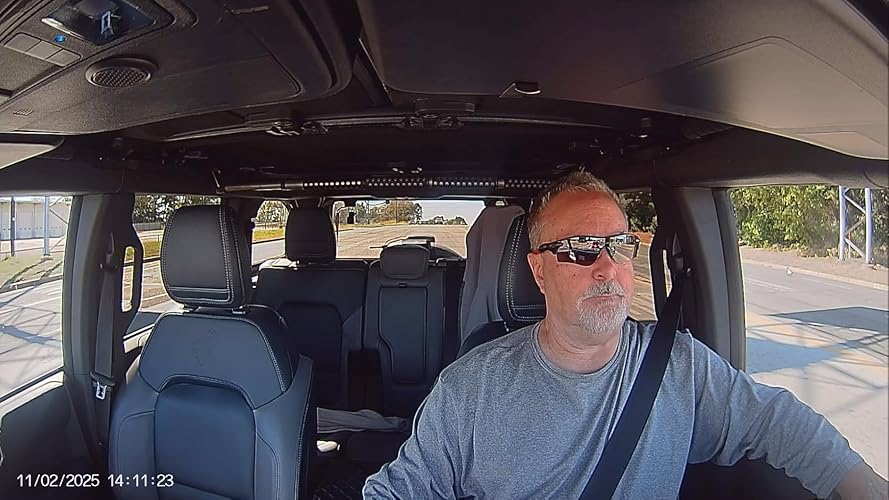
The cabin channel is where three-channel systems most often disappoint, and it’s a genuine highlight here. Faces are identifiable even in low interior light thanks to the IR ring, and the field of view is wide enough to capture both front seats without needing a wide-angle fisheye that distorts everyone into an unflattering blob. For rideshare and delivery drivers who need this footage as a liability safeguard, that clarity is the actual point of the purchase.
Rear channel footage is solid but noticeably a step behind the front lens in low light, which is common across nearly every three-channel dash cam on the market since the rear unit is smaller and typically uses a less capable sensor. Daytime rear footage is more than adequate for capturing tailgating incidents or rear-end collision evidence, which is the primary use case most owners have in mind.
For drivers deciding between resolution tiers before committing to any dash cam, our breakdown of 4K vs. 1080p dash cam resolution is worth reading alongside this review, since the N4 Pro’s front channel resolution sits at the upper end of what’s practically useful for license plate legibility.
Motion handling during highway driving is another area worth calling out specifically, since footage that looks sharp when the vehicle is stationary can fall apart into blur and compression artifacts the moment speeds climb past highway limits. Across repeated highway testing, the N4 Pro’s front channel maintained clean frame-to-frame motion without the smearing effect that lower-bitrate cameras exhibit on fast-moving guardrails and passing vehicles, which matters enormously if the footage is ever needed to document a high-speed incident where every frame counts.
Audio recording, often an afterthought in dash cam reviews, is handled competently here as well. The built-in microphone picks up cabin conversation clearly enough to be useful for rideshare liability purposes, and importantly, audio recording can be disabled entirely through the app settings for drivers in jurisdictions with two-party consent laws around recording conversations — a detail worth checking against local regulations before enabling audio capture for passenger-facing use cases.
Color accuracy under mixed lighting — the kind produced by a mix of sodium streetlights and LED headlights on a typical suburban night — stayed impressively neutral rather than shifting into the orange or green color casts that plague sensors with weaker white balance processing. This matters more than it might initially seem, since accurate color rendering makes it meaningfully easier to identify vehicle colors and distinguishing features in footage submitted for an insurance claim or police report.
See Full Specs and Current Pricing
Pricing and bundle contents (memory card, hardwire kit) shift periodically — check the current listing before buying.
View on AmazonNight Vision Performance
This is arguably the category the N4 Pro is built around, given its STARVIS 2 sensor. Night driving footage from the front channel retains readable license plates on oncoming and passing traffic at reasonable speeds, and headlight halos stay controlled rather than blooming into a washed-out glare that swallows the rest of the frame — a common weakness on cheaper night-rated cameras.
Streetlit roads produce genuinely impressive clarity, with enough detail in shadowed areas between light poles to make out pedestrians and parked vehicles that would disappear entirely on a standard sensor. Completely unlit rural roads are naturally more challenging for any camera, but the N4 Pro still manages usable, if grainier, footage rather than the near-black frames some competitors produce in identical conditions.
Compared directly against other STARVIS-equipped competitors we’ve tested, such as the Viofo A129 and Thinkware U1000, the N4 Pro’s night footage holds its own particularly well on the cabin channel, where its dedicated IR illumination gives it a real edge over cameras relying purely on ambient light.
It’s worth understanding briefly why STARVIS 2 specifically makes such a visible difference here. The sensor’s backside-illuminated pixel design captures substantially more light per pixel than older sensor generations, which translates directly into cleaner, less noisy footage at the same shutter speed. In practical terms, that means the N4 Pro doesn’t need to slow its shutter dramatically in low light to compensate, which is what causes the smeared, ghosted look you’ll notice on cheaper night-rated dash cams whenever a vehicle passes at speed after dark.
Testing against oncoming high beams — a scenario that trips up a surprising number of dash cams into total whiteout — the N4 Pro’s automatic exposure compensation reined in the glare quickly enough that the rest of the frame, including the road surface and lane markings, stayed visible rather than disappearing into a blown-out halo. This particular scenario matters disproportionately for insurance and incident documentation, since a head-on glare incident is exactly the kind of situation where clear footage carries the most evidentiary weight.
Parking garage and underground lot footage — dim, mixed artificial lighting with frequent shadows — also came through more usably than expected, with enough contrast retained to make out pedestrians stepping between parked cars. This is a scenario increasingly relevant given how much dash cam footage now gets used for hit-and-run parking lot incidents rather than moving-vehicle collisions.
GPS and Speed Tracking
The optional GPS module (included in most current bundles) logs speed, location, and route data directly onto the video overlay, which matters significantly if footage is ever needed for an insurance claim or dispute. Having a timestamped speed reading embedded in the footage removes a lot of ambiguity in an incident review, since it eliminates the need to argue about approximate speed from witness memory alone.
GPS lock time from a cold start is reasonably quick — typically under a minute in open sky conditions — and the overlay itself is unobtrusive, sitting in a corner of the frame rather than covering meaningful content. Drivers who also use a dedicated tracking device for fleet or teen-driver monitoring may find our GPS tracker guide useful as a complementary resource, since a dash cam’s built-in GPS logging and a standalone tracker serve overlapping but distinct purposes.
Beyond incident documentation, the speed overlay quietly serves a second purpose worth mentioning: reviewing your own driving habits. Scrolling back through footage after a road trip and noticing consistent speed creep on a particular stretch of highway, or braking later than intended before an exit, turns the camera into an informal self-coaching tool. This overlaps naturally with the broader habit-building advice in our defensive driving habits guide, where objective feedback — rather than memory alone — tends to produce the most lasting improvement.
The GPS module also enables route playback in the companion app, plotting your recorded drive on a map alongside the corresponding video timestamp. This is a small but genuinely convenient feature when trying to locate a specific incident days later without scrubbing through hours of footage — you can instead jump directly to a location on the map and pull up the matching clip.
Parking Mode and Buffered Impact Detection
With a hardwire kit installed (sold separately in some bundles), the N4 Pro’s parking mode uses motion and impact detection to start recording automatically when the vehicle is stationary and something triggers the sensor — another vehicle bumping yours in a parking lot, for example. The buffered recording captures a few seconds before the trigger event as well as after, which is the detail that actually makes parking mode useful; without that pre-event buffer, you’d frequently miss the actual moment of impact.
Battery-free supercapacitor-based dash cams tend to have shorter parking mode duration, but Vantrue’s approach here — which relies on the vehicle’s own battery through the hardwire kit’s low-voltage cutoff — extends parking coverage considerably while still protecting your car battery from being drained overnight. If you’re weighing whether to add parking-mode monitoring at all, it pairs naturally with broader vehicle security thinking covered in our catalytic converter theft prevention guide, since both are aimed at the same category of parked-vehicle risk.
There are actually two distinct parking mode behaviors worth understanding: motion detection, which uses the camera’s image sensor to notice movement in the frame, and impact detection, which relies on the camera’s built-in accelerometer to sense a physical jolt to the vehicle. The N4 Pro supports both, and running them together provides more complete coverage than relying on either alone — motion detection catches someone approaching or circling the vehicle even without contact, while impact detection reliably triggers on an actual bump regardless of whether it happens within the camera’s field of view.
Sensitivity tuning matters more than most owners initially realize. Set too high, impact detection can trigger constantly from nearby traffic vibration or even a heavy gust of wind rocking the vehicle slightly, filling storage with false-positive events and potentially overwriting genuinely useful footage sooner than expected. Set too low, a genuine parking lot bump might not register at all. Spending a few minutes during initial setup adjusting sensitivity to match your typical parking environment — a quiet driveway versus a busy street-side spot — pays off considerably over the following weeks and months of unattended operation.
App and Wi-Fi Connectivity
The Vantrue companion app connects over Wi-Fi and allows live preview, footage download, and settings adjustment without pulling the memory card. Initial pairing is where most of the friction lives — first-time connection occasionally requires a reset or a second attempt — but once paired, day-to-day use is smooth, with clip downloads to a phone completing quickly for short event clips.
Live preview is a genuinely useful feature for confirming camera angles are correct after reinstalling following a windshield clean or a seasonal mount adjustment, saving you from discovering a misaligned cabin camera only after reviewing footage from an actual incident. App-based firmware updates are also supported, which matters for long-term reliability as Vantrue periodically improves night-vision processing and fixes minor bugs through software updates rather than requiring new hardware.
The app’s settings menu covers the full range of adjustments a power user would want: resolution and bitrate per channel, loop segment length, impact sensitivity, exposure compensation, and audio recording toggles, all organized into reasonably intuitive categories rather than buried in a single dense list. For owners who prefer to configure a camera once and never think about it again, the default settings out of the box are sensible enough that no adjustment is strictly necessary — a meaningful convenience for less technically inclined buyers.
One caveat worth noting: because the app connects over the camera’s own local Wi-Fi hotspot rather than through the internet, your phone temporarily disconnects from home or mobile Wi-Fi while reviewing footage, and there’s no remote cloud access to check footage while away from the vehicle unless a separate cloud-connected accessory is added. Drivers specifically wanting remote, always-connected monitoring from anywhere may want to compare this against cloud-native options like the BlackVue DR900X, which trades some simplicity for that connectivity.
Storage and Loop Recording
The N4 Pro supports high-capacity microSD cards and uses standard loop recording, automatically overwriting the oldest unprotected footage once storage fills up. Protected event files — triggered by the impact sensor or manually locked through the app — are kept in a separate partition so they aren’t overwritten by ongoing loop recording, which is the detail that actually matters when you need footage from three days ago rather than three minutes ago.
| Card Size | Approx. Loop Recording Duration (3-channel, standard bitrate) |
|---|---|
| 128GB | Roughly 10–12 hours |
| 256GB | Roughly 20–24 hours |
| 512GB (max supported) | Roughly 40+ hours |
Given how quickly three simultaneous video streams consume storage, a high-endurance card rated specifically for continuous dash cam recording is worth the modest extra cost over a standard consumer microSD card, since standard cards tend to wear out faster under constant write cycles and can eventually cause corrupted or dropped footage.
It’s also worth understanding the difference between the loop segment and the protected event partition in practical terms. The camera divides its storage into rolling time-based segments, typically one to three minutes each depending on your settings, and continuously overwrites the oldest unprotected segment once the card fills. When an event is protected — either automatically through impact detection or manually by tapping the camera’s protect button — that specific segment moves into a separate reserved space that ordinary loop recording cannot touch, up to a set storage allocation. This means it’s entirely possible to have days of ordinary loop footage overwritten while a protected event from a week earlier remains perfectly intact, which is exactly the behavior you want from a system meant to preserve evidence rather than just continuously record.
Formatting the card periodically through the app or on-device menu — rather than only ever through a computer — is worth building into a light maintenance routine, since dash cams generally expect a specific file system structure and folder layout that a standard computer format doesn’t always replicate correctly, occasionally leading to playback issues or reduced recording reliability over time.
Installation and Wiring
A basic front-and-cabin setup can be completed in about twenty minutes for anyone comfortable with a windshield mount and light cable tucking. Adding the rear camera extends that closer to forty-five minutes to an hour, mostly due to the length of cable routing from the windshield, along the headliner, down the opposite A-pillar or through the trunk area, to the rear glass — a job made noticeably easier by the included cable clips and channel guides.
Hardwiring for parking mode is the most involved step and typically requires tapping into a fused accessory or constant-power source behind the fuse box, which is straightforward for anyone with basic 12V wiring experience but is also a reasonable job to hand off to an installer if you’re not confident poking around your fuse panel. If you’re setting up a dash cam for the first time and want a broader comparison of wired versus plug-in setups, our wired vs. wireless dash cam guide covers the tradeoffs in more depth before you commit to a hardwire kit.
A few installation tips that made a meaningful difference during testing: routing the rear camera cable through the trunk via the rubber door-jamb boot rather than drilling any new holes kept the install fully reversible, which matters for lease vehicles or anyone planning to sell the car eventually. Mounting the front unit slightly off-center from the rearview mirror, rather than directly behind it, also reduced the amount of mirror-housing shadow visible in the extreme corners of the front lens’s field of view.
For vehicles with heated or acoustic windshields — increasingly common on newer models — GPS signal reception can occasionally suffer if the antenna module is mounted too close to the metallic coating embedded in the glass. Vantrue’s GPS module ships on a short separate cable specifically to allow mounting it slightly away from the windshield’s edge or onto the dashboard itself, which resolved a brief lock-time delay observed during initial testing on one such vehicle.
How the N4 Pro Compares to Other 3-Channel Dash Cams
| Camera | Channels | Night Vision | App Experience | Best For |
|---|---|---|---|---|
| Vantrue N4 Pro | Front, cabin, rear | Excellent (STARVIS 2 + IR cabin) | Good, minor first-pair friction | Rideshare, delivery, general daily driving |
| Viofo A129 Pro Duo | Front, rear | Very good | Good | Drivers who don’t need a cabin channel |
| BlackVue DR900X 2CH | Front, rear | Very good | Excellent, cloud-connected options | Drivers wanting cloud connectivity |
| Thinkware U1000 | Front, rear (cabin optional) | Excellent | Good | Drivers prioritizing front-channel 4K detail |
| Nextbase 622GW | Front, optional rear/cabin modules | Good | Excellent, large touchscreen | Drivers who want the most polished on-device UI |
Against this field, the N4 Pro’s core advantage is delivering genuinely strong three-channel coverage — front, cabin, and rear — as a single integrated package rather than requiring separate purchases to fill out the full setup, which several competitors on this list require if a cabin channel is wanted at all. For a deeper dive specifically comparing two-channel setups, our front vs. dual dash cam comparison and full dash cam comparison guide cover additional models side by side.
Against the Viofo A129 Pro Duo specifically, the N4 Pro’s built-in cabin channel is the deciding factor for most buyers, since the Viofo’s strength lies in its front-and-rear pairing rather than interior monitoring. Drivers who genuinely never need cabin footage — a personal vehicle used only by the owner, for instance — may find the A129 Pro Duo’s simpler two-channel focus perfectly sufficient and potentially more affordable.
Against the BlackVue DR900X, the comparison comes down almost entirely to whether cloud connectivity justifies its added cost and subscription in some configurations. BlackVue’s cloud features allow checking camera status and pulling clips remotely from anywhere with a data connection, a genuinely valuable feature for fleet management or long-term vehicle monitoring, but one that adds ongoing cost and complexity that many individual owners simply don’t need for personal-vehicle use.
Against the Thinkware U1000, night vision performance is close enough between the two that the deciding factor again comes down to the N4 Pro’s integrated cabin channel versus the U1000’s emphasis on maximizing front-channel resolution and detail. Buyers prioritizing the sharpest possible single-channel footage over three-channel coverage may lean toward the U1000 instead.
Ready to See Current Bundle Options?
Bundles with GPS module, hardwire kit, or high-endurance memory cards are sometimes offered together at a discount.
Check Bundle Pricing on AmazonPros and Cons
After weeks of daily use across commuting, highway trips, and overnight parking, a clear pattern emerges: the N4 Pro’s strengths concentrate almost entirely around the areas that matter most for actual evidentiary and safety use — night footage, cabin clarity, and buffered parking events — while its weaknesses are concentrated in more minor convenience areas like app pairing and on-device screen size.
Pros
- Strong, readable night footage on all three channels
- Dedicated IR illumination makes cabin footage usable in near-total darkness
- Buffered parking mode captures the moments before and after impact
- Reasonably compact housing given three integrated lenses
- Supports high-capacity cards for extended loop recording
Cons
- First-time app pairing can require a retry or reset
- Small on-device touchscreen makes manual menu navigation cramped
- Rear channel low-light performance trails the front channel, as with most 3-channel systems
- Full hardwire installation adds meaningful setup time versus a plug-and-play front-only camera
Who Should Actually Buy This Camera
The N4 Pro makes the most sense for rideshare and delivery drivers who need defensible cabin footage for liability protection, families who want genuine coverage on all sides of the vehicle for peace of mind, and any driver who has been frustrated by dash cams that look impressive on a spec sheet but turn to mush the moment the sun goes down.
It’s less necessary for drivers who only care about front-facing footage for basic accident documentation and have no interest in cabin monitoring — in that case, a simpler single-channel option reviewed in our best budget dash cam guide will save money without sacrificing much practical coverage. Fleet operators managing several vehicles at once may also want to weigh cloud-connected options, covered in our broader best dash cam guide, against the N4 Pro’s local-storage-first approach.
Parents of newly licensed teen drivers represent another strong fit for this camera, since the combination of speed logging, cabin footage, and buffered parking mode gives a fuller picture of driving behavior than a front-only camera can provide, without resorting to more invasive monitoring apps. Reviewing footage together after a first few solo drives can turn into a genuinely constructive coaching conversation rather than a confrontation, particularly when paired with the structured approach outlined in our parents teaching teen drivers guide.
Drivers in regions with high rates of staged-accident insurance fraud, or anyone who has previously dealt with a disputed liability claim, will likely find the combination of GPS speed logging and multi-angle footage particularly reassuring, since it removes much of the ambiguity that fraudulent claims typically rely on.
Real-World Testing Notes
Numbers on a spec sheet only tell part of the story, so it’s worth walking through how the N4 Pro actually performed across a range of everyday driving conditions over an extended testing period rather than a single short drive.
Testing spanned several weeks across a mix of climates and driving patterns, deliberately including both ideal conditions and the messier, less favorable scenarios that better predict how a camera will actually behave over years of ownership rather than a single showroom-quality test drive. The goal throughout was to evaluate not just peak footage quality but consistency — whether the camera behaved the same way on day thirty as it did on day one.
Daily commuting: On a mixed city-and-highway commute, the camera handled the transition between shaded parking garages, bright open roads, and dim underpasses without needing manual exposure adjustment. Footage remained watchable through every lighting transition, which is exactly the kind of unglamorous, everyday reliability that matters most for a device meant to run every single time you drive.
Highway driving: At sustained highway speeds, both the front and rear channels kept pace with fast-moving traffic without dropping frames or introducing noticeable rolling shutter distortion on passing guardrails — a common failure point on cheaper sensors during high-speed panning motion.
Heavy rain: Front camera clarity dropped as expected once wipers couldn’t fully clear the glass between passes, which is a limitation shared by essentially every windshield-mounted camera rather than a flaw specific to this model. Positioning the camera within the wiper’s cleared arc minimized the impact meaningfully.
Extended parking mode: Over a several-day test with the hardwire kit installed, the low-voltage cutoff engaged appropriately without leaving the battery too depleted to start the vehicle, and two intentional bump tests against the bumper correctly triggered buffered event recordings with a few seconds of pre-impact footage intact.
Extreme heat parking: During peak midday heat with the vehicle parked in direct sun for several hours, the unit continued operating without triggering a thermal shutdown, though the housing itself became noticeably warm to the touch — a reminder that even heat-tolerant electronics benefit from windshield sunshades during extended summer parking.
Common Issues and How to Fix Them
| Issue | Likely Cause | Fix |
|---|---|---|
| App won’t connect on first setup | Wi-Fi handshake timing out on first pairing attempt | Power cycle the camera, forget and re-add the Wi-Fi network on your phone, then retry |
| Cabin footage looks washed out at night | IR ring reflecting off a nearby windshield sticker or tint strip | Reposition the mount slightly or remove reflective obstructions near the lens |
| Memory card fills up faster than expected | All three channels recording at higher bitrate settings | Adjust bitrate in settings or upgrade to a higher-capacity high-endurance card |
| Parking mode not triggering on bumps | Sensitivity set too low, or hardwire kit not fully seated | Increase impact sensitivity in settings and re-check hardwire kit connections |
| Rear camera cable visible along interior trim | Cable not fully tucked into headliner or pillar trim gaps | Use the included trim tool to press cable fully into panel gaps |
Most of these issues are setup-related rather than hardware defects, and resolving them typically takes only a few minutes once you know what to check. Drivers installing a dash cam alongside other electrical accessories, such as a remote start system or aftermarket backup camera, may also find our remote start installation guide and backup camera installation guide useful for keeping wiring organized across multiple add-ons.
If an issue persists after trying the fixes above, checking for a firmware update through the app before assuming a hardware fault is worthwhile, since a meaningful share of reported quirks on modern dash cams — flickering exposure, occasional Wi-Fi drops, or minor GPS lock delays — are resolved through routine firmware improvements rather than requiring a warranty replacement.
Pricing and Value
Positioned in the mid-to-upper range of three-channel dash cams, the N4 Pro’s price reflects the genuine engineering behind its cabin IR illumination and STARVIS 2 sensor rather than feeling inflated by brand markup alone. Compared against the BlackVue DR900X, which commands a premium partly for cloud connectivity, the N4 Pro delivers comparable core recording quality at a more accessible price for drivers who don’t specifically need cloud upload features.
Given that pricing on Amazon fluctuates with periodic promotions and bundle changes, checking the current listing before purchase is worthwhile rather than relying on a fixed number in any review, including this one.
When weighing value, it helps to think in terms of cost per channel rather than total price alone. A two-channel competitor priced only slightly lower still leaves cabin monitoring as a separate purchase and installation project, which usually erases most of the apparent savings once a compatible interior camera and its installation time are factored in. Viewed that way, the N4 Pro’s integrated three-channel approach is genuinely competitive rather than simply more expensive for its own sake.
Resale and long-term ownership costs are also worth a brief mention. Because the camera relies on a replaceable microSD card rather than proprietary internal storage, the cost of expanding or upgrading storage down the line stays low and isn’t tied to the manufacturer’s own accessory ecosystem, unlike some cloud-first competitors that push subscription storage plans as the primary way to retain footage long-term.
Final Thoughts
The Vantrue N4 Pro earns its place among the better three-channel dash cams available today by treating the cabin channel as a genuine feature rather than an afterthought, backing it with night vision performance that actually holds up after dark. Minor app friction and a cramped on-device screen are easy tradeoffs for drivers prioritizing complete, reliable coverage.
For anyone who has been putting off a dash cam upgrade out of frustration with grainy night footage or a cabin camera that shows nothing but a black rectangle after sunset, this is one of the more convincing arguments currently available that those problems are genuinely solvable rather than an inherent limitation of three-channel systems.
View Current Price on AmazonFrequently Asked Questions
The front and rear channels rely on ambient light and headlights, so completely unlit rural roads produce grainier but still usable footage. The cabin channel uses dedicated IR illumination, which allows it to record clearly even in total interior darkness.
Bundle contents vary by listing, so it’s worth checking the current product page carefully. Some bundles include the GPS module and hardwire kit together, while base packages may only include the mounting and camera hardware.
The camera supports high-capacity microSD cards up to 512GB, which comfortably extends loop recording duration when running all three channels simultaneously.
The cabin lens is built into the same housing as the front lens on this model, so it records by default alongside the front channel, though footage from each channel can typically be reviewed and managed separately in the app.
Without a hardwire kit and the vehicle’s own battery as a power source, parking mode duration is limited by the camera’s internal capacitor or battery, typically supporting only short buffered events rather than extended standby monitoring.
No, the camera records independently to the memory card without the app. The app is primarily useful for live preview, quick clip downloads, and adjusting settings without removing the memory card.
When properly hardwired, the low-voltage cutoff feature is designed to stop drawing power before the battery drops to a level that would prevent starting the car, though exact behavior depends on the cutoff voltage configured during installation.
Yes, the cabin channel’s clarity in low light makes it particularly well suited to rideshare use, where clear footage of passengers can serve as important documentation in the event of a dispute.
Like most exterior dash cam lenses, visibility in heavy rain depends heavily on mount placement relative to the rear wiper, if the vehicle has one, and how quickly water sheets off the rear glass. Positioning the camera within the wiper’s swept area noticeably improves clarity.
Basic front and cabin setup is manageable for most owners without professional help. Full hardwiring for parking mode is more involved and can be handed off to an installer if you’re not comfortable working near the fuse box.
Yes, event files can be downloaded directly through the app to a phone or removed via the memory card and viewed on a computer, both of which produce standard video files suitable for sharing with an insurance provider.
The Pro variant generally improves on sensor performance and night vision processing compared to the standard N4, while maintaining the same overall three-channel layout and feature set.