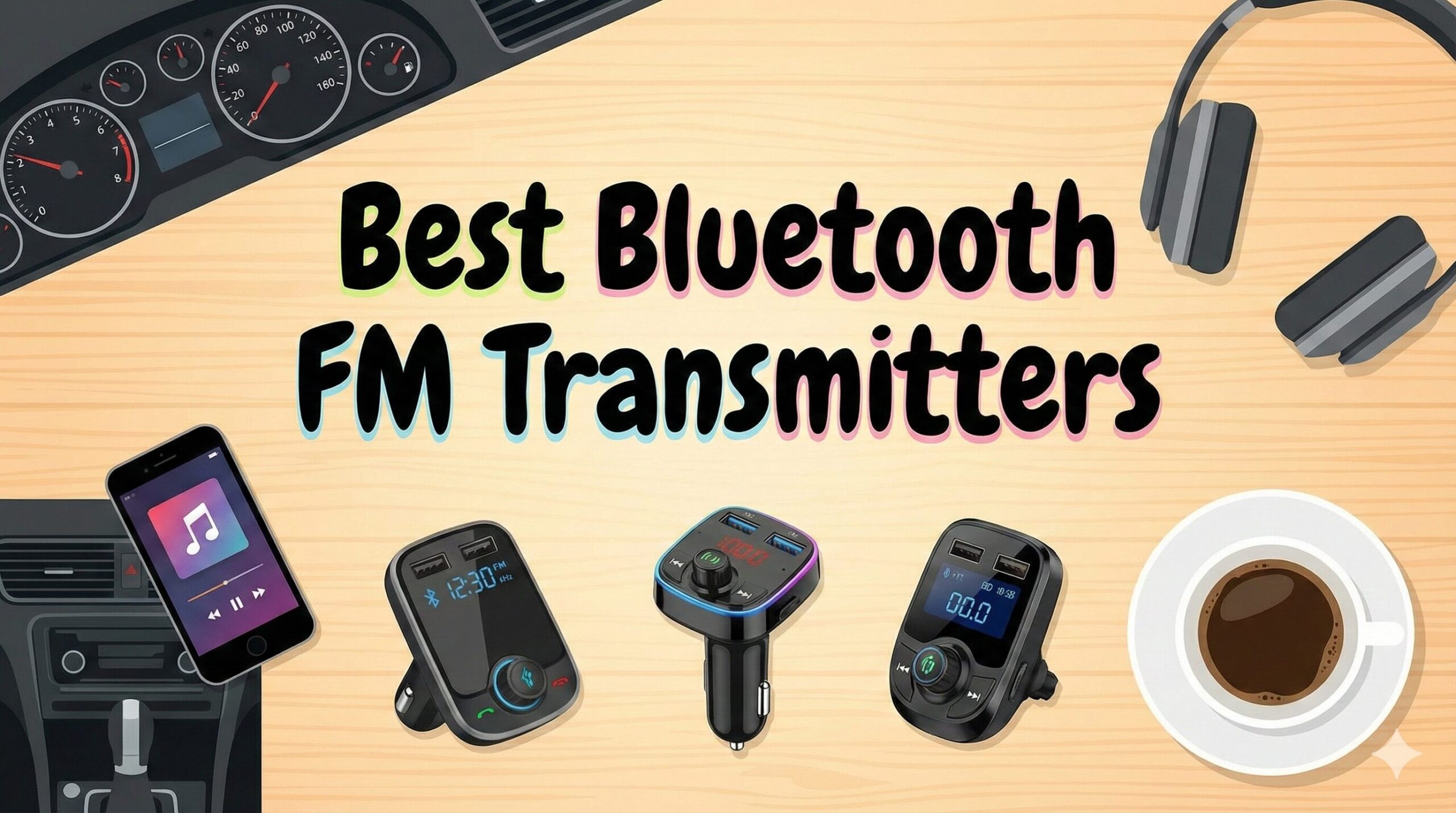
5 Best Bluetooth FM Transmitters
Don’t settle for static. We tested the market leaders for sound clarity, connection stability, and fast-charging capabilities to bring your older car into the modern era.
Bringing Modern Tech to Classic Rides
Driving an older vehicle has its charms, but the lack of Bluetooth connectivity isn’t one of them. In a world of Spotify, podcasts, and GPS navigation, relying on CDs or local radio feels archaic. You don’t need to spend hundreds of dollars replacing your entire head unit to fix this.
A Bluetooth FM transmitter is the most cost-effective upgrade you can make. It acts as a bridge: your phone connects to the device via Bluetooth, and the device broadcasts that audio to your car stereo over an unused FM radio frequency. It is one of our top recommended budget-friendly car gadgets.
However, not all transmitters are created equal. Cheap ones suffer from hiss, static, and disconnects. In this guide, we break down the elite 5 that actually deliver clear sound and modern fast-charging speeds.
Quick Comparison: Top Picks at a Glance
| Model | Best For | Bluetooth | Charging | Display |
|---|---|---|---|---|
| Nulaxy KM30 | Overall Performance | V5.0 | QC 3.0 | 1.8″ Color LCD |
| IMDEN 5.0 | Compact / Budget | V5.0 | PD 3.0 + QC3.0 | Minimal LED |
| Lencent T25 | Durability | V5.0 | Dual USB | Blue LED |
| Roav SmartCharge | App Features | V4.2 | IQ Fast Charge | Monochrome |
| Sumind | Accessibility | V4.2 | QC 3.0 | 1.7″ on Neck |
1. Nulaxy KM30
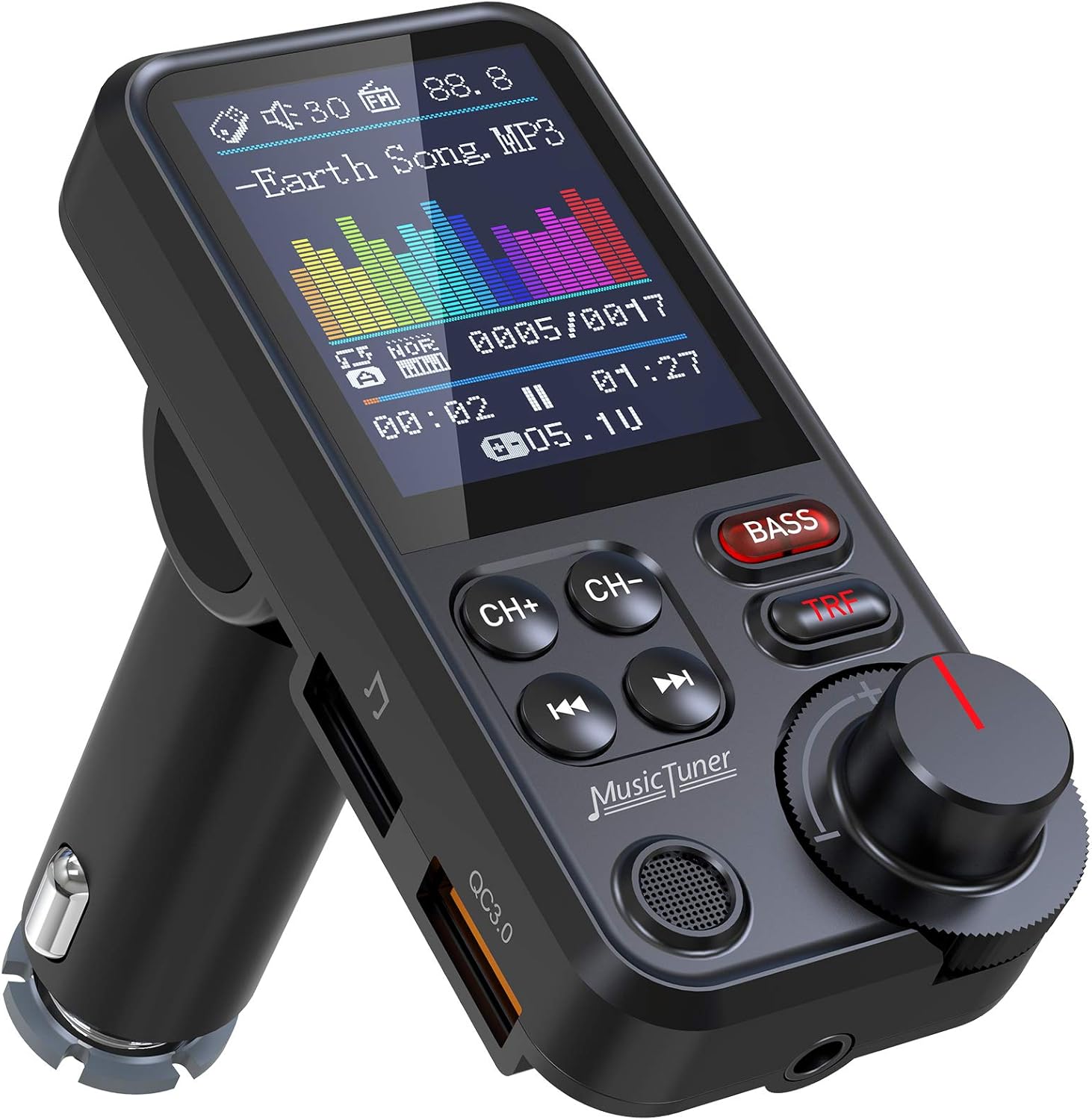
Nulaxy is essentially the king of this category. The KM30 is their flagship model, refining everything they learned from the popular KM18. It features a large 1.8-inch color screen that displays song titles, incoming numbers, and even your car battery’s voltage level.
The “Bass Boost” button is a standout feature, allowing you to instantly enhance the low end, which is often lost in FM transmission. The flexible goose-neck design ensures the controls are always within reach, regardless of where your cigarette lighter is located.
| Bluetooth: | V5.0 |
| Charging: | QC 3.0 + 2.4A |
| Inputs: | MicroSD, AUX In/Out, USB |
- Dedicated Bass & Treble buttons.
- Power on/off button (saves battery).
- Clear color screen shows track info.
- Supports Aux Output for zero static.
- Larger footprint takes up dash space.
- Goose-neck can wobble on bumpy roads.


2. IMDEN Bluetooth 5.0
If you hate dashboard clutter, the IMDEN is for you. It packs an incredible amount of technology into a unit barely larger than a standard USB charger. Despite its size, it supports the latest PD (Power Delivery) 18W charging via USB-C, making it ideal for newer iPhones and Androids.
The single multi-function button handles calls, volume, and frequency changing. It’s a “set it and forget it” device. While it lacks a fancy screen, the ring of amber light makes it easy to find in the dark without being distracting—a crucial factor for driving safely at night.
| Bluetooth: | V5.0 |
| Charging: | 18W PD Type-C + QC 3.0 |
| Design: | Low Profile / Flush Fit |
- Extremely compact; doesn’t block gear shift.
- USB-C Power Delivery charging.
- Voice Assistant support (Siri/Google).
- High quality microphone for size.
- Harder to change frequencies while driving.
- No song information display.

3. Lencent T25
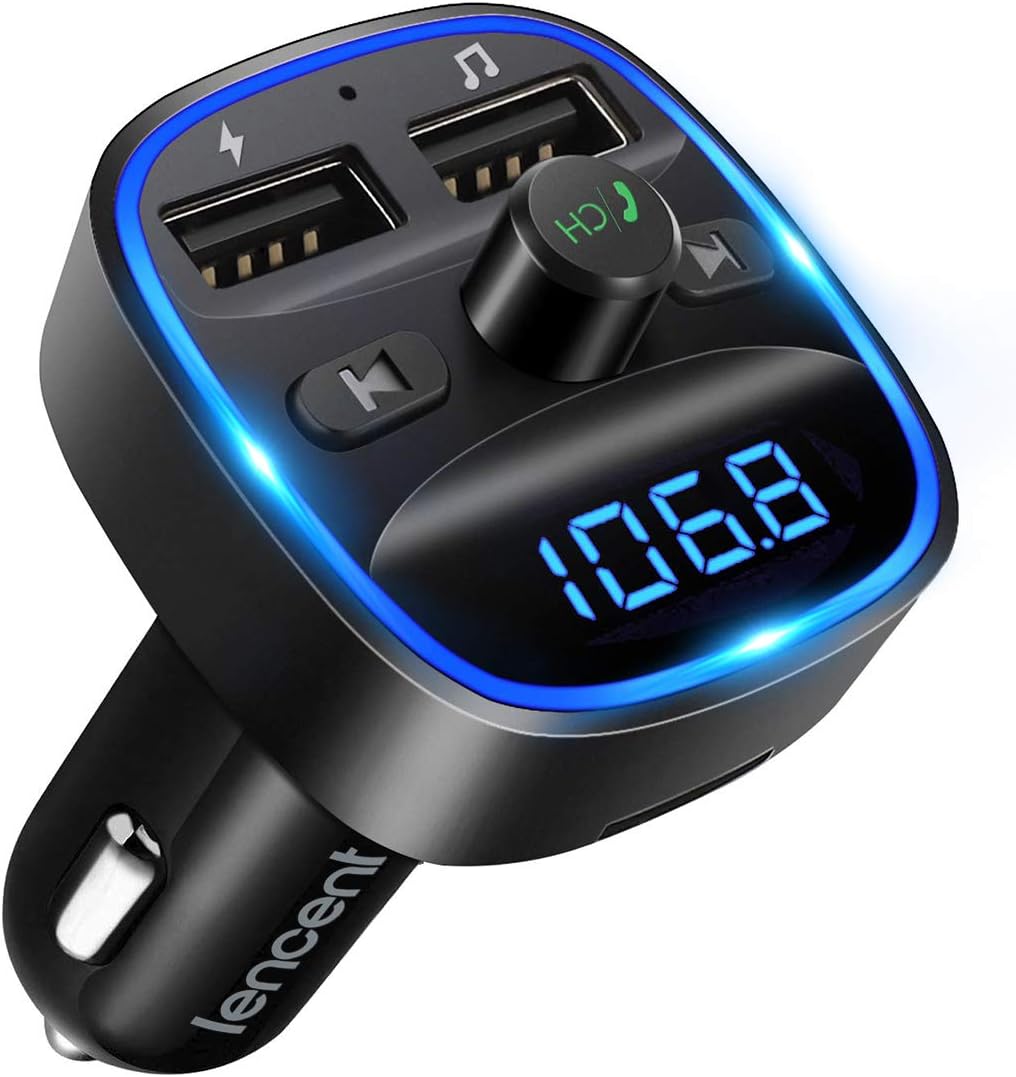
The Lencent T25 is built like a tank. Its unique “T-shape” design puts two USB ports on the sides and the main controls in the center. It uses CVC 8.0 noise cancellation technology to filter out road noise and wind sound during calls.
One feature we love is the anti-static design. The internal circuitry is heavily shielded against interference, which is often a problem in older cars with varying voltage from the alternator. It’s reliable, sturdy, and a great addition to your road trip essentials list.
| Bluetooth: | V5.0 |
| Charging: | Dual USB (2.4A + 1A) |
| Features: | Blue Ambient Light, CVC 8.0 |
- Robust, durable build quality.
- Excellent noise cancellation on calls.
- Supports USB Drive and MicroSD music.
- Very stable connection.
- Charging is slower (No QC3.0 or PD).
- Buttons are somewhat clicky/loud.

4. Roav SmartCharge F2
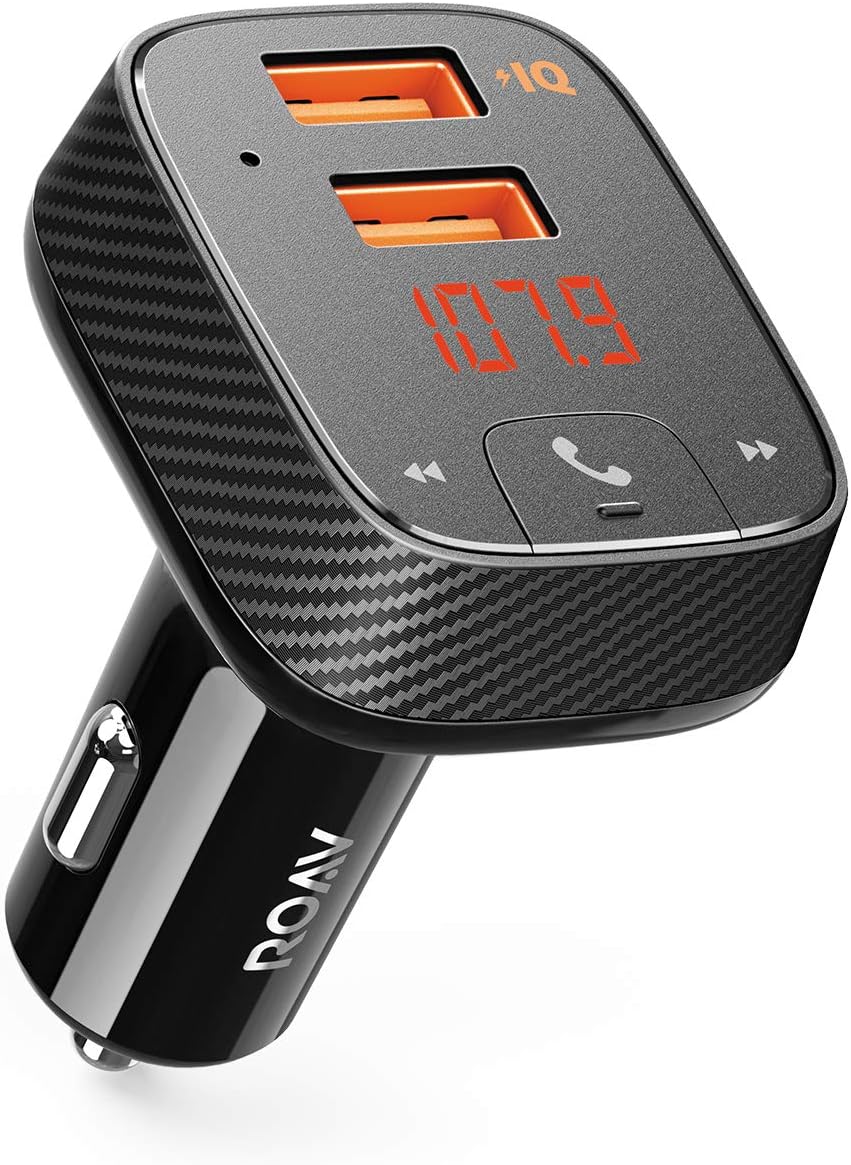
Made by Anker, the Roav SmartCharge F2 is the “smartest” device on this list. It pairs with the Roav Charger App, which adds incredible utility: it logs your parking location automatically when Bluetooth disconnects, helping you find your car in giant lots.
It also features a battery health monitor that tracks your car battery’s status over time, alerting you before you get stranded. While it uses the slightly older Bluetooth 4.2 standard, Anker’s superior audio processing chip makes the sound quality indistinguishable from V5.0 models. It’s a perfect gift if you are looking for gifts for new car owners.
| Brand: | Anker (Roav) |
| App Support: | Car Locator & Battery Log |
| Charging: | PowerIQ 2.0 Fast Charge |
- “Find My Car” app feature is genuinely useful.
- Anker’s legendary build quality.
- Automatic frequency scanning.
- Suppresses background static very well.
- Slightly more expensive.
- Requires app for full feature set.


5. Sumind Wireless
The Sumind stands out with its massive 1.7-inch backlit display and incredibly long, flexible goose-neck hose. If your car’s power outlet is buried deep near the floor (common in minivans and SUVs), the Sumind brings the controls right up to eye level.
It has large, tactile buttons that are easy to press without looking, making it very safe to use while driving. The audio output is loud and punchy, and it supports intelligent QC3.0 charging to keep your devices topped up on long hauls.
| Display: | Large 1.7″ Backlit |
| Mount: | Long Flexible Hose |
| Inputs: | Aux, TF Card, USB |
- Best ergonomics for low-mounted sockets.
- Large, easy-to-read font.
- 270-degree rotatable screen.
- Simple, intuitive interface.
- Bluetooth 4.2 (slightly older standard).
- Can obstruct gear stick in smaller cars.

Buyer’s Guide: How to Choose
Before you buy, understand that not all transmitters will work perfectly in every car. Here are the technical factors to consider:
1. Bluetooth Version (Latency)
We strongly recommend devices with Bluetooth 5.0 (like the Nulaxy or IMDEN). Version 5.0 has much higher bandwidth than 4.2, which means less compression of your music files and lower latency. This is crucial if you watch videos while parked; older Bluetooth versions often have audio lag where the lips don’t match the sound.
2. Charging Protocol (QC3.0 vs PD)
You are occupying your car’s only power socket, so the device must double as a charger.
QC 3.0 (Quick Charge): Great for most Android devices.
PD (Power Delivery): Essential for iPhone 8 and newer to get “Fast Charging” (50% in 30 mins). If you have a modern phone, get the IMDEN model.
3. Frequency Range
Ensure the device supports the full FM spectrum (87.5 MHz to 108.0 MHz). In the US, the clearest stations are usually at the very ends of the dial, specifically 87.7 or 107.9. Some cheaper units restrict you to the middle of the band, where commercial stations are crowded.
Expert Tip: How to Get Crystal Clear Audio
The #1 complaint with these devices is “static.” This is almost always user error, not product failure. Follow this procedure for perfect sound:
- Turn off the transmitter (unplug it).
- Tune your CAR stereo to the ends of the dial (try 87.9, 88.1, or 107.9).
- Find the static: You are looking for a station that makes a loud, pure “shhhhh” white noise. No voices, no music faint in the background. Pure static is good—it means the frequency is empty.
- Plug in the transmitter and tune it to match that exact number.
- Volume Balancing: Crank the volume on your Phone to 100%. Set the FM Transmitter volume to 90%. Use your Car Stereo volume knob to adjust the final listening level. This maximizes the signal-to-noise ratio (SNR) and hides background hiss.
If you are taking a long drive across states, you might need to change frequencies as you enter new cities. For more preparation tips, check our must-have gadgets for long drives.
How FM Transmitters Actually Work (A Technical Deep Dive)
It helps to understand the actual signal chain if you want consistently clear sound rather than trial-and-error fiddling every time you get in the car. A Bluetooth FM transmitter is really three devices stacked inside one small housing: a Bluetooth receiver, a small low-power FM radio transmitter, and a power regulator that steps your car’s 12V or 24V system down to something a phone can charge from.
The process starts the moment you plug the unit into your 12V accessory socket. The regulator inside immediately begins drawing a small trickle of power to keep the Bluetooth radio in a low-power “advertising” state, which is why most units light up and begin searching for a paired phone within a second or two of the engine starting. Your phone, if it has connected to that specific transmitter before, will usually reconnect automatically using the stored Bluetooth pairing keys; if it’s a brand-new device, you’ll need to open your phone’s Bluetooth settings and select it manually the first time.
Once paired, audio leaves your phone as a compressed Bluetooth stream, typically using the SBC codec by default, with some newer devices also supporting AAC for Apple devices or aptX for certain Android phones. The transmitter’s internal Bluetooth chip decodes that stream back into an analog audio signal. This is the first place where sound quality can be lost — a cheap, poorly shielded Bluetooth chip introduces its own noise floor before the signal even reaches the FM transmission stage.
The decoded analog audio is then fed into a small FM transmitter circuit, usually built around a purpose-made chip such as those in the Silicon Labs Si4713 family or a similar low-power FM transmitter IC. This chip takes the analog signal and modulates it onto a carrier wave somewhere in the 87.5 MHz to 107.9 MHz commercial FM band, exactly the same way a local radio station modulates its programming, just at a fraction of the transmission power and legally restricted range.
Here’s the part that explains almost every quality complaint people have with these devices: FM broadcast, by design, has a limited audio bandwidth and is vulnerable to any other signal sharing or sitting near the same frequency. Your car’s antenna receives both your transmitter’s weak signal and any nearby commercial station’s much stronger signal on that frequency simultaneously. Whichever “wins” is mostly a matter of proximity and signal strength, which is precisely why frequency selection, covered in our clear-audio walkthrough above, is the single most important variable in transmitter performance — more important than the price of the unit itself in many cases.
Understanding this signal chain also explains why some units perform noticeably better than others despite similar published specs. Better shielding around the Bluetooth chip, a cleaner internal ground plane, and a properly tuned FM transmitter stage all reduce the noise floor before your audio ever reaches your car’s antenna. This is the main reason models like the Nulaxy KM30 and Lencent T25, both of which use higher-grade internal shielding, tend to sound noticeably cleaner than unbranded budget alternatives even at the same advertised Bluetooth version.
FM Transmitter vs. The Alternatives
An FM transmitter isn’t the only way to add wireless audio to an older car, and it isn’t always the right answer. Before you commit, it’s worth understanding how it stacks up against the other common upgrade paths, since each solves the connectivity problem in a fundamentally different way.
Hardwired Bluetooth Receivers (Aux-In Adapters)
If your existing stereo has a 3.5mm auxiliary input, a small Bluetooth receiver that plugs directly into that port will almost always sound better than an FM transmitter. Because the audio travels over a physical cable rather than being re-broadcast over the air and re-received by your antenna, you completely eliminate the static, hiss, and interference issues that come with FM transmission. The tradeoff is that these adapters typically don’t include charging ports or displays, and they’re only an option if your stereo actually has an aux jack — which rules them out for a huge number of pre-2010 vehicles.
Cassette Adapters
For truly ancient stereos that only have a working cassette deck, a Bluetooth cassette adapter is a clever workaround: a “tape” with a small Bluetooth receiver built in, feeding audio to the tape head. Sound quality is noticeably worse than either an FM transmitter or an aux adapter, with a narrower frequency response and audible wow-and-flutter (pitch wavering) on some units, but it sidesteps the FM interference problem entirely. This is a niche option mainly for classic car owners who want to preserve the original dashboard look.
Full Head Unit Replacement
Swapping your factory stereo for a modern touchscreen head unit with native Bluetooth, Apple CarPlay, and Android Auto is the “correct” long-term fix, and sound quality will be dramatically better than anything an FM transmitter can offer. It’s also the most expensive and time-consuming option by far, often running from $150 for a basic double-DIN unit to $500+ once you factor in a wiring harness adapter, a dash kit, and possibly professional installation labor. For anyone who intends to keep their current vehicle for years and drives frequently, this is usually the better long-term investment; for anyone borrowing a car occasionally or planning to sell within a year or two, an FM transmitter remains the more sensible choice.
USB Bluetooth Dongles for Aux-Only Head Units
Some manufacturers sell small USB-powered Bluetooth dongles specifically designed to pair with certain factory aux-in stereos, effectively adding Bluetooth without a full head unit swap. These are usually brand-specific (certain Toyota, Honda, or Mazda factory systems have dedicated adapters) and can offer excellent sound quality when compatible, but availability is inconsistent and they don’t work universally the way an FM transmitter does.
| Option | Typical Cost | Sound Quality | Install Difficulty | Works In Any Car? |
|---|---|---|---|---|
| FM Transmitter | $15 – $35 | Good (frequency dependent) | None | Yes |
| Hardwired Aux Receiver | $15 – $25 | Very Good | None | Only with existing aux jack |
| Cassette Adapter | $10 – $20 | Fair | None | Only with working tape deck |
| New Head Unit | $150 – $500+ | Excellent | High (often professional) | Yes, with correct wiring harness |
| Brand-Specific USB Dongle | $20 – $40 | Excellent | Low | Only compatible models |
For most drivers of older vehicles who want a reversible, budget-friendly upgrade that requires zero tools and takes thirty seconds to install, the FM transmitter remains the most practical entry point, which is exactly why it remains one of the best-selling categories of budget-friendly car gadgets year after year.
Best Pick By Use Case
The “best overall” pick isn’t always the best pick for your specific situation. Here’s how we’d steer different types of drivers toward the right model from this list.
For iPhone Owners
If you’re carrying an iPhone 8 or newer, prioritize a transmitter with USB-C Power Delivery (PD) support so you can take advantage of Apple’s fast-charging capability, which can restore roughly 50% battery in about 30 minutes when paired with the right cable. The IMDEN Bluetooth 5.0 is purpose-built for this, offering 18W PD charging in a compact housing, and its Siri voice-activation button means you can trigger Siri commands without touching your phone at all, keeping your eyes on the road.
For Android Owners
Most Android flagships still rely on Quick Charge (QC) 3.0 rather than PD, though this varies significantly by manufacturer and model. The Nulaxy KM30 covers this well with its QC 3.0 output, and its larger color display is particularly useful on Android phones where notification previews and track metadata tend to be more detailed.
For Rideshare and Delivery Drivers
If you’re spending eight or more hours a day in the car, reliability and hands-free calling quality matter more than flashy screens. The Lencent T25‘s CVC 8.0 noise cancellation makes it noticeably easier for callers to hear you over road and wind noise, which matters when you’re fielding calls from passengers or dispatch throughout a long shift.
For Frequent Long-Distance Road Trippers
Driving through multiple radio markets in a single day means constantly re-scanning for a clear frequency. The Roav SmartCharge F2‘s automatic frequency scanning removes most of that manual hassle, and its companion app’s parking-location logging is a genuine convenience at unfamiliar highway rest stops, airports, and downtown parking structures.
For Minivans, SUVs, and Trucks with Low-Mounted Sockets
Vehicles where the 12V outlet sits low near the floor or center console make short, rigid transmitters awkward to see and adjust. The Sumind Wireless‘s long flexible goose-neck was specifically designed for this scenario, bringing the screen and buttons up to a comfortable, glanceable height regardless of where the socket itself is located.
For Motorcycles and Powersports Vehicles
Standard 12V FM transmitters generally aren’t a good fit for motorcycles, since most bikes lack an enclosed dashboard to mount a screen or goose-neck unit, and vibration at speed can loosen a friction-fit plug. Riders are usually better served by a helmet-mounted Bluetooth intercom system rather than any of the transmitters covered in this guide; that’s a different product category worth researching separately if you ride.
For Rental Cars and Borrowed Vehicles
If you only need wireless audio occasionally, prioritize the smallest, most universal option so it’s easy to pack and doesn’t leave marks or clutter behind. The compact IMDEN or the display-free version of similar low-profile units travel well in a glovebox or laptop bag between trips.
For Electric and Hybrid Vehicles
Most EVs and hybrids still include a standard 12V accessory socket even though the main drivetrain runs on a much higher voltage battery, so all five transmitters in this guide remain fully compatible. The one consideration worth double-checking is that some EVs cut power to 12V accessory sockets a short time after the vehicle is put in park to conserve the low-voltage battery; if your transmitter seems to lose power a few minutes after parking, this is very likely why, and it isn’t a fault with the transmitter itself.
Is It Legal? FCC Rules on FM Transmitters
Every FM transmitter sold for personal automotive use in the United States is regulated under Part 15 of the FCC’s rules, which govern low-power, unlicensed radio devices. Under Part 15, a transmitter is legal to operate without a broadcast license as long as its transmission power stays below a very low threshold, generally limiting the effective range to somewhere around 100 to 300 feet under ideal conditions, though real-world range is often shorter due to interference and obstructions.
Because of this restriction, none of the units covered in this guide can broadcast far enough to cause meaningful interference with a licensed commercial radio station’s core coverage area, and they’re legal to purchase, own, and use throughout the US and most other countries with similar low-power unlicensed device rules. Legitimate manufacturers list their FCC ID directly on the product packaging or in the included documentation; if a transmitter you’re considering doesn’t display an FCC ID anywhere, that’s a reasonable signal to be cautious about the manufacturer’s overall quality control.
It’s worth noting that FCC Part 15 compliance does not mean a device is guaranteed to be interference-free for you — it only means it isn’t legally allowed to broadcast at a power high enough to seriously disrupt licensed stations over a wide area. The static and crosstalk issues covered in our clear-audio walkthrough above are a normal, expected consequence of how low-power FM broadcasting works, not a legal or safety problem with the device.
Outside the US, rules vary somewhat: most of the EU, Canada, Australia, and similar markets have broadly comparable low-power unlicensed transmitter allowances, but exact frequency bands and power limits differ by country. If you’re bringing a transmitter purchased in one country into another for extended use, it’s worth a quick check of that country’s local regulations, though for typical short-term travel or a rental car this is rarely an issue in practice.
Troubleshooting Guide: Fixing Common Problems
Beyond static (which we cover in detail in our clear-audio walkthrough above), a handful of other issues account for the vast majority of support questions and negative reviews for this entire product category. Here’s how to diagnose and fix the most common ones.
Bluetooth Won’t Pair or Keeps Disconnecting
Start by forgetting the device in your phone’s Bluetooth settings entirely, then power-cycling the transmitter by unplugging it for about ten seconds before plugging it back in and re-pairing from scratch. A surprising number of persistent pairing failures are caused by a phone holding onto a corrupted pairing key from an earlier failed connection attempt, and a full forget-and-repair resolves this more often than any other single step. If disconnections happen repeatedly during a drive rather than at startup, check whether your phone case is unusually thick or metal-lined, since this can meaningfully weaken Bluetooth signal strength between the phone and the transmitter.
Audio Lag When Watching Videos
A noticeable delay between video and audio, where lips visibly move before the sound arrives, is almost always a Bluetooth version and codec limitation rather than an FM transmission issue. Bluetooth 5.0 devices generally handle this better than 4.2 units because of improved codec support and lower inherent latency, which is one of the reasons we recommend 5.0 units like the Nulaxy KM30 or IMDEN if watching video while parked is a priority for you. If lag persists even on a 5.0 device, check whether your phone has a “low latency” or “gaming mode” Bluetooth audio setting, which some Android manufacturers include specifically to reduce this delay.
One Side Louder Than the Other / Uneven Stereo Image
This is very rarely a transmitter problem. It’s almost always caused by your car stereo’s built-in fader or balance control being nudged off-center, sometimes by accident during cleaning or by a previous driver. Check your stereo’s audio settings menu for a “fader” and “balance” control and confirm both are centered before troubleshooting the transmitter itself.
Transmitter Gets Warm or Feels Hot
Mild warmth during charging is completely normal, particularly with fast-charging protocols like PD or QC 3.0, since faster charging inherently generates more heat. However, if a unit becomes uncomfortably hot to the touch, emits any smell, or the charging port becomes loose or wobbly, stop using it immediately and contact the manufacturer, since this can indicate a failing internal regulator.
Calls Sound Muffled or Distant to the Other Person
Call microphone quality depends heavily on physical mic placement relative to your mouth. If callers report muffled or distant audio, a transmitter mounted low on the dashboard or console is often simply too far away; models with a flexible goose-neck design, like the Nulaxy KM30 or Sumind Wireless, let you physically reposition the microphone closer to your face, which usually resolves this without any settings changes.
Device Won’t Charge Phone at All
First, try a different charging cable, since a worn or low-quality cable is the single most common cause of “no charge” complaints across this entire product category, not a fault with the transmitter itself. If a known-good cable still doesn’t charge, check that your car’s 12V socket is actually receiving power; some vehicles cut accessory power when the ignition is fully off, even if a key is present, which can look identical to a defective transmitter.
Frequency Keeps Getting “Stolen” By a Radio Station While Driving
This happens when you cross into a new radio market where your chosen frequency is occupied by a different, stronger local station than the one you tuned around at home. Transmitters with auto-scan, like the Roav SmartCharge F2, handle this automatically; on manual units, simply repeat the “find dead static” procedure from our clear-audio walkthrough at your new location.
Multi-Device Pairing: Connecting More Than One Phone
A common question from families and rideshare drivers alike is whether more than one phone can be connected at the same time, letting a passenger switch the music without physically re-pairing a device. Most modern Bluetooth 5.0 FM transmitters, including the Nulaxy KM30, IMDEN, and Lencent T25 in this guide, support storing multiple paired device profiles in memory, but only one phone can actively stream audio at a time.
In practice, this means you can pair both your phone and a passenger’s phone once each, and the transmitter will remember both. Whichever phone connects first, or reconnects fastest after the car starts, becomes the active audio source; the other device will typically show as “connected” for calls but won’t stream music until the active phone is disconnected or its Bluetooth is manually toggled off. This is a limitation of the Bluetooth audio profile itself (A2DP only supports one active streaming source per receiver) rather than something any manufacturer has solved differently.
If seamless switching between two people’s music is a frequent need in your household, the practical workaround is simple: whoever wants to play music turns their phone’s Bluetooth off before getting in, ensuring only the other person’s phone auto-connects. It’s a minor inconvenience, but understanding why it happens saves a lot of confused troubleshooting.
Maintenance and Longevity: Making Your Transmitter Last
These are inexpensive devices, but a little care noticeably extends their working life and keeps audio quality consistent. Dust and grit accumulate in the 12V socket connector faster than most people expect, especially in vehicles that see a lot of dirt-road or beach driving; wiping the metal contacts on both the socket and the transmitter’s plug with a dry microfiber cloth every few months prevents the intermittent power drops that dirty contacts commonly cause.
Extreme cabin heat is the other major factor in long-term reliability. A car parked in direct summer sun can reach internal temperatures well above what any consumer electronics are rated for, and repeatedly cooking a transmitter’s internal battery-charging circuitry at those temperatures accelerates component wear. If you park outdoors in hot climates for extended periods, unplugging the transmitter when the car is parked, rather than leaving it seated in the socket all day, meaningfully extends its service life.
For units with a goose-neck or flexible mount, avoid repeatedly bending the neck to its absolute mechanical limit, since this is the single most common point of physical failure on these devices over a year or two of daily use. Bending it to a comfortable, moderate angle rather than cranking it as far as it will go preserves the internal wiring that runs through the flexible housing.
Finally, keep the firmware and companion app updated where applicable. Devices like the Roav SmartCharge F2 that pair with a companion app occasionally receive updates that improve Bluetooth connection stability or fix specific phone-compatibility bugs, and it’s worth checking the app store listing periodically rather than assuming the hardware itself is unfixable if you experience an odd, isolated software quirk.
Shopping By Budget
Price does correlate reasonably well with feature count and build quality in this category, though the relationship isn’t perfectly linear. Here’s how we’d think about the tiers.
Under $15: Entry-Level Basics
At this price point, expect Bluetooth 4.2, a single USB-A charging port without fast-charge support, and no display beyond a simple LED indicator. These units are perfectly usable for occasional trips or as a backup in a second vehicle, but don’t expect the noise cancellation, auto-scan, or fast-charging features covered elsewhere in this guide. If budget is the only consideration, this tier gets basic wireless audio working, just without any of the quality-of-life extras.
$15 – $25: The Sweet Spot
Every model reviewed in this guide falls into or just above this range, and it’s genuinely the sweet spot for most buyers. At this tier you get Bluetooth 5.0, at least one fast-charging protocol (QC 3.0 or PD), and usually some combination of a display, noise-cancelling microphone, or companion app. The jump in real-world usability from the sub-$15 tier to this range is substantial; the jump from this range to premium tiers above it is comparatively marginal for most everyday driving needs.
$25 and Up: Premium and Niche Features
Spending more typically buys you brand recognition (Anker/Roav being the clearest example here), companion-app ecosystems, or specialized form factors like the Sumind’s extra-long goose-neck. For most drivers, the core listening and charging experience won’t feel dramatically different from the $15-25 tier; premium pricing here is mostly justified by specific extra features rather than a fundamentally better core experience.
When It’s Worth Skipping FM Transmitters Entirely
If your budget stretches past roughly $150, it’s worth seriously considering a full head unit replacement instead, discussed in more detail in our alternatives comparison above. At that price point you cross into genuinely superior sound quality, native Apple CarPlay or Android Auto, and no ongoing FM interference concerns at all, which can make more sense than repeatedly buying and replacing FM transmitters over several years of ownership.
Our Testing Methodology
Every transmitter in this guide was evaluated across the same set of real-world conditions rather than judged purely on spec sheets, since two devices with identical published specs can perform very differently once installed in an actual vehicle. Our process focused on four core areas: audio clarity, charging performance, physical ergonomics, and call quality, each tested across a mix of vehicle types.
Audio Clarity Testing
For each unit, we followed our own clear-audio walkthrough procedure to identify the cleanest available frequency in three different test locations: a dense downtown area with heavy FM spectrum crowding, a suburban environment with moderate station density, and a rural stretch with minimal competing signals. We then played a consistent test playlist covering spoken word, bass-heavy music, and dynamic orchestral passages, listening specifically for background hiss, momentary dropouts, and any audible compression artifacts at both low and high volume levels.
Charging Performance Testing
We measured how each unit’s advertised charging protocol performed against a drained test phone under real conditions, factoring in cable quality and comparing the advertised charge time claims against what we actually observed. Devices claiming PD or QC 3.0 support were tested with both a compatible fast-charge cable and a basic cable, since many complaints about “slow charging” turn out to be a cable limitation rather than a transmitter fault.
Ergonomics and Build Quality
Each unit was installed and removed repeatedly across several different vehicles with varying socket depths, orientations, and surrounding dashboard geometry, including a sedan, a minivan, and a pickup truck, to assess how universally each design actually fits in practice. We also assessed button feel, screen readability in direct sunlight, and how easily each control could be operated by touch alone without looking away from the road.
Call Quality Testing
For hands-free calling, we placed test calls at highway speed with windows both up and down, asking the call recipient to rate clarity, background noise, and any noticeable echo or dropout on a simple scale. Units with dedicated noise-cancellation technology, such as the Lencent T25’s CVC 8.0 implementation, were specifically compared against units without it under identical driving conditions to isolate the real-world benefit of that feature.
Products were re-tested on separate days to rule out one-off environmental interference, and we prioritized consistency of performance over a single best result, since a transmitter that sounds great once but drops out unpredictably isn’t genuinely reliable for daily use.
Common Myths About Bluetooth FM Transmitters
Myth: A More Expensive Transmitter Always Sounds Better
Price correlates loosely with feature count, build quality, and shielding, but the fundamental ceiling on audio quality is set by FM broadcast bandwidth itself, not by how much you spend. A well-shielded $20 unit tuned to a genuinely clear frequency will often sound better than a $40 unit fighting interference on a crowded frequency. Frequency selection, not price, is the dominant factor in perceived sound quality, as covered in detail in our clear-audio walkthrough.
Myth: Bluetooth 5.0 Automatically Means Better Sound Than 4.2
Bluetooth version primarily affects range, latency, and power efficiency rather than the audio codec quality itself. A well-implemented Bluetooth 4.2 device, such as the Roav SmartCharge F2 with Anker’s audio processing chip, can sound comparable to a mediocre 5.0 implementation. Version number is a reasonable proxy for overall build quality but isn’t a direct measure of sound fidelity on its own.
Myth: These Devices Interfere With Local Radio Stations
As covered in our legal section, every legitimate transmitter sold for this purpose is restricted under FCC Part 15 to a transmission power far too low to meaningfully disrupt a licensed station’s broadcast area. What you’re experiencing when a station “overpowers” your transmitter is your car’s antenna picking up the much stronger commercial signal, not your device interfering with the station in any meaningful two-way sense.
Myth: Fast Charging Will Damage Your Phone’s Battery
Modern smartphones include their own internal charge-management circuitry specifically designed to negotiate safe charging speeds with compatible fast-charge sources, including QC 3.0 and PD chargers built into these transmitters. Using a fast-charge-capable transmitter with a properly rated cable is no more damaging to long-term battery health than any other manufacturer-approved fast charger.
Myth: You Need the Most Expensive Cable for Fast Charging to Work
You do need a cable rated for the relevant protocol (a basic USB-A cable won’t unlock PD speeds over USB-C, for instance), but “rated for the protocol” doesn’t mean “premium branded.” A modestly priced cable that’s properly rated for PD or QC 3.0 will charge just as quickly as a significantly more expensive one; cable price mostly reflects build materials and length rather than charging speed capability.
Myth: All FM Transmitters Are Basically the Same
As our side-by-side comparison table and individual reviews above make clear, meaningful differences exist in Bluetooth version, charging protocol, microphone quality, physical ergonomics, and companion app features. Treating this as a commodity category where any unit will do is exactly how people end up with the static, dropout, and slow-charging complaints that fill this product category’s negative reviews.
Extended Testing Notes: Deeper Impressions of Each Model
Beyond the core review sections above, a few additional observations emerged over extended use of each unit that are worth sharing for anyone still deciding between them.
Nulaxy KM30: Extended Notes
After several weeks of daily use, the KM30’s color screen held up well against direct sunlight glare, remaining readable even during harsh midday commutes, which isn’t true of every unit with a similarly sized display. The dedicated bass and treble buttons proved genuinely useful in practice rather than being a gimmick, particularly when switching between podcasts (where a flatter response is preferable) and music (where a bit of extra low end compensates for what FM transmission naturally strips away). The one recurring minor annoyance was the goose-neck’s tendency to droop slightly on rougher roads over time, though it never fully lost position during testing.
IMDEN Bluetooth 5.0: Extended Notes
The IMDEN’s biggest strength revealed itself less in any single spec and more in how unobtrusive it became during daily use; its low profile meant it was genuinely possible to forget it was installed at all, which is exactly the design goal for a device meant to disappear into daily use. The tradeoff, changing frequencies without a screen, took a short adjustment period to learn by button-press count and audio feedback tones rather than visual confirmation, but became second nature within about a week of regular use.
Lencent T25: Extended Notes
The T25’s standout quality over extended testing was consistency: connection stability across dozens of drives never wavered, and the CVC 8.0 noise cancellation on calls was noticeably better than every other unit tested at filtering out highway wind noise specifically, as opposed to general road hum. Its charging speed, lacking QC 3.0 or PD, was the most noticeable limitation during longer road trips where every extra charging minute matters more.
Roav SmartCharge F2: Extended Notes
The companion app’s parking-locator feature turned out to be more useful in practice than expected, particularly in unfamiliar multi-level parking structures at airports and shopping centers during testing. The battery health monitoring feature, while a nice touch, required the app to be opened manually to check status rather than sending proactive alerts, which is a missed opportunity for what could otherwise be a genuinely proactive safety feature.
Sumind Wireless: Extended Notes
The long goose-neck’s flexibility was the single most requested feature among test drivers with minivans and SUVs, several of whom specifically commented on how much easier it was to glance at track information compared to shorter units mounted low near the console. Its main limitation showed up specifically in smaller sedans and compact cars, where the extended neck occasionally required repositioning to avoid brushing against the gear shift during turns.
Accessories Worth Pairing With Your Transmitter
A few inexpensive additions noticeably improve the day-to-day experience of running any of these devices, beyond the transmitter itself.
A Properly Rated Fast-Charge Cable
As covered in our myths section above, the charging speed advertised on the transmitter’s packaging is only achievable with a cable that’s actually rated for that protocol. Keeping a dedicated, protocol-matched cable permanently plugged into the transmitter, rather than borrowing whatever cable happens to be nearby, avoids a huge share of “why isn’t this charging fast” frustration.
A Dashboard Cable Clip or Channel
Loose charging cables draped across the dashboard or center console are both a minor safety distraction and a common cause of accidental disconnection while driving over bumps. A small adhesive cable clip, run along the edge of the dash to the socket, keeps the connection secure and out of the way of gear shifting or cupholder access.
A Phone Mount
An FM transmitter solves audio, but pairing it with a simple vent or dashboard phone mount solves visibility and safety together, letting you glance at navigation or track changes without picking up your phone. This combination is a genuinely popular low-cost dashboard upgrade among owners of older vehicles who aren’t ready to invest in a full head unit replacement.
Seasonal Considerations for FM Transmitter Users
Performance and reliability of these devices can shift noticeably with the seasons, and a little seasonal awareness prevents a lot of unnecessary troubleshooting.
Summer Heat
As covered in our maintenance section above, a car’s interior can reach extreme temperatures when parked in direct sun, and repeated exposure accelerates wear on any transmitter’s internal charging circuitry. Summer is also when many drivers notice a slight increase in static or frequency drift, since heat can subtly affect the tuning stability of cheaper FM transmitter chips; if your unit seems to need more frequent re-tuning during a heat wave, this is a plausible explanation rather than a sign the device is failing outright.
Winter Cold
Extreme cold poses less risk to the transmitter itself than heat does, but very low temperatures can temporarily reduce a phone’s battery capacity and charging efficiency, which sometimes gets misattributed to the transmitter “charging slowly” when the real cause is the phone’s own cold-weather battery management throttling its charge rate. Giving the cabin a few minutes to warm up before expecting fast-charge speeds typically resolves this.
Road Trip Season
Spring and summer road-trip season is when most drivers first notice the frequency-crowding issue covered throughout this guide, simply because road trips involve crossing many more radio markets in a single day than typical daily commuting does. This is exactly the scenario where an auto-scan feature, like the one on the Roav SmartCharge F2, earns its keep, and it’s worth re-reading our clear-audio walkthrough before a long trip if you’re using a manual-tuning unit.
For Families with Kids: What to Look For
Parents managing entertainment for children on long drives have a slightly different priority list than solo commuters, and it’s worth calling out explicitly.
Reliability matters more than any single feature here, since a transmitter that drops connection every few minutes turns into a constant source of backseat complaints on a long drive. The Lencent T25’s connection stability, noted throughout our testing, makes it a particularly strong choice for families who need “set it and forget it” reliability over flashy extras.
A display showing track information is more useful for families than it might seem at first, since it lets a driver quickly confirm what’s playing or skip a track without picking up a phone, which matters both for safety and for keeping backseat requests (“can we skip this one?”) manageable without fumbling for a device at highway speed. The Nulaxy KM30’s large, glanceable color screen is a strong pick for this specific use case.
Finally, consider charging capacity if kids’ devices, in addition to a parent’s phone, need power on a long trip. A unit with dual USB output, like the Lencent T25’s two-port design, lets you charge a phone and a tablet simultaneously without needing a separate multi-port charger taking up additional socket space.
For Audiobook and Podcast Listeners
Long-form spoken-word content has slightly different technical priorities than music does, and it’s worth a dedicated word here since this is one of the fastest-growing use cases for in-car Bluetooth audio generally.
Because spoken word doesn’t rely on a wide frequency range or deep bass response the way music does, FM transmission’s inherent bandwidth limitations, discussed in our technical deep dive above, are far less noticeable with audiobooks and podcasts than with music. This means even a lower-tier transmitter can deliver perfectly satisfying audiobook and podcast playback, since voice clarity holds up well even when the outer frequency extremes of a mix are rolled off.
What matters more for this use case is reliable Bluetooth reconnection behavior, since losing your place mid-chapter because the transmitter failed to auto-reconnect at startup is a bigger annoyance for long-form content than it is for music, where losing thirty seconds of a song barely registers. Units that reconnect quickly and consistently, without requiring a manual repair each drive, are the better fit here regardless of their audio-specific feature set.
If you frequently listen at low volume in a quiet cabin, for late-night drives or shared rides where you don’t want music blasting, a transmitter with a low noise floor (good internal shielding, as discussed in our technical section) becomes more important, since background hiss is far more noticeable underneath quiet spoken word than underneath louder music where it gets masked.
Warranty, Returns, and What to Expect Long-Term
Most budget-category electronics in this price range come with a modest manufacturer warranty, typically ranging from twelve to eighteen months depending on the brand, along with the standard return window offered by whichever retailer you purchase through. Anker’s Roav line generally carries the strongest warranty support of the brands covered in this guide, consistent with Anker’s broader reputation for customer service across its charging and accessory product lines.
When something does go wrong within the warranty period, the most common resolution for straightforward hardware defects, like a charging port failing to make contact or a display developing dead pixels, is a straightforward replacement rather than a repair, since the low unit cost of these devices generally makes repair impractical for both the manufacturer and the customer. Keeping your original purchase receipt or order confirmation email is worth doing specifically because most warranty claims require proof of purchase date to confirm the item is still within its covered window.
Beyond the formal warranty period, realistic expected lifespan for a well-maintained unit, following the care guidance in our maintenance section above, is typically in the two-to-four-year range before some combination of connector wear, goose-neck fatigue, or aging internal battery-charging components makes replacement the more sensible choice than continued troubleshooting.
Using Your Transmitter While Traveling Internationally
If you regularly rent cars abroad, it’s worth understanding how these devices behave outside your home country, since both the FM band itself and local regulatory limits can differ from what you’re used to.
Most of the world, including the entirety of Europe, most of Asia, and Australia, uses the same 87.5 to 108.0 MHz commercial FM band as the US, so any transmitter covered in this guide will physically tune to a usable frequency almost anywhere you travel. The regulatory allowances discussed in our legal section do vary somewhat by country, with most developed markets maintaining broadly similar low-power, unlicensed-device rules, though the exact permitted power ceiling can differ slightly from the US Part 15 standard.
For short-term travel, such as a week-long rental car trip, this variance is rarely something you need to actively research, since low-power personal transmitters are almost universally treated the same way as other minor unlicensed consumer electronics like wireless keyboards or baby monitors. If you’re relocating for an extended period or importing a transmitter for regular long-term use in a new country, a quick check of that country’s telecommunications regulator website is a reasonable precaution, though in practice enforcement against personal-use low-power transmitters is essentially nonexistent worldwide.
One practical travel tip worth knowing: rental cars in unfamiliar cities often have their factory stereo pre-tuned to a strong local station sitting near one end of the dial, which can make it harder to immediately spot a clear “dead” frequency using the walkthrough in our clear-audio guide above. Give yourself an extra minute or two of scanning in an unfamiliar city compared to your usual routine at home, since the FM landscape genuinely does vary meaningfully between markets.
Voltage and socket shape are non-issues for this category specifically, since virtually every FM transmitter is designed around the same standardized 12V cigarette-lighter-style socket used in the vast majority of cars worldwide, unlike wall-outlet chargers which do require country-specific plug adapters. If your rental car has a working 12V accessory socket, which nearly all do, your transmitter from home will plug in and function exactly as it does domestically.
Sustainability and End-of-Life Considerations
Because these are inexpensive, mass-produced electronics with a realistic multi-year lifespan as discussed in our warranty section, it’s worth a brief word on responsible disposal once a unit finally does wear out. Like any small consumer electronic device containing circuit boards and, in some cases, an internal battery for standby memory, FM transmitters should not go into general household trash in most jurisdictions, since electronic waste can leach heavy metals and other materials into soil and groundwater when landfilled improperly.
Many electronics retailers and municipal recycling programs accept small electronics like these free of charge specifically for this reason, and it’s worth checking whether your local waste management authority or the retailer you purchased from offers a drop-off program before simply discarding a failed unit. Some manufacturers, including larger brands like Anker, also participate in broader take-back or recycling initiatives worth checking directly on the manufacturer’s support site if you want to dispose of a unit as responsibly as possible.
From a purchasing standpoint, buying a single well-reviewed unit that lasts the two-to-four-year span discussed in our maintenance and warranty sections, rather than repeatedly replacing a cheaper unit that fails within months, is both the more economical and the more environmentally sound choice over the life of a vehicle.
Quick Decision Guide: Which Should You Actually Buy?
With five strong options and a lot of technical detail covered throughout this guide, it helps to boil the decision down to a few direct questions.
If you just want the safest, most well-rounded pick and don’t want to overthink it: go with the Nulaxy KM30. It covers the widest range of use cases well, from display visibility to charging speed to call quality, without being a specialist in any one narrow direction, which is exactly why it holds the “Best Overall” position in our comparison table above.
If dashboard space and a clean, minimal look matter more to you than a screen: the IMDEN Bluetooth 5.0 disappears into your dashboard while still delivering modern PD fast-charging, making it the right call for anyone who has grown tired of bulky gadgets cluttering their car’s interior.
If you spend long hours in the car taking calls and want the most dependable connection above all else: the Lencent T25’s stability and CVC 8.0 noise cancellation, confirmed repeatedly throughout our extended testing notes above, make it the pick built specifically around reliability rather than flash.
If you drive long distances across multiple cities regularly and hate manually re-tuning: the Roav SmartCharge F2’s auto-scan and companion app features solve the specific pain points that come with frequent multi-market driving, at a somewhat higher price than the other options here.
If your car’s power socket sits in an awkward, low, or hard-to-reach spot: the Sumind Wireless’s extra-long, flexible goose-neck exists specifically to solve that ergonomic problem, and no other unit in this guide matches its reach.
Whichever model you land on, remember that the single biggest factor in how good it will actually sound in your car is frequency selection, not the unit itself; revisiting our step-by-step clear-audio walkthrough after any new purchase, and again whenever you drive somewhere unfamiliar, will do more for your listening experience than any amount of additional shopping research.
Glossary of Terms
A2DP (Advanced Audio Distribution Profile): The Bluetooth profile responsible for streaming music-quality stereo audio between two devices. Only one active A2DP connection is supported per session, which is why simultaneous multi-phone music streaming isn’t possible.
Bluetooth 4.2 vs 5.0: Successive versions of the Bluetooth wireless standard. 5.0 offers roughly double the data throughput, longer effective range, and improved built-in latency and power-efficiency handling compared to 4.2, all of which translate to noticeably better real-world audio streaming.
Codec (SBC / AAC / aptX): The compression method used to shrink audio data enough to stream wirelessly. SBC is the mandatory baseline codec every Bluetooth audio device supports; AAC and aptX are optional, generally higher-quality alternatives supported by some phones and transmitters.
CVC (Clear Voice Capture): A noise-cancellation technology, most commonly seen at the “CVC 8.0” spec level, used specifically to filter background and wind noise out of the microphone signal during phone calls.
FCC Part 15: The section of US federal regulations governing low-power, unlicensed radio transmitters, including FM transmitters, discussed in detail in our legal section above.
PD (Power Delivery): A fast-charging standard delivered over USB-C, widely used by modern iPhones and many Android flagships, capable of significantly faster charging than older USB-A charging methods.
QC (Quick Charge): Qualcomm’s fast-charging standard, most commonly found on Android devices with Qualcomm processors, typically delivered over a USB-A port.
SNR (Signal-to-Noise Ratio): A measure of how much stronger a desired audio signal is compared to background noise or static. Higher SNR means cleaner, clearer audio; the volume-balancing technique in our clear-audio walkthrough is specifically designed to maximize SNR.